


Summary of Ir Light Dimmer v.1 adjusting lights with remote controller using PIC12F629
The Ir LightDimmer lets you control household incandescent bulbs (40–400W resistive) via any 38 kHz IR remote or a push-button. It supports on/off, gradual dimming by holding controls, memorizing two remote keys, and a double-click sleep mode in planned updates. Built around a PIC12F629 microcontroller with TSOP-series IR receiver and a TIC20x triac output, it mounts in the light junction box and retains learned keys after power loss. It requires 220V/50Hz, is for resistive loads only, and demands careful, safety-conscious wiring.Parts used in the Ir LightDimmer:
- PIC12F629 microcontroller
- IR receiver TSOP1738 (or TSOP2238 or any 38KHz receiver)
- Triac TIC206 or TIC216
- Push-button (replacement for existing light switch)
- Heat sink (required for loads over 150W)
- Circuit board (36 x 32 mm or smaller 27 x 21 mm SOIC version)
- Resistors, capacitors and other passive components as defined in schematic
- AC mains wiring and fuse/switches for 220V/50Hz supply
This is a device for adjusting lights in your home with any type of remote controller (tv, dvd, video,…). Today we are using many devices in our homes to improve quality of our life and this is another example on how you can enhance a simple procedure like switching the lights ON/OFF. It may be difficult to many of us to stand up from our chair only to switch lights, so try imagining yourself doing this with your remote controller.
Here is a solution for you:
The Ir LightDimmer is simple to use, you only need two keys of your remote controller, which are not often used (like teletext keys or similar) or which are not used at all and one push-button that you will put in place of the existing light switch. Ir LightDimmer can memorize two remote controller keys (see “memorizing the remote controller keys” section), so that the first one will be used to turn on lights or increase light intensity, and the other will be used to turn off lights or decrease light intensity.
How it works
We have two ways to control light: either with push-button or with remote controller. Using the push-button, when we apply a short press we can turn ON or OFF lights, but if we press and hold the button more than 300ms the light intensity is increasing to maximum or decreasing to minimum continuously until you press the button. If we press and hold the button so that lights go to maximum 3 times, then device enters “memorizing the remote controller keys” mode.
In a new software version, I will add a “double click” mode (like PC mousses), so when you double click the push-button, the lights go ON to 70%, and slowly decreasing light intensity to minimum in a period of 1 minute. This mode is good for your bedroom, so when you go to sleep just double click the button and go to bed. If you don’t like to wait lights to go OFF in 1 minute, you can break this mode by pressing button or by pressing remote controller keys.
Using remote controller key to control the dimmer you can turn on lights or increase light intensity. With a short press, lights turn ON to maximum and if you press and hold key then light intensity increases until you press that key.
The same thing happens with second remote controller key which is used to turn lights off or decrease light intensity. When you short press that key, the lights will turn OFF and if you press and hold key then light intensity decrease until you press that key.
When turning lights ON or OFF they are not reacting immediately but they change state slowly so your bulbs will have longer life duration. Also with adjusting light intensity you save on electrical energy.
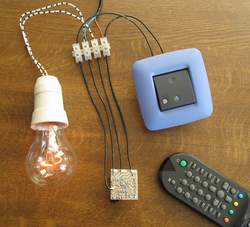
highlights about 5%
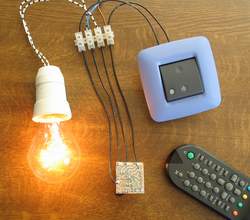
highlights about 50%
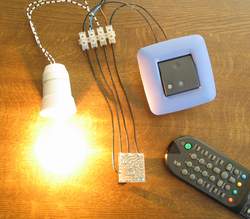
highlights 100%
Memorizing the remote controller keys
If you have chosen which remote controller keys will be used as controlling keys, we can start with memorizing process. Press and hold button until lights go 3 times to maximum. After that, light will turn OFF, and that is indication of successful entering “memorizing the remote controller keys” mode, then you can release button. In the next 5 seconds, you must press the first key on remote controller, if you do, lights will blink several times. After that, you must press the second remote controller key, if you do, lights will also blink several times. That’s all, memorizing process is finished.
You can change the assigned remote controller keys when you wish. After powering down the Ir LightDimmer, it will keep in memory these remote controller keys, so you don’t have to memorizing remote controller keys again when the device powers up.
Instructions
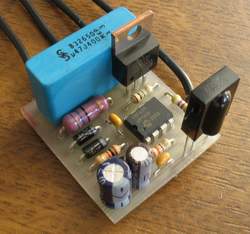
Ir LightDimmer is a small device (36*32mm) and can be easily mounted in electrical case where electrical wires terminate. Device works only with 220V/50Hz and only for resistive loads of 40W-400W. With Ir LightDimmer you can’t use inductive or capacity loads (only bulbs).
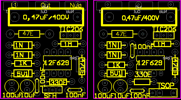
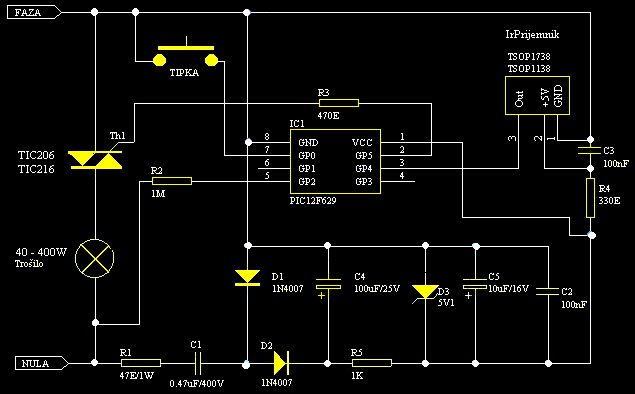
Device is based on PIC12F629 which is a small microchip microcontroller and therefore overall device is small and uses a few components. On circuit board you can find the IR-receiver, which in our case is TSOP1738, but you can use any other type of IR-receiver which has frequency of 38KHz. For output power stage you can use triac TIC206 or TIC216. For loads more than 150W you must add a heat sink on triac. The rest of parts are defined in schematic.

You must be careful when you connect IrLightDimmer to electrical wire, so you must break fuse switches of your lights. All connections must be like in my schematic, otherwise device will definitive burn out.
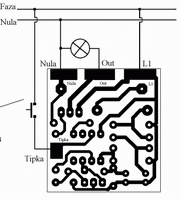
If you have IrLightDimmer mounted and connected and you want to change your lights, you must break fuse switches because there is risk of electric shock.

|
Circuit board can be downloaded here:
|
IrLightDimmerSfh.pcb or IrLightDimmerTsop.pcb |
| Ir LightDimmerTsop.pdf - circuit board in pdf format |
Dimming The Lights with remote controller, device Ir Light Dimmer, has got a new and simplest version. The most significant change is microcontroller PIC12F629 in Small-Outline Integrated Circuit (SOIC) package, TSOP2238 ir receiver instead of TSOP1738, and less components on circuit board.
So, at that way dimension of circuit board is shrink from 36 x 32 mm, to 27 x 21 mm.
All function of that version is the same like above described device Ir Light Dimmer v.1, so it's no diference in software, only in schematic and in circuit board.

You must be careful when you connect IrLightDimmer to electrical wire, so you must break fuse switches of your lights. All connections must be like in my schematic, otherwise device will definitive burn out. experience in electrics, it's better way t call skilled person to mount your Ir Light Dimmer.If you don't have any 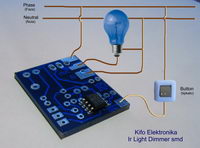
Schematic Ir Light Dimmer - PIC12F629 smd
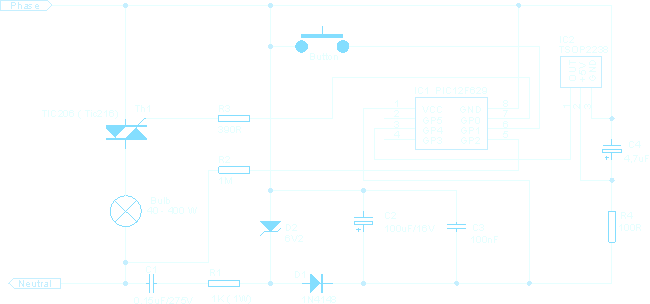
Ir Light Dimmer v.1 works only with 220V/50Hz and only for resistive loads of 40W-400W. With Ir LightDimmer you can’t use inductive or capacity loads (only bulbs).
Source : Ir Light Dimmer v.1 adjusting lights with remote controller using PIC12F629
- What loads does Ir LightDimmer support?
It supports only resistive loads (bulbs) from 40W to 400W and not inductive or capacitive loads. - Which microcontroller is used in the device?
The device is based on PIC12F629 microcontroller. - Which IR receiver can be used with Ir LightDimmer?
TSOP1738 is used in one version; TSOP2238 or any 38KHz IR receiver can also be used. - How many remote keys can the device memorize?
It can memorize two remote controller keys for increase/on and decrease/off functions. - How do you enter memorizing mode?
Press and hold the push-button until lights go to maximum three times; when lights turn off, release and then press the first key within 5 seconds followed by the second key. - What happens when you short press or hold remote keys?
Short press turns lights fully ON or OFF; press and hold increases or decreases intensity continuously until the key is released. - Does the device retain memorized keys after power loss?
Yes, after powering down the Ir LightDimmer it keeps the remote controller keys in memory. - Do lights change state immediately when turning on or off?
No, they change state slowly to extend bulb life and save energy. - When is a heat sink required?
A heat sink must be added to the triac for loads greater than 150W. - What safety precautions are advised for installation?
Break fuse switches before wiring, follow the schematic exactly, and consider a skilled electrician to avoid electric shock or damage.
Related projects
RGB LED PWM Driver for High Power 350mA LEDs using PIC12F629
Description This project combines a PIC and three constant current 'buck' converters to produce an RGB LED controller that will operate with...
Communication & Interfacing · PIC12F629Wireless controlled lightdimmer using PIC12F629
The meaning from this design is to build it in -i.e. a shaded lamp- and to switch this lamp on and off...
LED Projects · PIC12F629Navigation Lights for Models for PIC12F629
Description This project was inspired from a post on the Picprojects forum where a member had adapted the RGB Moodlight project for...
Home Automation & SecurityVoice Activated Power Sockets (Home Automation)
Yet another voice controlled home automation system! As shown in the picture, the system can control any electrical appliance, by turning ON...
Home Automation & SecurityHome Security System with GSM Using 8051 Microcontroller
Security is a big challenge everywhere because thefts are increasing day by day owing to the unsafe and insecure security systems in...
Home Automation & SecurityHome Automation and Security System using Microcontroller ATMEGA8 with Arduino Programming
Home automation and security systems have become very popular these days, today industrial automation techniques are widely adopted by luxurious homes and...

Ibrar Ayyub
I am an experienced technical writer holding a Master's degree in computer science from BZU Multan, Pakistan University. With a background spanning various industries, particularly in home automation and engineering, I have honed my skills in crafting clear and concise content. Proficient in leveraging infographics and diagrams, I strive to simplify complex concepts for readers. My strength lies in thorough...