
Summary of My GPS LCD Display Project using PIC16F84
Summary: A DIY GPS LCD display built around a PIC16F84 parses NMEA data from GPS units and shows position on a 4x20 Hitachi-compatible LCD. The design uses minimal I/O (4-bit LCD bus), receives GPS serial on RA1, and uses RA2 and RA3 for RS and E. A software-inverted serial routine removed the need for a MAX232. Optional input (encoder or SPDT switch) may allow simple user settings. Breadboard and PCB-sized layouts are possible.
Parts used in the GPS LCD Display Project:
- PIC16F84 microcontroller
- 4x20 LCD module (Hitachi chipset)
- Crystal or oscillator for PIC (as required by PIC16F84)
- Decoupling capacitors for power supply
- Resistors for LCD contrast/inputs as required
- Optional mechanical encoder or SPDT switch
- Level conversion components (MAX232) — optional, omitted in final design
- Wiring/connectors for GPS serial input
- PCB or breadboard for assembly
This is a project that I started back late 2003 when I just starting to learn PIC programming. I wanted to building something that actually did somthing useful. This project is based on a PIC16F84.
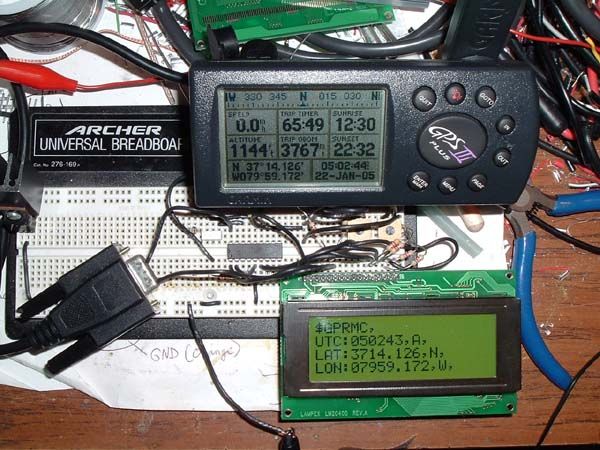
I actually came up with this idea and then after doing some searching I found that a few people had the same idea. But, I wanted to build my own that I could call mine, developed by me. The whole idea is, I have several GPS units with no display and I wanted an easy way to see my position. I have the option with the HamHUD II to see this, but it uses up precious display space that I rather use to display some APRS related information instead. So, I need a way to take the NMEA data comming out and display it in a simple format that can be read easily while driving down the road.
The circuit it’self is pretty simple, take in the data on one pin, parse it, format it and then display it to a 4×20 LCD module (Hitachi Chipset). That is the basic idea, but I might add in somthing like a mechanical encoder that would allow for changing options or changing settings in the display unit. This might be as simple as a SPDT (Singe Pole Double Throw) switch if the options are as simple as two settings.
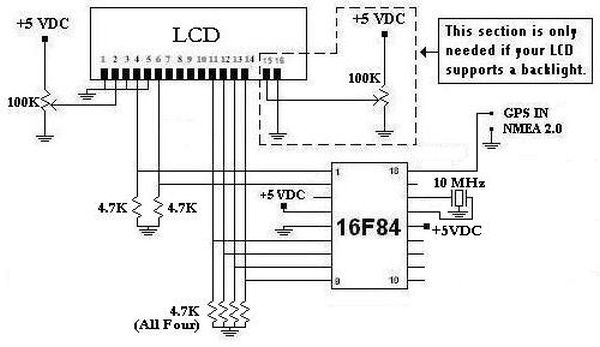
Here is the schematic. I used a 4 Bit configuration for the LCD to PIC wiring. This all that would be required for this application. Plus, the 16F84 does not have a lot of port pins, so I have to use them wisely. You can see the GPS data is comming in on PORT A PIN 1. The LCD data goes out on PORT B PINS 0-3. The LCD’s Register Select (Rs) is on PORT A PIN 2 and the LCD’s Enable (E) is on PORT A PIN 3. In the original design, I had included a MAX232 level converter to do the TTL to Serial conversion before it came into the PIC. I found a serial routine that did software inversion and allowed me to eliminate the MAX232, so one less part. This is really nice because basically the entire circuit could be layed out on a board the same size as the 4×20 LCD.
Here is a breadboard version of the project. This just doesn’t have the entire code loaded into it yet (I need to finnish writing it). I used a negative yellow LCD from Crystalfontz.
For more detail: My GPS LCD Display Project using PIC16F84
- What microcontroller is used in this project?
The project uses a PIC16F84 microcontroller. - How is the GPS data received by the PIC?
GPS NMEA data is received on PORT A PIN 1 of the PIC. - How is the LCD connected to the PIC?
The LCD is wired in 4-bit mode with data on PORT B PINS 0-3, RS on PORT A PIN 2, and E on PORT A PIN 3. - Is a MAX232 required for serial conversion?
Originally included but removed because a software-inverted serial routine eliminated the need for a MAX232. - What display is used to show position?
A 4x20 LCD module with a Hitachi-compatible chipset is used. - Can the project support user input for settings?
Yes, an optional mechanical encoder or a simple SPDT switch can be added for changing options or settings. - Was a breadboard version created?
Yes, a breadboard prototype exists though the full code was not finished at the time described. - Why was this project created?
To display GPS position from units without displays, conserving display space on other devices like the HamHUD II.
