
Summary of How to display 5×8 and 5×10 size font characters on 16×2 lcd with 8-bit microcontrollers
This article explains how to display 5x8 and 5x10 font characters on HD44780-based character LCDs using PIC16F877 and 8051 microcontrollers. It details initialization commands for font selection, memory limitations (208 chars in 5x8, 32 in 5x10), and custom character creation via CG-RAM. The project demonstrates displaying specific characters like G, J, P, and Q by addressing their locations in the controller's memory.
Parts used in the Displaying Font Sizes Project:
- PIC 16f877 microcontroller
- 16x2 lcd
- Potentiometer
- Crystal (20 MHz)
- Capacitors 33Pf
Character lcds can display character of font size 5×8 and 5×10. In 5xn, 5 represents number of coulombs and N represents number of rows. Character lcd’s especially which are controlled by Hitachi HD44780 controller can display 5×8 and 5×10 size font character. Some lcd’s can only display character in 5×8 font. In this project i am going to teach you how to display characters of font size 5×8 and 5×10 on character lcd?
If you are newbie and don’t know about internal structure of character lcd and how to interface it with microcontrollers? Than i suggest you you first take the getting started with lcd tutorial.
As you know first we have to initialize the lcd that we are using (8×1, 8×2, 8×4, 16×1, 16×2, 16×4, 20×1, 20×2, 20×4, 24×1, 24×2, 24×4, 32×1, 32×2, 40×1, 40×2, 40×4). By initialization I mean
- Should the cursor appears on lcd or not? If appearing, whether it should be blinking or normal?
- What should be the size of character-font appearing on lcd (5×8, 5×10)?
To learn about lcd initialization standard commands go through the simple tutorial below.
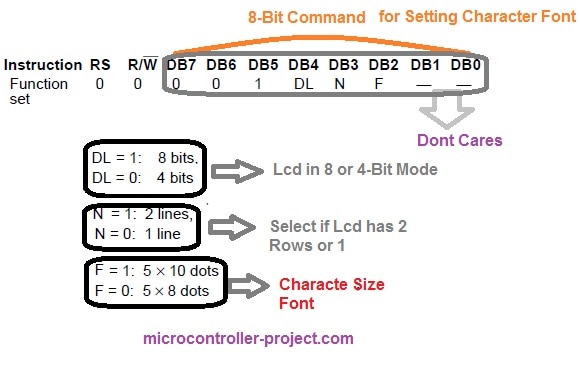
We are going to discuss only commands that are related to character size Font-matrix in this tutorial. To initialize character lcd we have to send commands to command-register of lcd. All the commands are 8-bit in nature. For Initializing character font size, 8-bit commands individual bits represents.
- DL selects lcd mode. 8-bit or 4-bit. Don’t know Go through the tutorial(Lcd in 4-bit and 8-bit mode)
- N selects if lcd contains 2 rows or 1.
- F selects character font size. (5×8 or 5×10)
Now if I have a 16×2 lcd and i want to initialize its Character font to be 5×10 my command will be.
Standard Lcd Commands for 5×10 Display
Now i am going to display characters on lcd in 5×8 and 5×10 font. I am going to print it on lcd using two different microcontrollers. Microchip pic16f877 and 8051(89c51,89c52) microcontroller.
- You can display 208 characters in 5×8 font and 32 characters in 5×10 font. Total ASCII characters present in HD44780 lcd controller are 240. In which 208 are in 5×8 font and 32 are in 5×10 font.
- In CG-RAM you can create 8 custom characters at a time in 5×8 font and 4 custom characters in 5×10 font. Don’t know about CG-RAM and custom characters? Go through(CG-RAM & custom characters generation and display)
See the difference in the same characters in same row, marked against red and green star. red star represents 5×8 font size character and green represents same character with 5×10 size font. Picture taken from hd44780 controller data sheet.
Displaying 5×10, 5×8 font size Characters on character lcd Using PIC16f877 Microcontroller.
Project Requirements
- PIC 16f877 microcontroller
- 16×2 lcd
- Potentiometer (To set Lcd Contrast)
- Crystal (20 MHz)
- Capacitors 33Pf
I am going to print/display G,J,P & Q in 5×8 and 5×10 font. These characters are present in HD44780 Controller in 5×8 and 5×10 font. I will call their addresses and they will appear/display on lcd screen.
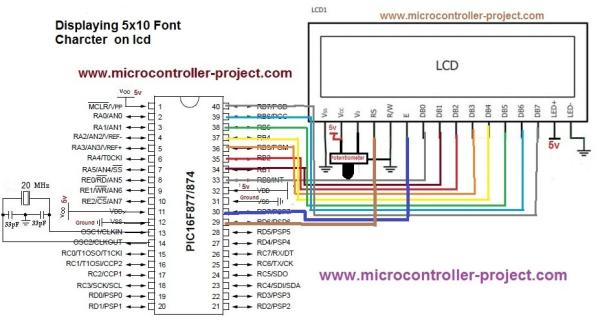
Lcd data pins are Connected to Port-B of microcontroller. Lcd control pins (en,rs,rw) are connected to Port-D Pins#7,6,5. Rest of the connections are normal connections. Supplying power to microcontroller. Grounding GND pin. Connecting Crystal to microcontroller etc. Circuit diagram of the project is given below.
- What font sizes can Hitachi HD44780 controlled LCDs display?
They can display 5x8 and 5x10 size fonts, though some units only support 5x8. - How many characters can be displayed in 5x8 and 5x10 fonts?
You can display 208 characters in 5x8 font and 32 characters in 5x10 font. - Which bits in the 8-bit initialization command control the font size?
The F bit selects the character font size between 5x8 or 5x10. - How many custom characters can be created in CG-RAM at a time?
You can create 8 custom characters in 5x8 font or 4 custom characters in 5x10 font. - Can this project use both PIC and 8051 microcontrollers?
Yes, characters can be displayed using either Microchip PIC16F877 or 8051 microcontrollers like 89C51 and 89C52. - What is the total number of ASCII characters available in the HD44780 controller?
There are 240 total ASCII characters present in the HD44780 LCD controller. - Which pins on the PIC16F877 connect to the LCD data pins?
LCD data pins are connected to Port-B of the microcontroller. - What is the purpose of the potentiometer in this circuit?
The potentiometer is used to set the LCD contrast.
