
Summary of Hack your fridge with IoT kit!
This hack uses the IoT Kit Wi‑Fi (FlyportPRO) to alarm your fridge: it emails a chosen recipient each time the fridge door is opened during a set time window. FlyportPRO starts as a softAP so you can configure the receiver email, subject, and activation start/stop via its web server; then it connects to your Wi‑Fi and uses a light sensor to detect door openings and trigger emails.
Parts used in the Fridge Alarm IoT Hack:
- IoT Kit Wi‑Fi (FlyportPRO)
- Light sensor
- Power supply for FlyportPRO
- Wi‑Fi network (for connectivity)
- Web browser (to access FlyportPRO web server)
This is the first hack we made using the new IoT Kit Wi-Fi!
We know you guys like to eat during night (the best time for programming and hacking) but this is a really unhealthy habit and we want you fit and healthy! 
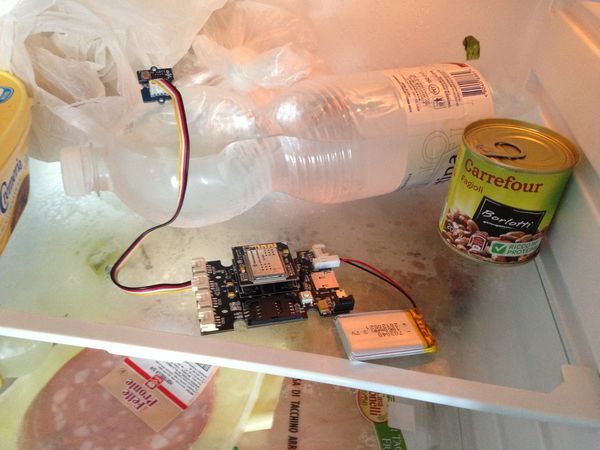
How it works
The alarm for your fridge activates at a certain time and sends an email (to your girlfriend, mum, enemy or whoever kicks your ass) every time you open the door of the fridge
How to set it up? Easy, FlyportPRO starts as softAP and you can connect to its web server where you can setup the email address of the receiver, the subject and the activation time (start/stop). After setup it restarts and connects to your Wi-Fi and the light sensors makes the rest.
For more detail: Hack your fridge with IoT kit!
- How does the fridge alarm detect door openings?
It uses a light sensor to detect when the fridge door is opened. - Can I change who receives the email alerts?
Yes, you can set the receiver email address via the FlyportPRO web server. - How do I configure the alarm settings?
Connect to FlyportPRO while it is a softAP and use its web server to set the email, subject, and activation times. - Does the device need to stay in softAP mode to work?
No, after setup FlyportPRO restarts, connects to your Wi‑Fi, and operates using the light sensor. - What information is sent in the alert email?
You can configure the email receiver and the subject via the web interface. - When will the alarm send emails?
The alarm sends an email every time the fridge is opened during the configured activation time window.

