


Summary of DHT22 (AM2302) Digital Humidity and Temperature Sensor Proteus Simulation
The article explains the DHT22 (AM2302) digital humidity and temperature sensor, its 1-wire communication with a microcontroller, data format (16-bit RH, 16-bit temperature, 8-bit checksum), example conversions, negative temperature encoding, and the start/response timing. It notes Proteus support requires version 8.1+, and describes a PIC18F4550 Proteus simulation using the internal 8 MHz oscillator with MCLR disabled.Parts used in the DHT22 (AM2302) Proteus Simulation:
- DHT22 (AM2302) sensor
- PIC18F4550 microcontroller
- Proteus simulation software (version 8.1 or higher)
- Single data wire connection (1-wire bus)
- Power supply (as required by DHT22 and PIC18F4550)
- Connections for internal oscillator configured at 8 MHz
- Configuration to disable MCLR
Illustration of our 1-wire bus:
Example: MCU has received 40 bits data from AM2302 as
0000 0010 1000 1100 0000 0001 0101 1111 1110 1110
16 bits RH data 16 bits T data check sum
Here we convert 16 bits RH data from binary system to decimal system,
0000 0010 1000 1100 → 652
Binary system Decimal system
RH=652/10=65.2%RH
Here we convert 16 bits T data from binary system to decimal system,
0000 0001 0101 1111 → 351
Binary system Decimal system
T=351/10=35.1℃
When highest bit of temperature is 1, it means the temperature is below 0 degree Celsius.
Example: 1000 0000 0110 0101, T= minus 10.1℃
16 bits T data
Sum=0000 0010+1000 1100+0000 0001+0101 1111=1110 1110
Check-sum=the last 8 bits of Sum=1110 1110
response data from DHT22 that reflect the relative humidity and temperature. DHT22 will change to standby status when data collecting finished if it don't receive start signal from MCU again.
Interfacing PIC18F4550 with DHT22 (AM2302) Proteus simulation:
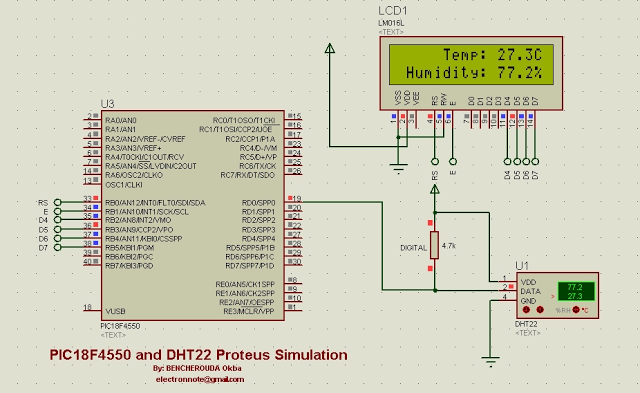
- What communication bus does DHT22 use?
DHT22 uses a 1-wire bus for communication between the sensor and the master device. - How many bits of data does DHT22 send per reading?
DHT22 sends 40 bits: 16 bits humidity, 16 bits temperature, and 8 bits checksum. - How is relative humidity calculated from the 16-bit RH data?
Convert the 16-bit RH binary to decimal and divide by 10 to get percent RH. - How is temperature calculated from the 16-bit temperature data?
Convert the 16-bit temperature binary to decimal and divide by 10 to get degrees Celsius; highest bit 1 indicates negative temperature. - What indicates a negative temperature in DHT22 data?
If the highest bit of the 16-bit temperature data is 1, the temperature is below 0°C. - What must the MCU do to receive data from DHT22?
The MCU must send a start signal; without it DHT22 will not respond with data. - How often does DHT22 respond after a start signal?
One start signal elicits one 40-bit response; the sensor returns to standby until it receives another start signal. - Which Proteus versions support the DHT22 component?
DHT22 is available only in Proteus version 8.1 or higher; version 8.0 or earlier will not work. - What PIC configuration was used in the Proteus simulation?
The simulation used the PIC18F4550 with internal oscillator at 8 MHz and MCLR disabled.
Related projects
Spectrum Analyzer using TMS320F28023DA with Proteus Simulation
Introduction This project demonstrates a real-time audio spectrum analyzer using the TMS320F28023DA Piccolo microcontroller, simulated in Proteus VSM. The system captures an...
Sensors & TemperatureDHT22 Low Cost Humidity Sensor using PIC18F25K20 with Proteus Simulation
IntroductionThis microcontroller project demonstrates how to interface a DHT22 (RHT03) digital temperature and humidity sensor with a PIC18F25K20 using Proteus simulation.The project...
Sensors & TemperatureCrafting a Microcontroller-Based Temperature Monitoring System
Abstract As technological advancements progress, processes become increasingly intricate, demanding a corresponding expansion in the parameters necessary for efficient analysis. Data acquisition,...
Sensors & TemperatureAutomated Room Temperature Monitoring System using Microcontrollers
Abstract Monitoring the temperature within a computer server room stands as a crucial responsibility to uphold the server's performance amidst potential disruptions...
Sensors & TemperatureInnovative Approaches to Control System Design for 100KV Impulse Generators
1. INTRODUCTION An impulse generator is an electrical device designed to generate short-duration surges of high voltage or high current. Impulse signals...
Sensors & TemperatureSmart Baby Incubator: Enhancing Care with PIC Microcontrollers
INTRODUCTION Within the effective Baby Incubator system, the incubator serves as an infant-stimulation apparatus designed for the intensive care of newborns, particularly...

Ibrar Ayyub
I am an experienced technical writer holding a Master's degree in computer science from BZU Multan, Pakistan University. With a background spanning various industries, particularly in home automation and engineering, I have honed my skills in crafting clear and concise content. Proficient in leveraging infographics and diagrams, I strive to simplify complex concepts for readers. My strength lies in thorough...