
Summary of A Brief Introduction to MSP430 using Launchpad (MSP430G2553)
This tutorial introduces the Texas Instruments MSP430G2553 microcontroller, a 16-bit low-power device ideal for embedded applications. It details using the MSP430 Launchpad kit, which includes a programmer/debugger and two microcontrollers. The guide covers hardware specifications like the 20-pin DIP package, ADC, timers, UART, Flash memory, and RAM. Code examples are provided in embedded C, compiled using IAR Embedded Workbench or Code Composer Studio, with recommendations to consult the official user manual.
Parts used in the MSP430 Launchpad Project:
- MSP430 Launchpad from TI
- MSP430G2553 Microcontroller
- IAR Embedded Workbench
- Code Composer Studio
- MSP430G2xxx User Manual (slau144j.pdf)
In this tutorial we will be exploring the workings of a MSP430 based microcontroller from Texas Instruments.MSP430 is developed by Texas Instruments as an extremely low power 16 bit architecture for use in low power, low cost, energy constrained embedded applicationsThe Hardware used is the MSP430 Launchpad from TI which contains a programmer/Debugger + two microcontrollers making it an ideal platform to start learning about MSP430G2xxx controller.
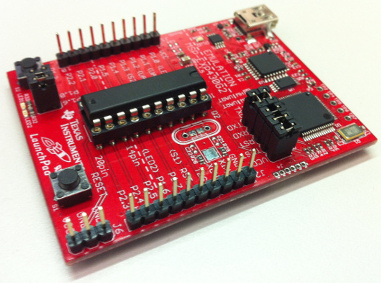
Please note that this tutorial is a work in progress so new info will be added as it becomes available.
Tutorial Overview
In this tutorial,I will be focusing on MSP430G2553 which comes along with the Launchpad development kit.MSP430G2553 comes in a easy to use 20 pin DIP package with a 10 bit, 8 channel ADC,2 timers,1 UART,16KB Flash and 512 bytes of RAM.The code in the tutorial is written in embedded C and is compiled with an code limited version of IAR embedded workbench.You can also use Code Composer Studio from Texas Instruments.Before beginning I would recommend you to get a copy of the MSP430G2xxx user manual (slau144j.pdf) from TI website.It is better to print out the relevant sections of the usermanual for peripherals like ADC,timer uart etc so that you can easily browse through it.
For More Details : A Brief Introduction to MSP430 using Launchpad (MSP430G2553)
- What is the primary purpose of the MSP430 architecture?
It is designed for extremely low power, low cost, energy constrained embedded applications. - Which microcontroller model is the focus of this tutorial?
The tutorial focuses on the MSP430G2553. - What programming language is used for the code in the tutorial?
The code is written in embedded C. - Can I use Code Composer Studio instead of IAR Embedded Workbench?
Yes, you can also use Code Composer Studio from Texas Instruments. - What file should be downloaded from the TI website before starting?
You should get a copy of the MSP430G2xxx user manual (slau144j.pdf). - Does the MSP430 Launchpad include a debugger?
Yes, it contains a programmer and debugger along with two microcontrollers. - How many channels does the ADC have on the MSP430G2553?
The MSP430G2553 has an 8 channel ADC.

