


Summary of Another DIY function generator using PIC16F628
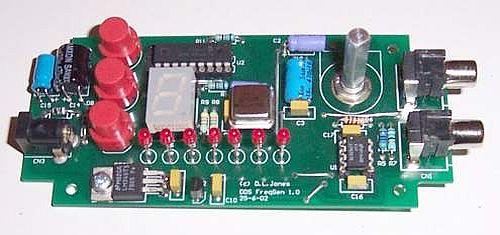
This low-cost Custom Function Generator uses the AD9835 DDS chip to produce sine and square waves from 1Hz to 10MHz with 1Hz resolution. Controlled by a PIC16F628 microcontroller, it features three push buttons and a sliding window LED display. The design requires no wiring and fits neatly into a standard UB3 Jiffy Box.Parts used in the Custom Function Generator:
- Analog Devices AD9835 Direct Digital Synthesis (DDS) Generator chip
- Microchip PIC16F628 controller chip
- Three push buttons
- Sliding window LED display
- Standard UB3 Jiffy Box
An extremely simple and low-cost Sine/Square wave generator, known as the "Custom Function Generator," is developed based on the Analog Devices AD9835 Direct Digital Synthesis (DDS) Generator chip.. The frequency can be set for any frequency from 1Hz to 10MHz in 1Hz resolution steps! All this with three push buttons and a novel "sliding window" LED display. The controller chip, a Microchip PIC16F628, is programmed to facilitate various functions seamlessly. There is no wiring required, and the PCB snugly fits into a standard UB3 Jiffy Box, making it an ideal solution for a Custom Function Generator.
Read the complete Project Article in HTML format.
The Schematic Diagram in GIF format.
The Front Component Overlay in GIF format.
The Back Component Overlay in GIF format.
The Front Panel in ZIPed PDF format
The Front Panel in ZIPed EPS format
The PCB file in Protel format.
For more detail: Another DIY function generator using PIC16F628
Quick Solutions to Questions related to Custom Function Generator:
- What frequency range does this generator support?
The device can generate any frequency from 1Hz to 10MHz. - How precise are the frequency steps?
The generator offers resolution steps of 1Hz. - Can I build this without soldering wires?
No wiring is required for this project. - What type of waveforms can be generated?
The unit produces Sine and Square waves. - How is the frequency controlled?
Frequency settings are managed using three push buttons. - What kind of display is used?
A novel sliding window LED display is utilized. - Which controller chip powers the circuit?
The Microchip PIC16F628 serves as the controller. - What enclosure is recommended for this build?
The PCB fits snugly into a standard UB3 Jiffy Box.
Related projects
DHT11 Low Cost Humidity Sensor using PIC16F628A with Proteus Simulation
IntroductionThis microcontroller project demonstrates how to interface a low-cost DHT11 temperature and humidity sensor with a PIC16F628A using a Proteus simulation environment.The...
LCD & Display Projects · PIC16F628AFrequency Counter by PIC16F628
In this project we are building a basic and low cost frequency counter circuit . It can measure from 16Hz to 100Hz...
Games, Toys & Calculators · PIC16F628ATIC TAC TOE game using PIC16F628
This project is not to introduce Tic Tac Toe. Everyone knows this game. It's to introduce two features. Bi-coloured LEDs, microcontrollers and...
Beginner Tutorials · PIC16F877APIC16F877 Driving LCD in 4-Bit Mode using PIC16F877 with Proteus Simulation
Introduction This microcontroller project shows how a PIC16F877 can drive an LCD display using 4-bit mode inside a Proteus simulation.The project demonstrates...
Beginner Tutorials · PIC18F4550PICDEM FS USB CDC Evaluation Board using PIC18F4550 with Proteus Simulation
Introduction The PICDEM FS USB CDC Evaluation Board is a practical microcontroller project built around the PIC18F4550, designed to demonstrate USB communication...
Beginner TutorialsPIC12CE518 I2C EEPROM using PIC12CE518 with Proteus Simulation
Introduction This microcontroller project demonstrates how to write and read data using the internal I2C EEPROM of the PIC12CE518 and visualize the...

Ibrar Ayyub
I am an experienced technical writer holding a Master's degree in computer science from BZU Multan, Pakistan University. With a background spanning various industries, particularly in home automation and engineering, I have honed my skills in crafting clear and concise content. Proficient in leveraging infographics and diagrams, I strive to simplify complex concepts for readers. My strength lies in thorough...