


Summary of A PIC16F84A Alarm Clock
This article describes a simple PIC16F84A alarm clock project designed for educational purposes, featuring timekeeping for seconds, minutes, hours, and days of the week. It utilizes four seven-segment LED displays for output and three buttons (up, down, enter) for setting start times and alarms. The device supports multiple alarms limited only by ROM space, with alerts indicated on an RA4 open collector output and a decimal point on the display. The firmware is written in MikroBasic to assist beginners.Parts used in the PIC16F84A Alarm Clock:
- PIC16F84A microcontroller
- Four seven segment LED displays
- Three adjustment buttons (up, down, enter)
- RA4 open collector output pin
- MikroBasic compiler
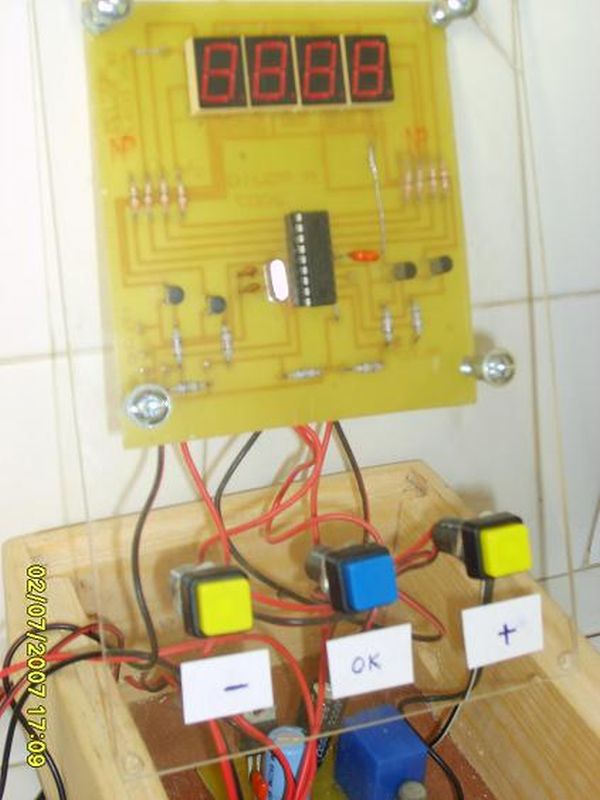
This clock counts seconds, minutes, hours and day of the week.
Time is displayed on 4 seven segment LED displays, and is adjustable with three buttons at start time (up, down, enter).
You can program the day of the week, hour, minute and duration of the alarms.
The number of alarms are limited by ROM space only.
The alarm is on the RA4 open collector output of the PIC, and is repeated on a decimal point of the display.
For once, the program is in BASIC (mikroBasic) and I hope it will make a good start for beginners.
First, the BASIC source code.
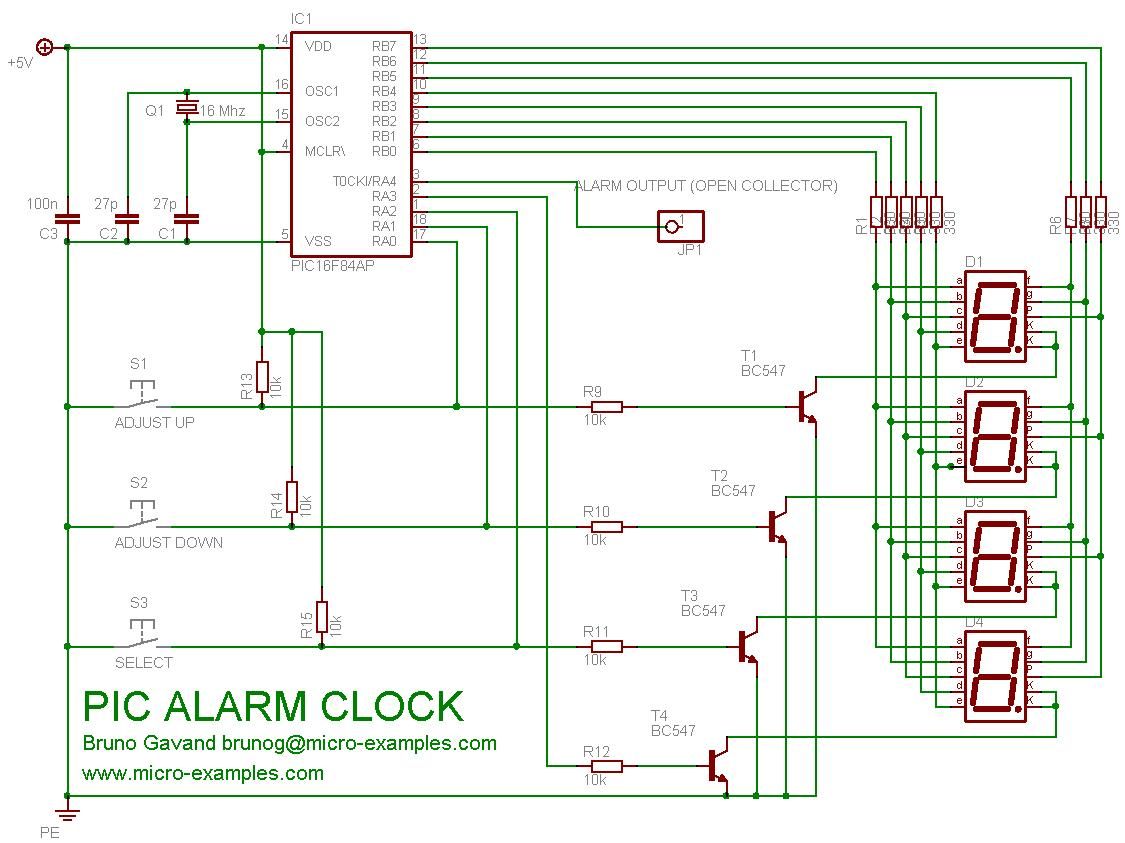
Note that you can build it either for common cathod or common anode LED display.
For more detail: A PIC16F84A Alarm Clock
Quick Solutions to Questions related to PIC16F84A Alarm Clock:
- What components are required to build this alarm clock?
You need a PIC16F84A microcontroller, four seven segment LED displays, and three buttons for adjustments. - Can the display be configured for common cathode or common anode types?
Yes, the design allows building it for either common cathod or common anode LED displays. - How many alarms can the system support?
The number of alarms is limited only by the available ROM space. - Which programming language is used for the source code?
The program is written in BASIC using the mikroBasic compiler. - How does the user adjust the time settings?
Time is adjustable using three buttons labeled up, down, and enter at the start time. - What indicates when the alarm is active?
The alarm activates the RA4 open collector output and repeats on a decimal point of the display. - Does the clock track the day of the week?
Yes, the clock counts seconds, minutes, hours, and the day of the week.
Related projects
PIC Stepper Motor Controller using PIC16F84A with Proteus Simulation
Introduction Stepper motors are widely used in embedded systems and DIY electronics projects where precise position control is required. This PIC Stepper...
Programmers & ICSP · PIC16F84APIC Musical Doorbell using PIC16F84A with Proteus Simulation
IntroductionThis microcontroller project demonstrates a musical doorbell built around a PIC16F84A and a simple piezo sounder.Using two push buttons, the system allows...
Beginner Tutorials · PIC16C84Exploring the World of PIC Microcontrollers: An Architectural Overview
A Peripheral Interface Microcontroller (PIC), developed by General Instruments Microcontrollers in 1993, operates under software control and is programmed to execute various...
Clocks & TimersAdaptive Alarm Clock: Build a Smart, User-Centric wake-Up system
Project Overview The goal of this ambitious undergraduate project was to develop a novel alarm clock capable of analyzing a person's unique...
Clocks & TimersDesigning Your Ideal Alarm Clock: An Introduction to PIC18
Within this laboratory session, you'll employ the C language to create an alarm clock, delving into the implementation of "C" programs on...
Clocks & TimersBuilding your Dream Alarm Clock Using the PIC18
Objective: In this laboratory session, your objective is to create an alarm clock using the C programming language. You will gain proficiency...

Ibrar Ayyub
I am an experienced technical writer holding a Master's degree in computer science from BZU Multan, Pakistan University. With a background spanning various industries, particularly in home automation and engineering, I have honed my skills in crafting clear and concise content. Proficient in leveraging infographics and diagrams, I strive to simplify complex concepts for readers. My strength lies in thorough...