


Summary of One PIC Microcontroller Platform Development Board
This board supports firmware development for Microchip's 8-bit, 16-bit, and 32-bit PIC microcontrollers on a single platform. It features preprogrammed firmware for LCDs, LEDs, and capacitive touch pads, alongside a real-time clock and AAA battery power. The kit includes three specific microcontrollers, wireless demonstration capabilities (IR, RF4CE, WiFi), and various connectors for expansion and programming.Parts used in the OnePIC Microcontroller Platform Development Board:
- PIC16LF1939-I/PT
- PIC24FJ256GA106-I/PT
- PIC32MX795F512L-80I/PT
- MCP1640T-I/CH
- MCP79410-I/S
- MPLABX V1.00 Software
- .NET Framework v2.0 or later
- MCP2200 Driver
- ZENA Wireless Adapter
- PICkit™ 3 Connector
- PICtail™ Board Connector
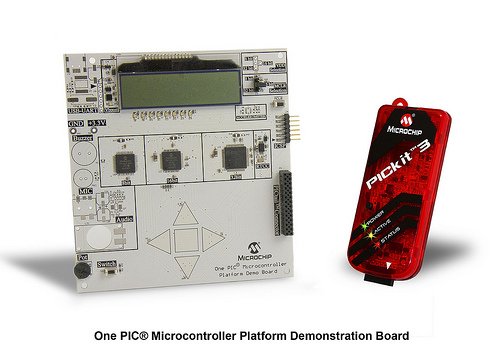
One PIC Microcontroller Platform Development Board
Develop firmware using Microchip's 8/16/32-bit PIC® Microcontrollers all on one board!
Each device comes preprogrammed with firmware to operate the LCD, LED and capacitive touch pads. In addition to three PIC® Microcontrollers, this board also has a dedicated Real-Time Calendar Clock circuit and is able to run from a single AAA Ultimate Lithium battery.
Feature
PIC Microcontrollers
PIC16LF1939-I/PT
PIC24FJ256GA106-I/PT
PIC32MX795F512L-80I/PT
Capacitive Touch Pads
Segmented LCD
Colored LEDs
Single Cell Battery Supply
MCP1640T-I/CH
Real-Time Calendar Clock
1 MCP79410-I/S
PICkit™ 3 Connector
PICtail™ Board Connector
System Requirements:
Software:
- MPLABX V1.00
- .NET Framework v2.0 or later (required for 8bit IR Demo GUI)
- MCP2200 & SimpleIO-M.dll (required for 8bit IR Demo GUI)
Drivers:
- MCP2200 (Downloaded)
- ZENA Wireless Adapter (Provided)
Compilers ( use latest available versions):
- PIC16 HI-TECH: (developed with v9.83)
- PIC24 C30: (developed with v3.31)
- PIC32 C32: (developed with v2.01)
Overview:
This demo board is populated with 8bit, 16bit, and 32bit PIC microcontrollers. Refer to the schematic of the board for more details.
8 bit MCU : PIC16LF1939
16 bit MCU: PIC24FJ256GA106
32 bit MCU: PIC32MX795F512L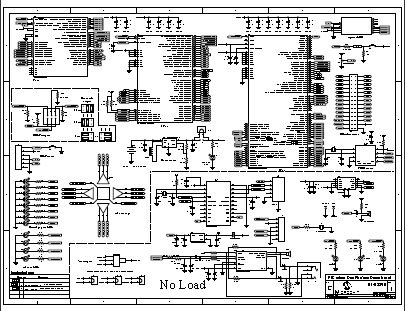
OnePIC Demo Board
The demo code consists of:
- A “base” code which demonstrates the
- LCD
- LEDS
- mTouch
- Potentiometer
- Switch
- Three Wireless Demonstrations, one for each PIC
- 8bit – Infrared
- 16bit – RF4CE (Radio Frequency for Consumer Electronics)
- 32bit – WiFi
The following document is intended as a walk-through guide to using the provided software. Items will be presented in the order they might be presented during a demonstration of the OnePIC board.
For more detail: One PIC Microcontroller Platform Development Board
Quick Solutions to Questions related to OnePIC Microcontroller Platform Development Board:
- What types of PIC microcontrollers are included?
The board is populated with an 8-bit PIC16LF1939, a 16-bit PIC24FJ256GA106, and a 32-bit PIC32MX795F512L. - How does the board get powered?
The system runs from a single AAA Ultimate Lithium battery using the MCP1640T-I/CH circuit. - Can I use this board for wireless demonstrations?
Yes, it supports three wireless demonstrations: Infrared for 8-bit, RF4CE for 16-bit, and WiFi for 32-bit. - Does the board come with preprogrammed firmware?
Yes, each device comes preprogrammed with firmware to operate the LCD, LED, and capacitive touch pads. - What software is required to develop firmware?
You need MPLABX V1.00, .NET Framework v2.0 or later, and specific drivers like MCP2200. - Which compilers should be used for these chips?
Use PIC16 HI-TECH for 8-bit, PIC24 C30 for 16-bit, and PIC32 C32 for 32-bit devices. - Is there a Real-Time Calendar Clock on the board?
Yes, the board includes a dedicated Real-Time Calendar Clock circuit using the MCP79410-I/S chip. - What connectors are available for expansion?
The board features a PICkit™ 3 Connector and a PICtail™ Board Connector.
Related projects
Voltage Measurement with A PIC Microcontroller
Voltage Measurement with PIC Microcontroller articulates a methodical framework for facilitating analog voltage measurement using the PIC18F4520, an advanced member of Microchip’s...
Development Boards & KitsUltra-Low Power: Microcontroller Standby Current to 130uA with OPEnS Power Control Board
At the OPEnS Lab, a key focus for our projects is achieving exceptionally long battery life. This was particularly true for the...
Development Boards & KitsAn Integrated Approach to Developing Applications with Microchip PIC Microcontrollers
1. Introduction In our daily lives, a variety of devices such as telephones, household appliances, and cars incorporate "smart" electronics, typically manifested...
Development Boards & KitsMicrocontroller-Driven AC Voltage Control with Soft Start Feature
1. INTRODUCTION PWM-based AC voltage controllers find extensive application in uninterruptible power supplies (UPS) and high-power flexible AC transmission systems. This variable...
Development Boards & KitsPIC Microcontroller-Based IC Tester for Efficient Integrated Circuit Verification
1. INTRODUCTION Within the electronics industry[1], as circuit complexity undergoes a drastic increase and the demand for higher reliability rises, a significant...
Development Boards & Kits · PIC16F887Hands-On Microcontroller Projects: BK300 Development Board Featuring PIC16F887 Chip Lab
1. INTRODUCTION The study of microcontroller systems is experiencing a global surge across various fields within science, engineering, and technology departments of...

Ibrar Ayyub
I am an experienced technical writer holding a Master's degree in computer science from BZU Multan, Pakistan University. With a background spanning various industries, particularly in home automation and engineering, I have honed my skills in crafting clear and concise content. Proficient in leveraging infographics and diagrams, I strive to simplify complex concepts for readers. My strength lies in thorough...