
Summary of UART Communication using PIC Code
The article documents mikroC PRO for PIC UART library functions for using hardware UART on PIC microcontrollers (e.g., 16F887). It explains per-module (UARTx_...) and generic routines, initialization, data ready and transmit idle checks, reading/writing bytes and text with delimiters, and switching active UART via UART_Set_Active. It notes baud rate must be a compile-time constant and that number of UART modules varies by MCU.
Parts used in the UART Communication using PIC Project:
- PIC microcontroller with hardware UART (example: PIC16F887)
- RS-232 interface (for PC connection)
- mikroC PRO for PIC compiler/library
- UART-capable peripherals or devices to communicate with
- Optional level shifter or MAX232 for RS-232 voltage translation
- Power supply for MCU and peripherals
The UART hardware module is available with a number of PIC compliant MCUs. The mikroC PRO for PIC UART Library provides comfortable work with the Asynchronous (full duplex) mode.
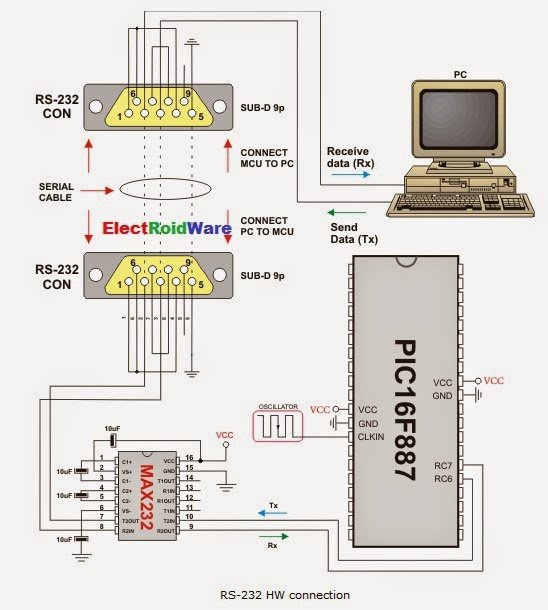
You can easily communicate with other devices via RS-232 protocol (for example with PC, see the figure at the end of the topic – RS-232 HW connection). You need a PIC MCU with hardware integrated UART, for example 16F887. Then, simply use the functions listed below.
Important :
- UART library routines require you to specify the module you want to use. To select the desired UART module, simply change the letter x in the routine prototype for a number from 1 to 2.
- Switching between the UART modules in the UART library is done by the UART_Set_Active function (UART modules have to be previously initialized).
- Number of UART modules per MCU differs from chip to chip. Please, read the appropriate datasheet before utilizing this library.

Library Routines
- UARTx_Init
- UARTx_Data_Ready
- UARTx_Tx_Idle
- UARTx_Read
- UARTx_Read_Text
- UARTx_Write
- UARTx_Write_Text
- UART_Set_Active
Generic Routines
- UART_Data_Ready
- UART_Tx_Idle
- UART_Read
- UART_Read_Text
- UART_Write
- UART_Write_Text
UARTx_Init
| Prototype | void UARTx_Init(const unsigned long baud_rate); |
|---|---|
| Returns | Nothing. |
| Description | Initializes desired hardware UART module with the desired baud rate. Refer to the device data sheet for baud rates allowed for specific Fosc. If you specify the unsupported baud rate, compiler will report an error. |
| Requires | You need PIC MCU with hardware UART.UARTx_Init needs to be called before using other functions from UART Library.Parameters :
Refer to the device data sheet for baud rates allowed for specific Fosc. Note : Calculation of the UART baud rate value is carried out by the compiler, as it would produce a relatively large code if performed on the library level.
Therefore, compiler needs to know the value of the parameter in the compile time. That is why this parameter needs to be a constant, and not a variable. |
| Example |
// Initialize hardware UART1 and establish communication at 9600 bps UART1_Init(9600); |
UARTx_Data_Ready
| Prototype | char UARTx_Data_Ready(); |
|---|---|
| Returns |
|
| Description | Use the function to test if data in receive buffer is ready for reading. |
| Requires | UART HW module must be initialized and communication established before using this function. |
| Example |
// If data is ready, read it:
if (UART1_Data_Ready() == 1) {
 receive = UART1_Read();
 }
|
UARTx_Tx_Idle
| Prototype | char UARTx_Tx_Idle(); |
|---|---|
| Returns |
|
| Description | Use the function to test if the transmit shift register is empty or not. |
| Requires | UART HW module must be initialized and communication established before using this function. |
| Example |
// If the previous data has been shifted out, send next data:
if (UART1_Tx_Idle() == 1) {
  UART1_Write(_data);
 }
|
UARTx_Read
| Prototype | char UARTx_Read(); |
|---|---|
| Returns | Returns the received byte. |
| Description | Function receives a byte via UART. Use the function UARTx_Data_Ready to test if data is ready first. |
| Requires | UART HW module must be initialized and communication established before using this function. |
| Example |
// If data is ready, read it:
if (UART1_Data_Ready() == 1) {
 receive = UART1_Read();
 }
|
UARTx_Read_Text
| Prototype | void UARTx_Read_Text(char *Output, char *Delimiter, char Attempts); |
|---|---|
| Returns | Nothing. |
| Description | Reads characters received via UART until the delimiter sequence is detected. The read sequence is stored in the parameter output; delimiter sequence is stored in the parameter delimiter.This is a blocking call: the delimiter sequence is expected, otherwise the procedure exits (if the delimiter is not found). Parameters :
|
| Requires | UART HW module must be initialized and communication established before using this function. |
| Example | Read text until the sequence “OK” is received, and send back what’s been received:
UART1_Init(4800);                         // initialize UART1 module
Delay_ms(100);

while (1) {
  if (UART1_Data_Ready() == 1) {          // if data is received
    UART1_Read_Text(output, "OK", 10);    // reads text until 'OK' is found
    UART1_Write_Text(output);             // sends back text
 }
}
|
UARTx_Write
| Prototype | void UARTx_Write(char data_); |
|---|---|
| Returns | Nothing. |
| Description | The function transmits a byte via the UART module. Parameters :
|
| Requires | UART HW module must be initialized and communication established before using this function. |
| Example |
unsigned char _data = 0x1E; ... UART1_Write(_data); |
UARTx_Write_Text
| Prototype | void UARTx_Write_Text(char * UART_text); |
|---|---|
| Returns | Nothing. |
| Description | Sends text via UART. Text should be zero terminated. Parameters :
|
| Requires | UART HW module must be initialized and communication established before using this function. |
| Example | Read text until the sequence “OK” is received, and send back what’s been received:
UART1_Init(4800);                         // initialize UART1 module
Delay_ms(100);

while (1) {
  if (UART1_Data_Ready() == 1) {          // if data is received
    UART1_Read_Text(output, "OK", 10);    // reads text until 'OK' is found
    UART1_Write_Text(output);             // sends back text
 }
}
|
UART_Set_Active
| Prototype | void UART_Set_Active(char (*read_ptr)(), void (*write_ptr)(unsigned char data_), char (*ready_ptr)(), char (*tx_idle_ptr)()) |
|---|---|
| Returns | Nothing. |
| Description | Sets active UART module which will be used by the UART library routines. Parameters :
|
| Requires | Routine is available only for MCUs with two UART modules. Used UART module must be initialized before using this routine. See UARTx_Init routine |
| Example |
UART1_Init(9600); // initialize UART1 module UART2_Init(9600); // initialize UART2 module RS485Master_Init(); // initialize MCU as Master UART_Set_Active(&UART1_Read, &UART1_Write, &UART1_Data_Ready, &UART1_Tx_Idle); // set UART1 active RS485Master_Send(dat,1,160); // send message through UART1 UART_Set_Active(&UART2_Read, &UART2_Write, &UART2_Data_Ready, &UART2_Tx_Idle); // set UART2 active RS485Master_Send(dat,1,160); // send through UART2 |
UART_Data_Ready
| Prototype | char UART_Data_Ready(); |
|---|---|
| Returns |
|
| Description | Use the function to test if data in receive buffer is ready for reading. This is a generic routine which uses the active UART module previously activated by the UART_Set_Active routine. |
| Requires | UART HW module must be initialized and communication established before using this function. |
| Example |
// If data is ready, read it:
if (UART_Data_Ready() == 1) {
 receive = UART_Read();
 }
|
UART_Tx_Idle
| Prototype | char UART_Tx_Idle(); |
|---|---|
| Returns |
|
| Description | Use the function to test if the transmit shift register is empty or not. This is a generic routine which uses the active UART module previously activated by the UART_Set_Active routine. |
| Requires | UART HW module must be initialized and communication established before using this function. |
| Example |
// If the previous data has been shifted out, send next data:
if (UART_Tx_Idle() == 1) {
  UART_Write(_data);
 }
|
UART_Read
| Prototype | char UART_Read(); |
|---|---|
| Returns | Returns the received byte. |
| Description | Function receives a byte via UART. Use the function UART_Data_Ready to test if data is ready first. This is a generic routine which uses the active UART module previously activated by the UART_Set_Active routine. |
| Requires | UART HW module must be initialized and communication established before using this function. |
| Example |
// If data is ready, read it:
if (UART_Data_Ready() == 1) {
 receive = UART_Read();
 }
|
 UART_Read_Text
| Prototype | void UART_Read_Text(char *Output, char *Delimiter, char Attempts); |
|---|---|
| Returns | Nothing. |
| Description | Reads characters received via UART until the delimiter sequence is detected. The read sequence is stored in the parameter output; delimiter sequence is stored in the parameter delimiter.This is a blocking call: the delimiter sequence is expected, otherwise the procedure exits (if the delimiter is not found). This is a generic routine which uses the active UART module previously activated by the UART_Set_Active routine. Parameters :
|
| Requires | UART HW module must be initialized and communication established before using this function. |
| Example | Read text until the sequence “OK” is received, and send back what’s been received:
UART1_Init(4800);                         // initialize UART1 module
Delay_ms(100);

while (1) {
  if (UART_Data_Ready() == 1) {          // if data is received
    UART_Read_Text(output, "OK", 10);    // reads text until 'OK' is found
    UART_Write_Text(output);             // sends back text
 }
}
|
For more detail: UART Communication using PIC Code
- How do you initialize a hardware UART module?
Call UARTx_Init with the desired baud rate constant, for example UART1_Init(9600). - Can the baud rate be a variable at runtime?
No. The baud_rate parameter must be a compile-time constant so the compiler can calculate baud settings. - How do you check if received data is ready?
Use UARTx_Data_Ready for a specific module or UART_Data_Ready for the active module; it returns 1 if data is ready. - How do you read a received byte?
After confirming data is ready, call UARTx_Read for the module or UART_Read for the active module to get the received byte. - How do you send a single byte via UART?
Use UARTx_Write with the byte to transmit, e.g., UART1_Write(_data). - How do you send a null-terminated string via UART?
Use UARTx_Write_Text with the string pointer, e.g., UART1_Write_Text(text). - How do you read text until a delimiter sequence?
Use UARTx_Read_Text(Output, Delimiter, Attempts) which blocks until the delimiter is found or Attempts expires. - How do you switch which UART module generic routines use?
Call UART_Set_Active with pointers to the chosen UARTx handlers after initializing the used modules. - Does UARTx_Tx_Idle indicate transmission completion?
Yes. UARTx_Tx_Idle returns 1 if the data has been transmitted (shift register empty). - Are the generic UART routines available for single and dual UART MCUs?
Generic routines use the active UART set by UART_Set_Active and are available when an active module is set; UART_Set_Active is available only on MCUs with two UART modules.
