PIC10 RS232 Parity Checker using PIC10F202 with Proteus Simulation

Summary of PIC10 RS232 Parity Checker using PIC10F202 with Proteus Simulation


The PIC10 RS232 Parity Checker uses a PIC10F202 to sample RS232 serial data bit-by-bit in software, count data ones, and verify parity (even/odd via GP2). GP0 receives serial bits, GP1 drives an LED on parity error, and timing delays emulate UART sampling. The project is demonstrated in Proteus VSM with a virtual terminal, illustrating timing-critical sampling and parity validation on a minimal microcontroller.

Parts used in the PIC10 RS232 Parity Checker:

  • PIC10F202 Microcontroller
  • RS232 terminal (Proteus VTERM)
  • LED (error indicator)
  • 330Ω resistor
  • Power supply and ground connections

Introduction

The PIC10 RS232 Parity Checker is a compact microcontroller project that demonstrates how basic serial communication concepts can be implemented on a minimal PIC device. Built around the PIC10F202, this project monitors incoming RS232 serial data and verifies its parity in real time.
Using a simple LED indicator, the system flags parity errors instantly, making it a great learning example for microcontroller projects, Proteus simulation, and embedded systems fundamentals.
Despite the limited resources of the PIC10 family, this project shows how practical electronics techniques can still deliver meaningful functionality.
It is especially useful for understanding low-level serial data handling without hardware UART support.

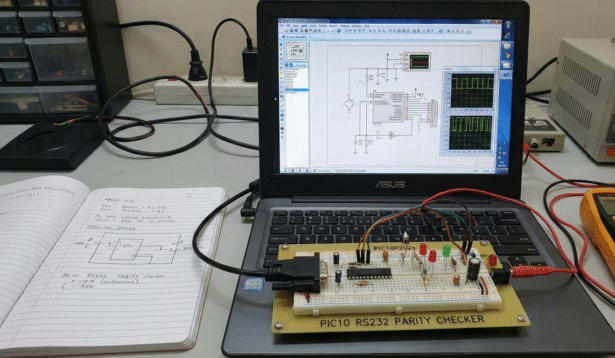
PIC10 RS232 parity checker hardware setup
Illustrative View of the Concept.

How the Project Works (Overview)

This project receives RS232 serial data bit-by-bit on GP0 of the PIC10F202. The firmware manually samples each bit using timing delays instead of a hardware UART.
Eight data bits are captured, followed by a parity bit. The code counts the number of logic-high bits and determines whether the parity condition is valid.
A configuration input on GP2 allows switching between even parity and odd parity checking.
If a parity error is detected, GP1 is asserted to turn on an LED, providing immediate visual feedback.

Block Diagram / Workflow Explanation

  1. Wait for Start Bit
    The firmware continuously monitors GP0 until a low start bit is detected.

  2. Bit Sampling
    Using calibrated delay loops, the PIC samples each of the 8 data bits at fixed intervals.

  3. Bit Counting
    Each logic-high data bit increments a counter to track the number of ‘1’ bits.

  4. Parity Evaluation
    The received parity bit and the GP2 parity-mode input are added to the bit count.

  5. Error Indication
    If parity validation fails, GP1 drives an LED to indicate an error.

  6. Stop Bit & Restart
    After detecting the stop bit, the system resets and waits for the next byte.

Key Features

  • Software-based RS232 reception using GPIO

  • Supports even and odd parity selection

  • Visual parity error indication using an LED

  • Minimal hardware with a PIC10 microcontroller

  • Fully testable using Proteus VSM simulation

  • Demonstrates timing-critical serial data sampling

Components Used

  • PIC10F202 Microcontroller

  • RS232 terminal (Proteus VTERM)

  • LED (error indicator)

  • 330Ω resistor

  • Power supply and ground connections

Applications

  • Learning RS232 communication fundamentals

  • Educational embedded systems demonstrations

  • Debugging serial data parity behavior

  • Testing parity settings from terminal software

  • Training projects for low-pin-count microcontrollers

Explanation of the Code (High-Level)

The firmware begins by configuring GPIO directions, with GP0 as input and GP1 as output.
The program waits for a valid RS232 start bit, then samples incoming bits using precise delay loops.
Each received bit is shifted into a byte register while counting the number of logic-high bits.
After reading the parity bit, the code adjusts the bit count based on the selected parity mode (GP2).
If the final count indicates a parity mismatch, the LED output is activated.
The firmware then waits for the stop bit and repeats the process indefinitely.

Source Code

Download
;PIC10 Parity Checker

        LIST    p=10F202 ; 
	#include "P10F202.INC" ; Include header file

        CBLOCK 0x08   ; Temporary storage
        dc1
        bitcount
        databyte
        onecount
        ENDC


	; Vector for normal start up.
        org     0
        goto    start


; Main program starts here:
start   clrw			; Clear W.	
        movwf   GPIO            ; Ensure PORT is zero before we enable it.
        movlw	0xFD		; All inputs except GP1
        tris	GPIO

Proteus Simulation

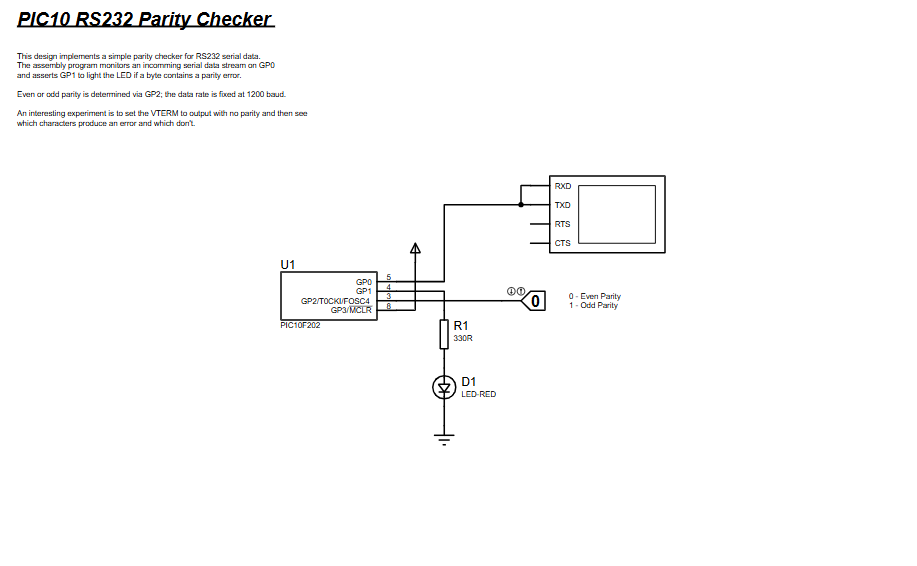
In Proteus VSM, the PIC10F202 is connected directly to a virtual RS232 terminal.
The terminal sends serial characters at a fixed baud rate, while the parity setting can be enabled or disabled.
When incorrect parity is transmitted, the LED turns on immediately, clearly showing how parity errors are detected in real time.
This setup makes it easy to experiment with different characters and parity configurations.

(FAQs)

1. Why is there no hardware UART used in this project?

The PIC10F202 does not include a hardware UART, so serial communication is implemented in software.

2. Can this project work with different baud rates?

The baud rate is fixed by delay timing values in the code and would need recalibration to change.

3. How is even or odd parity selected?

Parity mode is selected using the GP2 input pin.

4. Why is Proteus ideal for this project?

Proteus allows accurate timing simulation and easy RS232 terminal testing without physical hardware.

5. Can this code run on other PIC10 devices?

It is specifically written for the PIC10F202 but can be adapted to similar PIC10 devices.

6. What happens if no parity bit is sent?

Characters without parity will often trigger errors, making this a useful experiment.

7. Can the LED logic be inverted?

Yes, the GPIO output logic can be modified to invert LED behavior.

8. Is this suitable for real hardware testing?

Yes, with proper RS232 level shifting, the design can be implemented on physical hardware.

Conclusion

The PIC10 RS232 Parity Checker is a clean, educational example of implementing serial communication logic on a very small microcontroller.
It highlights how timing, bit manipulation, and parity checking work at a low level without relying on hardware peripherals.
Through Proteus simulation, learners can safely explore RS232 behavior and parity errors in a controlled environment.
This project delivers strong learning value for anyone interested in embedded systems, DIY electronics, and practical firmware design.

Quick Solutions to Questions related to PIC10 RS232 Parity Checker:

  • Why is there no hardware UART used in this project?
    The PIC10F202 does not include a hardware UART, so serial communication is implemented in software.
  • Can this project work with different baud rates?
    The baud rate is fixed by delay timing values in the code and would need recalibration to change.
  • How is even or odd parity selected?
    Parity mode is selected using the GP2 input pin.
  • Why is Proteus ideal for this project?
    Proteus allows accurate timing simulation and easy RS232 terminal testing without physical hardware.
  • Can this code run on other PIC10 devices?
    It is specifically written for the PIC10F202 but can be adapted to similar PIC10 devices.
  • What happens if no parity bit is sent?
    Characters without parity will often trigger errors, making this a useful experiment.
  • Can the LED logic be inverted?
    Yes, the GPIO output logic can be modified to invert LED behavior.
  • Is this suitable for real hardware testing?
    Yes, with proper RS232 level shifting, the design can be implemented on physical hardware.

About The Author

Ibrar Ayyub

I am an experienced technical writer holding a Master's degree in computer science from BZU Multan, Pakistan University. With a background spanning various industries, particularly in home automation and engineering, I have honed my skills in crafting clear and concise content. Proficient in leveraging infographics and diagrams, I strive to simplify complex concepts for readers. My strength lies in thorough research and presenting information in a structured and logical format.

Follow Us:
LinkedinTwitter