
Digital Temperature Sensing using PIC16F676 with Proteus Simulation

Summary of Digital Temperature Sensing using PIC16F676 with Proteus Simulation


This project demonstrates digital temperature sensing using a TC72 PICtail sensor interfaced to a PIC16F676 microcontroller, following Microchip AN940. Temperature is read via an SPI-style serial interface, converted to BCD in firmware (MPASM), and output on discrete pins to drive LEDs. Designed for Proteus VSM simulation, it’s suitable for learning sensor interfacing, SPI communication, and BCD display of temperature for educational and practical applications.

Parts used in the Digital Temperature Sensing using PIC16F676 with Proteus Simulation:

  • PIC16F676 microcontroller
  • TC72 digital temperature sensor (PICtail™)
  • Resistors (current limiting and pull-ups)
  • LEDs for BCD temperature display
  • Push switch (control/input)
  • PICKIT™ FLASH Starter Kit interface (simulation reference)
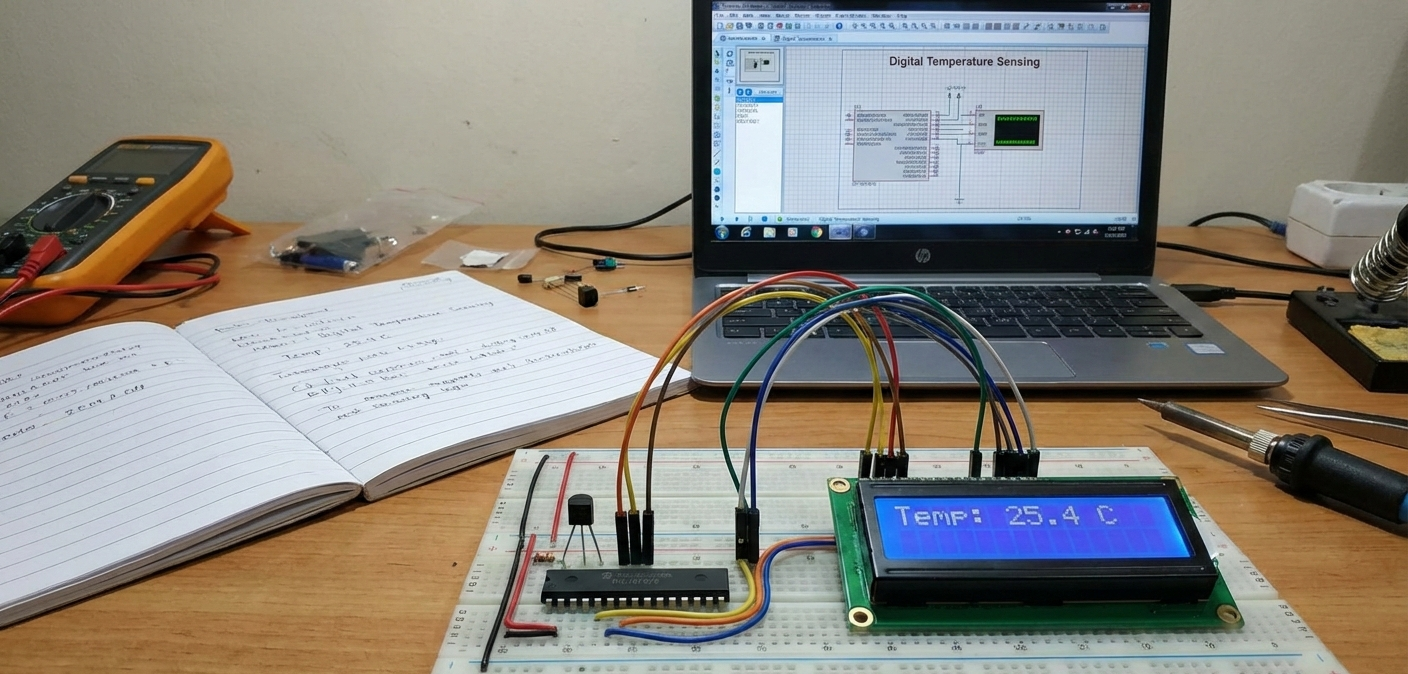
Introduction

This microcontroller project demonstrates digital temperature sensing using the TC72 PICtail™ temperature sensor interfaced with a PIC16F676 microcontroller. Based on Application Note AN940, the project shows how accurate temperature data can be acquired digitally and processed inside a PIC MCU.
Designed for Proteus simulation, this project is ideal for learning embedded systems, sensor interfacing, and SPI communication in practical electronics.
It also highlights how temperature values can be displayed in BCD format, making the design suitable for educational and real-world applications.

How the Project Works (Overview)

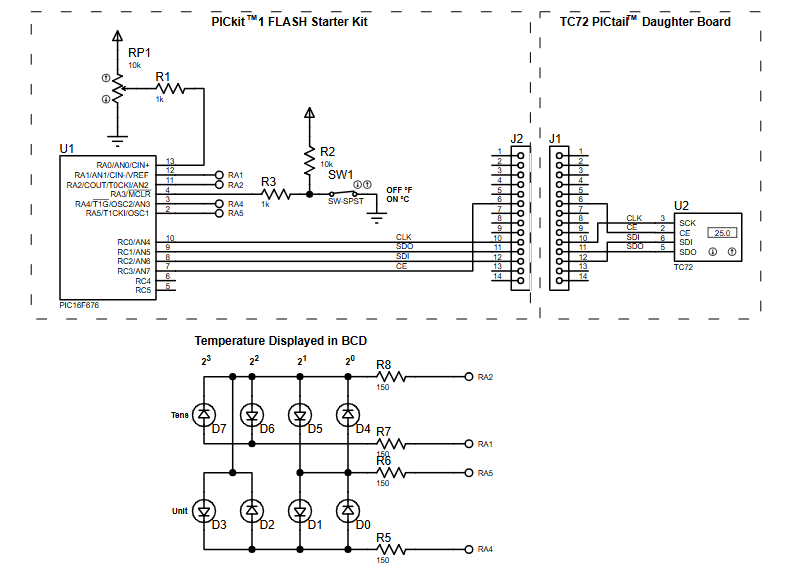
The system uses the TC72 digital temperature sensor to measure ambient temperature and transmit the data to the PIC16F676 via a synchronous serial interface.
The microcontroller reads the temperature value, processes it internally, and outputs the result in Binary Coded Decimal (BCD) form.
Discrete outputs represent the tens and units of the measured temperature, allowing the value to be visualized using LEDs during simulation.

Block Diagram / Workflow Explanation

  1. TC72 Temperature Sensor measures ambient temperature digitally

  2. Serial communication lines (CLK, SDI, SDO, CE) transfer data to the PIC

  3. PIC16F676 MCU receives and processes the temperature value

  4. Temperature is converted into BCD format

  5. Output pins drive LED indicators representing temperature digits

This workflow closely follows the structure described in AN940 and is fully observable in the Proteus simulation environment.

Key Features

  • Digital temperature sensing using TC72 PICtail™

  • PIC16F676-based embedded system

  • SPI-style serial communication

  • Temperature displayed in BCD format

  • Designed for Proteus VSM simulation

  • Application-note-based reference design (AN940)

  • Clear separation of sensor input and display output

Components Used

  • PIC16F676 microcontroller

  • TC72 digital temperature sensor (PICtail™)

  • Resistors (current limiting and pull-ups)

  • LEDs for BCD temperature display

  • Push switch (control/input)

  • PICKIT™ FLASH Starter Kit interface (simulation reference)
Applications

  • Digital thermometer systems

  • Embedded temperature monitoring

  • Educational PIC microcontroller projects

  • Sensor interfacing tutorials

  • Industrial or appliance temperature indication

  • DIY electronics learning platforms

Explanation of the Code (High-Level)

The firmware is written in MPASM and targets the PIC16F676.
At a high level, the code:

  • Initializes I/O pins and serial communication lines

  • Communicates with the TC72 sensor to read temperature data

  • Converts the received value into BCD format

  • Drives output pins connected to LEDs to represent tens and units

The logic follows Microchip’s AN940 application note, making it easy to understand and extend.

Source Code

Download

;   Filename:           TC72 PICtail.asm
;   Date:               January 26, 2004
;   File Version:       0.1
;   Assembled using:    MPLAB IDE v6.50
;
;   Author:             Steven Bible
;   Company:            Microchip Technology Inc.

Proteus Simulation

In Proteus VSM, the TC72 sensor communicates with the PIC16F676 exactly as it would in hardware.
As the simulated temperature changes, the microcontroller updates its outputs, and the LEDs display the temperature in BCD format.
This makes the project especially useful for debugging, learning firmware behavior, and understanding sensor-to-MCU interaction without physical hardware.

(FAQs)

1: Can this project be fully simulated in Proteus?

Yes, it is designed specifically for Proteus simulation using VSM components.

2: Why use a digital temperature sensor instead of analog?

Digital sensors like the TC72 offer better accuracy and eliminate ADC calibration issues.

3: Is PIC16F676 mandatory for this project?

This implementation targets the PIC16F676, as referenced in AN940.

4: How is temperature displayed in this project?

Temperature is converted into BCD format and shown using LEDs.

5: Can the display be replaced with an LCD or 7-segment display?

Yes, the BCD outputs can be adapted for other display modules.

6: What communication protocol is used with the TC72?

The TC72 uses a serial interface similar to SPI.

7: Is this suitable for beginners in embedded systems?

Yes, it’s an excellent learning project for PIC microcontrollers and sensor interfacing.

Conclusion

This Digital Temperature Sensing using PIC16F676 with Proteus Simulation project is a clean, practical example of real-world embedded systems design.
By combining a digital sensor, a PIC microcontroller, and simulation-friendly hardware, it provides strong learning value for anyone exploring microcontroller projects, firmware development, and DIY electronics.
It’s a solid foundation for expanding into more advanced temperature monitoring systems.

Quick Solutions to Questions related to Digital Temperature Sensing using PIC16F676 with Proteus Simulation:

  • Can this project be fully simulated in Proteus?
    Yes, it is designed specifically for Proteus simulation using VSM components.
  • Why use a digital temperature sensor instead of analog?
    Digital sensors like the TC72 offer better accuracy and eliminate ADC calibration issues.
  • Is PIC16F676 mandatory for this project?
    This implementation targets the PIC16F676, as referenced in AN940.
  • How is temperature displayed in this project?
    Temperature is converted into BCD format and shown using LEDs.
  • Can the display be replaced with an LCD or 7-segment display?
    Yes, the BCD outputs can be adapted for other display modules.
  • What communication protocol is used with the TC72?
    The TC72 uses a serial interface similar to SPI.
  • Is this suitable for beginners in embedded systems?
    Yes, it is an excellent learning project for PIC microcontrollers and sensor interfacing.

About The Author

Ibrar Ayyub

I am an experienced technical writer holding a Master's degree in computer science from BZU Multan, Pakistan University. With a background spanning various industries, particularly in home automation and engineering, I have honed my skills in crafting clear and concise content. Proficient in leveraging infographics and diagrams, I strive to simplify complex concepts for readers. My strength lies in thorough research and presenting information in a structured and logical format.

Follow Us:
LinkedinTwitter
