
Summary of Displaying Scrolling(Moving) text on 16×2 lcd Using Pic16f877 and Pic18f452 Microcontroller
This article details a project to display and scroll text on a 16x2 LCD using a PIC 16F877 microcontroller. Written in C with the High-Tech C compiler, the system initializes the LCD, defines a character array for the scrolling text ("microcontroller-project.com"), and uses specific port connections to control data, register select, and enable pins. The code implements custom delay functions and LCD command logic to shift text leftward once it reaches the end of the display line.
Parts used in the Scrolling Text on LCD Project:
- Pic 16f877 microcontroller
- 16x2 lcd
- Potentiometer
- Crystal(20MHz)
- Power supply
Displaying moving or scrolling text on lcd(16×2,8×1,16×4,8×2,16×1,20×1,20×2 etc) is very easy. You just need to know how to efficiently use lcd commands.In this project i am using pic 16f877 microcontroller to display text and then scroll it on the lcd. The lcd which i am using is 16×2. Where 16 represents number of coulombs and 2 represents number of rows. The text which i am scrolling on the lcd is my website name “microcontroller-project.com”. The code is written in c language using mplab-ide with high tech c compiler.
Project requirements are
- Pic 16f877 microcontroller
- 16×2 lcd (I am using.)
- Potentiometer (To set lcd contrast)
- crystal(20MHz)
- Power supply
If you are newbee and dont know much about 16×2 lcd working and pin out just go through this simple tutorial. It will explain you about all the pins and functions of 16×2 lcd.
The circuit of the project is given below. Data pins of 16×2 lcd are directly connected to Port-b of microcontroller.The rd(read-write) pin of lcd is connected to port-d pin no 5. The rs(register select) pin of 16×2 lcd is connected to port-d pin 6.The en(enable)pin of 16×2 lcd is connected to port-d pin 7 of pic 16f877. 20MHz crystal is connected to pin 13 and 14 in parallel to two 33pf capacitors. Apply 5volts to pin 1,11&32. Ground pin 12 and 31. Set lcd contrast using potentiometer.
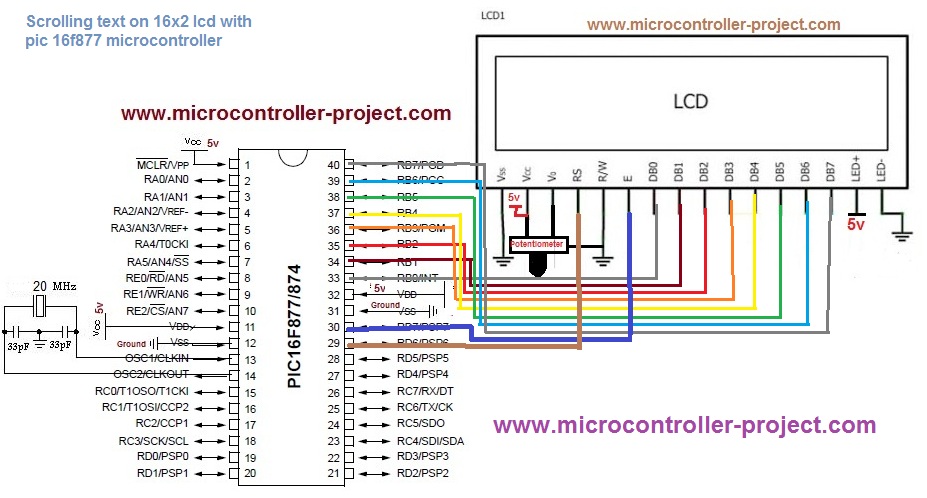
The code is written in c language and is easy to understand and to modify. First include the necessary header file #include<htc.h>. This header file is necessary to be included if you are using high tech c compiler. Then #define _XTAL_FREQ 20000000 is defining our crystal frequency which is 20MHz. This crystal frequency is necessary to be defined if you are using __delay_ms() & __delay_us() predefined functions. These predefined functions are used to generate delay in ms() milli seconds and us() microseconds. I made my own delay function so i am not using thesepredefined functions. Than a character array is inialized. The array size is variable. It contains my website name “microcontroller-project.com”. This is the text which i want to scroll on my lcd.
After the header files now its time to define our functions. First i defined delay function it is used to generate some delay in program execution.Then lcdcmd() function is sending commands to 16×2 lcd. For sending commands first put your command on port-b then select register(for command register make rs=0) then select which operation you want to perform read or write(for read rw=1 and write rw=0) now give strobe to write command present on data pins of lcd to lcd controller, make en high(en=1) and low (en=0) with some delay for this purpose. display() functions works in the same way as lcdcmd but with little difference that except command it is writting data on lcd and you just need to select the data register to write data(rs=1 takes you to lcd data register).
lcdint() function is intializing our lcd and ports.TRISB=0x00 declares port-b as output port.TRISD5=0,TRISD6=0 & TRISD7=0 are making individual pins of port-d as output. Rest of the commands are initializing our 16×2 lcd. If you want to know about the funtions of the commands just go through the tutorial(Link is given at the top after first paragraph).
In the main function i am displaying text on lcd. I start displaying text from first coulomb of row 1 and when my text reaches at the end of the row 1 i start scrolling the text to the left.The statement if(i>=14){lcdcmd(0x18);} is performing this function. When my text reaches to last coulomb of 16×2 lcd which is 15 i start scrolling it to left. The command 0x18–>lcdcmd(0x18) scrolls the text.
I recommend you to please go through the tutorial 16×2 lcd pinout and working if you dont understand commands and their working.
For more detail: Displaying Scrolling(Moving) text on 16×2 lcd Using Pic16f877 and Pic18f452 Microcontroller
- Which microcontroller is used in this project?
The project uses a pic 16f877 microcontroller. - What type of LCD is utilized for displaying the text?
A 16x2 lcd is used where 16 represents columns and 2 represents rows. - How is the contrast of the lcd adjusted?
Lcd contrast is set using a potentiometer. - What crystal frequency is required for the circuit?
A 20MHz crystal connected in parallel to two 33pf capacitors is used. - In which programming language is the code written?
The code is written in c language using mplab-ide with high tech c compiler. - Which pins on Port-B are connected to the lcd data pins?
Data pins of the 16x2 lcd are directly connected to Port-b of the microcontroller. - What value triggers the text scrolling to the left?
When the text index i is greater than or equal to 14, the command 0x18 scrolls the text left. - How are the rs and en pins of the lcd connected to the microcontroller?
The rs pin connects to port-d pin 6 and the en pin connects to port-d pin 7.

