


Summary of 4 ALARM SOUNDS using PIC12F629
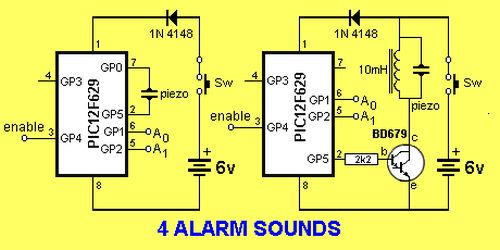
This project is a minimalist 1-chip alarm using a PIC microcontroller, a tilt switch, a battery, and a piezo speaker. The chip sleeps at ~100 µA, wakes when the tilt switch enables it, plays a Space Gun alarm for about three minutes, then returns to sleep. An optional Darlington buffer, piezo tweeter, and 10 mH choke increase output. Provided are ASM and HEX files for a 4-alarm chip (Space Gun selected when A0 and A1 are high). The description contrasts a complex original program with a shorter, cleaner PIC12F629 version that uses efficient instruction sequences and GPIO toggling.Parts used in the 1-chip alarm:
- PIC microcontroller (PIC12F629)
- Tilt switch (for enable line)
- Battery (power source)
- Piezo speaker
- Darlington buffer transistor (optional, for higher output)
- Piezo tweeter (optional, for higher output)
- 10 mH choke (optional, for higher output)
This project is a miniature 1-chip alarm. All you need is a tilt switch, battery and piezo to produce a complete alarm.
If you want a very high output, you can add a Darlington buffer transistor, piezo tweeter and a 10mH choke.
The chip does all the work.
It sits in sleep mode (100 microamps) and waits for the enable line to go high via the tilt switch.
It then produces a SPACE GUN alarm for approx 3 minutes and goes into sleep mode again.
The .asm and .hex for 4 Alarm Sounds chip with Space Gun selected when A0 and A1
HIGH, is in the following files:
4 Alarm Sounds.asm
4 Alarm Sounds.hex
Below is the program written by the original designer of the project. It is complex and contains an instruction: movlw wabl_dir_mask ;change direction This instruction is now allowed. Possibly it should be: movfw wabl_dir_mask ;change direction. I don't know how he was able to compile the program. I could not assemble it.
Read through the program then look at the next program for PIC12F629. It is shorter, easier to read, has better sounds, includes sleep mode (100microamps) and a 3 minute timer. You can always learn from other peoples work.
Here are some of the things to consider.
1. The second program has has fewer instructions for each sub-routine. For instance:
decf dwell,1 ; test if dwell = 0
btfsc ZERO
has been replaced with:
decfsz dwell,1 ; test if dwell = 0
goto $-2 ;go up the program two instructions
2. The piezo lines toggle via the following instructions:
movlw b'00100001'
xorwf GPIO,1 ;toggle bits 0 & 5
This makes GP0 and GP5 change state each time the sub-routine is executed. You do not need to know the previous state of either line. They change state each time the sub-routine is called.
3. Instruction: goto $+1 uses 2 cycles and saves writing: nop nop and saves one line of code.
For more detail: 4 ALARM SOUNDS using PIC12F629
Quick Solutions to Questions related to the 1-chip alarm:
- What components are required to build the 1-chip alarm?
The article states you need a PIC microcontroller, a tilt switch, a battery, and a piezo; optionally a Darlington buffer, piezo tweeter, and 10 mH choke for higher output. - How does the alarm wake and operate?
The chip sits in sleep mode (~100 microamps) and wakes when the enable line goes high via the tilt switch, then produces the Space Gun alarm for about 3 minutes before sleeping again. - Can the alarm output be increased?
Yes, by adding a Darlington buffer transistor, a piezo tweeter, and a 10 mH choke as described in the article. - Which alarm sound is selected when A0 and A1 are high?
The Space Gun alarm is selected when A0 and A1 are high, according to the provided 4 Alarm Sounds files. - Are ASM and HEX files provided for the project?
Yes, the article lists 4 Alarm Sounds.asm and 4 Alarm Sounds.hex files for the chip with Space Gun selected. - Does the improved PIC12F629 program include sleep mode and a timer?
Yes, the shorter PIC12F629 program includes sleep mode (~100 microamps) and a 3 minute timer as stated. - How are piezo output lines toggled in the program?
The program uses movlw b'00100001' followed by xorwf GPIO,1 to toggle GP0 and GP5 each time the subroutine runs. - Why is the second program considered better?
The article says the second program is shorter, easier to read, has better sounds, includes sleep mode and a 3 minute timer, and uses fewer instructions per subroutine.
Related projects
RGB LED PWM Driver for High Power 350mA LEDs using PIC12F629
Description This project combines a PIC and three constant current 'buck' converters to produce an RGB LED controller that will operate with...
Communication & Interfacing · PIC12F629Wireless controlled lightdimmer using PIC12F629
The meaning from this design is to build it in -i.e. a shaded lamp- and to switch this lamp on and off...
LED Projects · PIC12F629Navigation Lights for Models for PIC12F629
Description This project was inspired from a post on the Picprojects forum where a member had adapted the RGB Moodlight project for...
Home Automation & SecurityVoice Activated Power Sockets (Home Automation)
Yet another voice controlled home automation system! As shown in the picture, the system can control any electrical appliance, by turning ON...
Home Automation & SecurityHome Security System with GSM Using 8051 Microcontroller
Security is a big challenge everywhere because thefts are increasing day by day owing to the unsafe and insecure security systems in...
Home Automation & SecurityHome Automation and Security System using Microcontroller ATMEGA8 with Arduino Programming
Home automation and security systems have become very popular these days, today industrial automation techniques are widely adopted by luxurious homes and...

Ibrar Ayyub
I am an experienced technical writer holding a Master's degree in computer science from BZU Multan, Pakistan University. With a background spanning various industries, particularly in home automation and engineering, I have honed my skills in crafting clear and concise content. Proficient in leveraging infographics and diagrams, I strive to simplify complex concepts for readers. My strength lies in thorough...