
Summary of 2-CHANNEL USB THERMOCOUPLE SENSOR USING STM32
This article describes a 2-channel USB thermocouple sensor developed by Richard Klinger. It features a compact PCB that connects to computers via USB, utilizing MAX31855 ADCs and an STM32F070CBT6 microcontroller to read Type K thermocouples. The device outputs CSV data via USB CDC, supports RTC configuration, and includes a PyQt interface for real-time plotting. While STL models for panels are provided, a full casing is not included.
Parts used in the 2-Channel USB Thermocouple Sensor:
- Type K thermocouple sensors
- MAX31855 ADC
- STM32F070CBT6 microcontroller
- USB port
- PCB (60mm x 80mm)
- PyQt based interface software
- STL models for front and back panels
- Terminal program
A thermocouple is one of the most utilized sensors nowadays when measuring temperature. From the tip of your soldering iron to your gas oven, its value is undeniable, so if you are not integrating one in your projects, then you should! They are cheap and extremely useful. If you are, you probably wanted to test a thermocouple or wanted to take quick temperature measurements with the aid of your computer. Well, now you can!
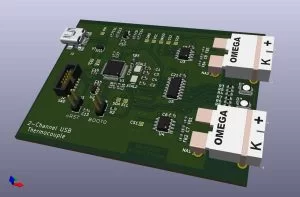
The maker Richard Klinger developed a convenient and quite simple to use 2-channel thermocouple sensor that works via USB. It is composed of a small 60mm x 80mm PCB that connects to your computer via USB and reads out the temperatures of two type K thermocouple sensors via a MAX31855 ADC. The ADC is then connected to an STM32F070CBT6 microcontroller, powered by the popular ST platform and easily configured and tinkered by the STM32CubeIDE.
When the device is powered from the USB port, it starts sending out the measurements from the sensors as CSV values. It can also receive commands, to set the RTC clock and the interval between measurements (which can be on a relative interval or a specific time). The device runs in USB CDC mode, making it possible to work in any terminal program since the device registers to the host computer as a serial interface. It can also be set into DFU bootloader mode so that a different firmware can be flashed by you. Lastly, in case of errors, caused for instance by a defective sensor, the according to channel won’t output values, which makes sense when only one channel is used. If both are unavailable, then you get an error.
Besides the PCB, the project is accompanied by a PyQt based interface, containing a plot of both sensor measurements over time and allowing you to configure the timings. Unfortunately, if you are uncomfortable with using a command-line interface, you will have to, at least to convert the interface python script into an executable. Apart from the interface, there are also STL models for the front and back panels, but the casing ends there, where the casing around the PCB would be deeply appreciated and give you another reason to make and support this project.
Read more: 2-CHANNEL USB THERMOCOUPLE SENSOR USING STM32
- How does the device connect to a computer?
The device connects to your computer via a USB port and registers as a serial interface. - What type of thermocouple sensors does it support?
The project reads out temperatures from two type K thermocouple sensors. - Can I configure the measurement intervals?
Yes, the device can receive commands to set the interval between measurements on a relative or specific time basis. - Does the device work with any terminal program?
Yes, since the device runs in USB CDC mode, it works in any terminal program. - How can I update the firmware on this device?
You can set the device into DFU bootloader mode to flash different firmware. - What happens if a sensor is defective?
If a sensor is defective, the corresponding channel will not output values. - Is there a graphical interface available for this project?
Yes, a PyQt based interface is provided containing a plot of both sensor measurements over time. - Do I need to compile the Python script to use the interface?
Yes, you must convert the interface python script into an executable if you are uncomfortable using a command-line interface. - Are STL models provided for the casing?
Yes, STL models for the front and back panels are included, but a full casing around the PCB is not.

