
Summary of ytimer
This project features a countdown timer utilizing super bright 7-segment displays that flash upon completion, replacing or supplementing an audible alarm. Built around a PIC16F886 microcontroller, the device uses a TLC5916 LED driver and dual P-channel MOSFETs to manage the displays. User input is handled via a rotary encoder with a push button and two microswitches for power and sound toggling. The system runs on two AAA batteries and includes a green indicator LED controlled by the sound switch.
Parts used in the Countdown Timer:
- PIC16F886 microcontroller
- TLC5916 LED driver
- Dual P-channel MOSFETs
- Rotary encoder with push button
- Two microswitches (power and sound toggle)
- Green 0603 indicator LED
- Super bright 7-segment displays
- Two AAA batteries
Description
A countdown timer with super bright 7-segment displays that flash when the time is up, instead (or in addition to) an audible alarm.
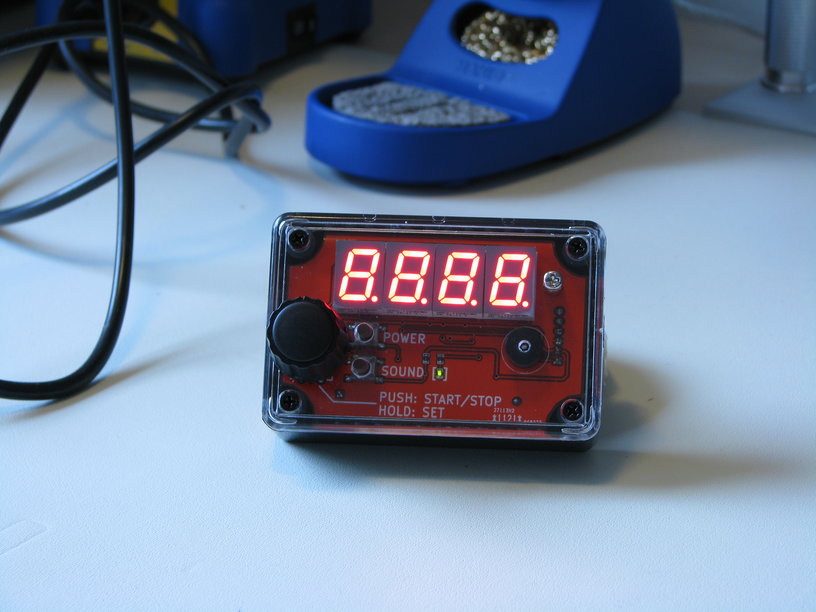
The design is based on a PIC16F886 microcontroller which drives the displays using a TLC5916 LED driver and dual P-channel MOSFETs. A rotary encoder with a push button is used for input, in addition to two microswitches, one for power and one for toggling sound. The sound switch also toggles a green 0603 indicator LED.
The device is powered from two AAA batteries, which will hopefully deliver adequate battery life.
For more detail: ytimer
- How does the timer signal when time is up?
The super bright 7-segment displays flash when the time is up instead of or in addition to an audible alarm. - What microcontroller drives the displays?
The design is based on a PIC16F886 microcontroller which drives the displays using a TLC5916 LED driver. - How is user input managed?
A rotary encoder with a push button is used for input, along with two microswitches for power and sound control. - Does the sound switch affect any lights?
Yes, the sound switch also toggles a green 0603 indicator LED. - What powers the device?
The device is powered from two AAA batteries intended to deliver adequate battery life. - Which components drive the LEDs?
The displays are driven using a TLC5916 LED driver and dual P-channel MOSFETs. - Can the audible alarm be disabled?
Yes, a microswitch allows the user to toggle the sound on or off. - What type of display is used?
The project uses super bright 7-segment displays.

