


Microcontroller ( MCU ) circuits
TINACloud supports a lot of PIC, AVR, 8051 and ARM microcontrollers; new MCUs are constantly being added. You can see and modify the program running in the processor and, of course, you can create your own code.
There are two ways of providing the program for microcontrollers in TINACloud.  You can use the binary code and debug file made by a standard compiler (e.g. MPLAB for PICs) or you can just load your assembly code to run and debug in TINACloud using its built in assembler-debugger.
Running and editing MCU code
Load the PIC Flasher.TSC circuit from the Examples\Microcontrollers\Pic folder. The following schematic using the 16F73 PIC microcontroller will appear with the 16F73 PIC microcontroller.
Click the picture to run this circuit online with TINACloud
This circuit simply counts forward one-by-one. Press the Dig button to see how it works. The display should step forward one-by one
Click the MCU component and then the ... button to see the "ASM code" line. A Property dialog will appear with the editable ASM code in it.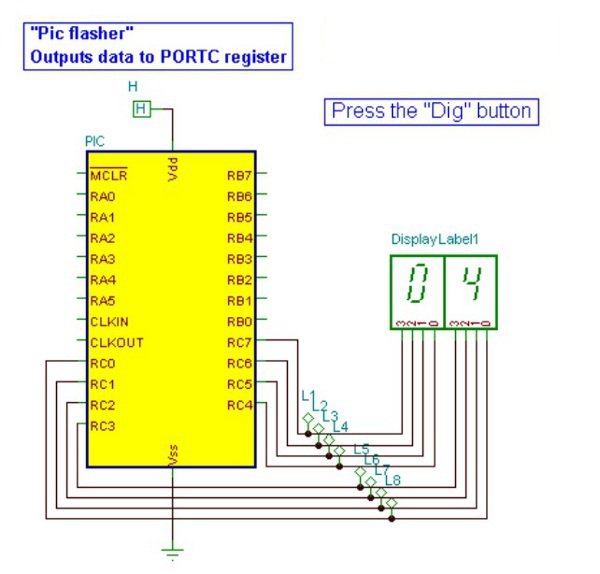
TINACloud has a great feature whereby you can edit and change the source code directly in TINACloud.
Lets make the following change in the code. Change the instruction (selected above) in line 25 (you can see the line number in the right bottom corner of the code editor window)
Save the changed code to TINACloud by simply pressing OK and close the open MCU window. If you press the Dig button now, the increment will be 2! Note that the changed code will be automatically saved in the TINA .TSC file
For more detail: WEB-BASED CIRCUIT DESIGN & ANALYSIS
Related projects
Calculator Test using PIC24FJ64GA006 with Proteus Simulation
Introduction The Calculator Test using EASYHDL is a practical microcontroller project built on the PIC24FJ64GA006 and simulated in Proteus. This project demonstrates...
Programmers & ICSPPID Controlled Oven using TMS320F28027PT with Proteus Simulation
IntroductionThis project demonstrates a PID controlled oven implemented using a PICCOLO TMS320F28027PT microcontroller and verified through Proteus simulation.It is a practical microcontroller...
Programmers & ICSPPICCOLO Motor Controller Sample Design using TMS320F28023PT with Proteus Simulation
IntroductionThis project demonstrates a PICCOLO motor controller sample design implemented using the TMS320F28023PT Piccolo microcontroller and tested through Proteus simulation. It focuses...
Programmers & ICSP · PIC16F84APIC Musical Doorbell using PIC16F84A with Proteus Simulation
IntroductionThis microcontroller project demonstrates a musical doorbell built around a PIC16F84A and a simple piezo sounder.Using two push buttons, the system allows...
Programmers & ICSP · PIC16F877AEPE PIC/LCD Demo using PIC16F877 with Proteus Simulation
IntroductionThe EPE PIC/LCD Demo is a classic microcontroller project that demonstrates how a PIC16F877 can fully control a PG12864F graphical LCD.Designed as...
Programmers & ICSP · PIC16F628ADHT11 Low Cost Humidity Sensor using PIC16F628A with Proteus Simulation
IntroductionThis microcontroller project demonstrates how to interface a low-cost DHT11 temperature and humidity sensor with a PIC16F628A using a Proteus simulation environment.The...

Ibrar Ayyub
I am an experienced technical writer holding a Master's degree in computer science from BZU Multan, Pakistan University. With a background spanning various industries, particularly in home automation and engineering, I have honed my skills in crafting clear and concise content. Proficient in leveraging infographics and diagrams, I strive to simplify complex concepts for readers. My strength lies in thorough...