
Summary of SIMPLE ADAPTER BOARD TURNS A USB-C POWER SUPPLY INTO A VARIABLE VOLTAGE SOURCE
The ZY12PDN is a compact, STM32-powered adapter board that transforms a standard USB-C power supply into a variable voltage source. By utilizing USB Power Delivery protocols and a simple push-button interface, it negotiates specific voltages between 3V and 20V without requiring I2C configuration. This design allows users to power diverse electronic devices ranging from phones to laptops with up to 100W of output, offering flexibility through header pins, USB-A ports, and screw terminals.
Parts used in the ZY12PDN Project:
- STM32 microcontroller
- USB-C connector
- Header pins
- USB-A connector
- Screw terminal landing patterns
- Push-button for voltage selection
Being able to turn a USB-C supply to a variable power supply is certainly a big deal for a simple ingenious board like the ZY12PDN board shared by Keneth Finnegan on his twitter handle recently. The ZY12PDN is a simple STM-powered adapter board that turns a USB-C supply to a universal power supply for almost any electronic device.
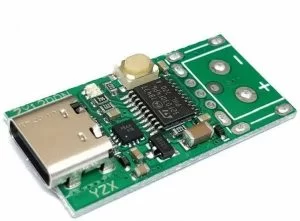
We know that a USB-C, when it comes to power delivery, allows you to negotiate for 5, 9, 12, 15, 20 volts, with supply up to 100W which makes it possible to charge devices like laptops, phones, tablets, but the simplicity with which the ZY12PDN achieves it, brings lot of possibilities to the table.
The ZY12PDN, a USB-C power delivery trigger board uses the USB-C power delivery protocols to negotiate the level of voltage you want. The ZY12PDN has an STM32 microcontroller that helps in negotiating for the PD protocol. It also has, on one of its sides, a USB-C connector and on another side, header pins, USB-A connector and landing patterns for screw terminals.
Unlike some other USB power delivery adapters that need I2C communication for configuration, this power adapter board makes use of a push-button for setting the voltage you want to negotiate. “Finnegan” has created a video, that shows how the device works since the board does not come with any instructions. He explained that the board must first be configured anytime it is powered up with a sequence that helps to program the board, forcing it to stay powered-up in the desired mode. When connected, the USB power delivery uses a separate communication channel that automatically determines which becomes the supply and which the sink after which they negotiate the power profile they want to use in terms of voltage and current limits.
Some specifications of the board include:
- Voltage: 3 – 20 volts
- Current: 0 – 5A
- Power: 100W
- Weight: 0.8 ounces
- Dimensions: 6.7 X 5.2 X 0.3 inches
Read more: SIMPLE ADAPTER BOARD TURNS A USB-C POWER SUPPLY INTO A VARIABLE VOLTAGE SOURCE
- What is the primary function of the ZY12PDN board?
It turns a USB-C supply into a universal variable power supply for almost any electronic device. - How does the board select the desired voltage level?
It uses a push-button to set the voltage instead of requiring I2C communication for configuration. - Can the ZY12PDN charge laptops and tablets?
Yes, it supports power delivery profiles up to 100W suitable for charging laptops, phones, and tablets. - What is the maximum current output of the board?
The board can deliver a current of up to 5A. - Does the board require manual programming every time it powers up?
Yes, the board must be configured with a sequence upon power-up to force it to stay powered in the desired mode. - How does the USB power delivery protocol determine roles?
It uses a separate communication channel to automatically determine which device becomes the supply and which becomes the sink. - What are the physical dimensions of the ZY12PDN board?
The dimensions are 6.7 X 5.2 X 0.3 inches. - Is there an instruction manual included with the board?
No, the board does not come with instructions, so a demonstration video was created by Finnegan.

