


Summary of Programmer using PIC16F84 microcontroller
This article describes a very simple, low-cost serial programmer for the PIC16F84 microcontroller that works with Nigel Goodwin’s WPicProg V1.20 software. It explains the hardware design using LPT1 (parallel port) control of Vdd and Vpp via transistors and diodes, deriving Vpp by lifting the 78L09 ground, and using RB7/D0/ACK/D1 for data and clock. It also references obtaining WPIC16.ZIP from Nigel’s site and notes DC input should be about 17V.Parts used in the F84-Programmer:
- PIC16F84 microcontroller
- 2N2907 PNP transistors (for Vdd and Vpp control)
- Diodes D2 and D3 (inversion/control diodes)
- 78L09 voltage regulator
- Resistors (various, for transistor/base/current limiting)
- Capacitors (for regulator and decoupling)
- Parallel port connector (LPT1 interface)
- DC power input supply (approximately 17V)
- Wiring/PCB or breadboard
- Optional sockets for PIC16F84 and connectors
Build a low-cost and very simple serial programmer for a PIC16F84 Microchip Flash Microcontroller. Below picture is my personal writer for F84 chip, it works very nice with Nigel WPicProg V1.20.
Introduction
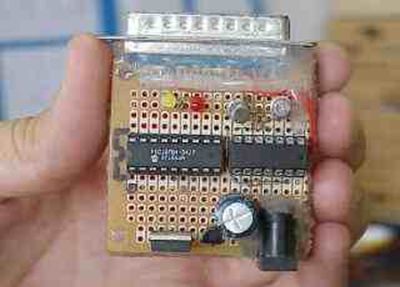
I finally found a very nice universal window based software designed to work with any serial programmers for PIC16F84, i.e., WPicProg16 V1.20, written by Nigel Goodwin. Build this programmer before started experimenting the forthcoming many interesting F84 projects. Some PIC programmers can be used for in circuit programing, some provide many PIC chips including eeprom, say. The F84-Programmer, however is suitable for beginners. It's so simple and cheap.
Hardware
Figure 1 shows a circuit diagram of the F84-Programmer. The programmer connects some bits shown in the figure through printer port LPT1, say. Vdd is controlled by D2 with invert setting, logic '0' at this pin turns 2N2907 on applying +5V to pin14. Similarly for Vpp with invert setting, D3 controls 2N2907, gating approx. +14V to MCLR pin. A programming voltage Vpp is derived by lifting GND pin of the 78L09 to +5V as shown. Data read and write use RB7, D0 sends serial packet while ACK reads back during verify. D1 is clock output synchronizing programming flow. DC input should be approx. 17V.
Software
WPIC16.ZIP Updated zip format of window version software for F84-Programmer written by Nigel Goodwin. The Latest WPIC16.ZIP may get directly from Nigel's Software page.
For our F84-Programmer, check hardware settings window as follows;
For more detail: Programmer using PIC16F84 microcontroller
Quick Solutions to Questions related to the F84-Programmer:
- What software works with this F84-Programmer?
WPicProg16 V1.20 (WPIC16.ZIP) by Nigel Goodwin is used with this programmer. - How is Vdd controlled in the circuit?
Vdd is controlled by D2 and a 2N2907 transistor; a logic 0 at the printer port pin turns the 2N2907 on to apply +5V to pin 14. - How is the programming voltage Vpp generated?
Vpp is derived by lifting the ground pin of the 78L09 regulator to +5V as shown in the circuit. - What voltage should the DC input be?
The DC input should be approximately 17V. - Which PIC pins are used for data and clock?
Data read/write uses RB7, D0 sends serial packets while ACK reads back during verify, and D1 is the clock output. - Can this programmer perform in-circuit programming?
The article notes some PIC programmers support in-circuit programming, but this F84-Programmer is a simple beginner-friendly design; it does not specify in-circuit capability. - Where can I get the programmer software?
The latest WPIC16.ZIP can be obtained from Nigel Goodwin's software page.
Related projects
PIC Stepper Motor Controller using PIC16F84A with Proteus Simulation
Introduction Stepper motors are widely used in embedded systems and DIY electronics projects where precise position control is required. This PIC Stepper...
Programmers & ICSP · PIC16F84APIC Musical Doorbell using PIC16F84A with Proteus Simulation
IntroductionThis microcontroller project demonstrates a musical doorbell built around a PIC16F84A and a simple piezo sounder.Using two push buttons, the system allows...
Beginner Tutorials · PIC16C84Exploring the World of PIC Microcontrollers: An Architectural Overview
A Peripheral Interface Microcontroller (PIC), developed by General Instruments Microcontrollers in 1993, operates under software control and is programmed to execute various...
Programmers & ICSPCalculator Test using PIC24FJ64GA006 with Proteus Simulation
Introduction The Calculator Test using EASYHDL is a practical microcontroller project built on the PIC24FJ64GA006 and simulated in Proteus. This project demonstrates...
Programmers & ICSPPID Controlled Oven using TMS320F28027PT with Proteus Simulation
IntroductionThis project demonstrates a PID controlled oven implemented using a PICCOLO TMS320F28027PT microcontroller and verified through Proteus simulation.It is a practical microcontroller...
Programmers & ICSPPICCOLO Motor Controller Sample Design using TMS320F28023PT with Proteus Simulation
IntroductionThis project demonstrates a PICCOLO motor controller sample design implemented using the TMS320F28023PT Piccolo microcontroller and tested through Proteus simulation. It focuses...

Ibrar Ayyub
I am an experienced technical writer holding a Master's degree in computer science from BZU Multan, Pakistan University. With a background spanning various industries, particularly in home automation and engineering, I have honed my skills in crafting clear and concise content. Proficient in leveraging infographics and diagrams, I strive to simplify complex concepts for readers. My strength lies in thorough...