


Summary of PIC16F877A LED blink
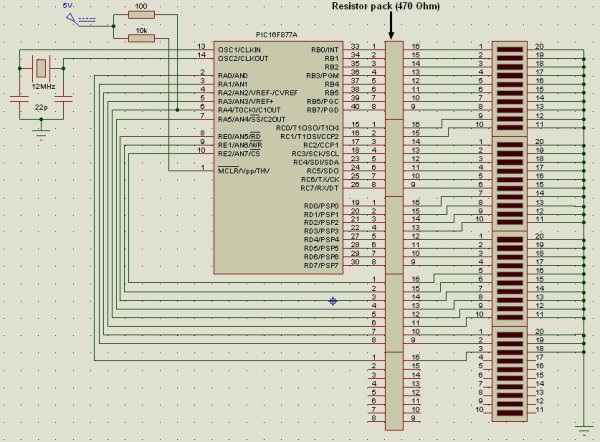
This project configures a PIC16F877A microcontroller to blink 33 LEDs by using each available digital I/O pin. All analog channels are set to digital; ports A–E are configured as outputs and toggled continuously. RA4 requires a pull-up resistor because it is open-drain. The code is written in MikroC PRO for PIC and inverts each port every 500 ms to blink the LEDs.Parts used in the PIC16F877A 33 LED Blink Project:
- PIC16F877A microcontroller (40-pin)
- 33 LEDs
- Current-limiting resistors for each LED
- Pull-up resistor for RA4
- Power supply (Vdd and Vss connections)
- Decoupling capacitor(s)
- Programming connector or ICSP for PIC
- Prototyping board or PCB and wiring
void main(){ ADCON1 = 0x07; // Configure all analoge pins as digital PORTA = 0; TRISA = 0; // Configure PORTA as output PORTB = 0; TRISB = 0; // Configure PORTB as output PORTC = 0; TRISC = 0; // Configure PORTC as output PORTD = 0; TRISD = 0; // Configure PORTD as output PORTE = 0; TRISE = 0; // Configure PORTE as output while (1) { PORTA = ~ PORTA; // Invert PORTA status PORTB = ~ PORTB; // Invert PORTB status PORTC = ~ PORTC; // Invert PORTC status PORTD = ~ PORTD; // Invert PORTD status PORTE = ~ PORTE; // Invert PORTE status delay_ms(500); } } For more detail: PIC16F877A LED blink
Quick Solutions to Questions related to PIC16F877A 33 LED Blink Project:
- How are the analog pins configured for digital output?
The code sets ADCON1 = 0x07 to configure all analog pins as digital. - How do you configure the microcontroller ports as outputs?
The code clears each PORT register and sets TRISx = 0 for TRISA, TRISB, TRISC, TRISD, and TRISE to configure them as outputs. - How is RA4 handled differently from other pins?
RA4 is an open-drain output and requires a pull-up resistor to turn it on and off. - How many LEDs does this project blink and how are they connected?
The project blinks 33 LEDs, each connected to one I/O pin of the PIC16F877A. - What compiler is used for the provided code?
The code is written using MikroC PRO for PIC compiler. - How often do the LEDs toggle state in the example code?
The code inverts all ports and then delays for 500 ms, causing the LEDs to toggle every 500 ms. - Which ports are toggled in the main loop?
PORTA, PORTB, PORTC, PORTD, and PORTE are inverted in the main loop. - What operation is used to invert the port outputs?
The code uses bitwise NOT (~) on each PORT register to invert the outputs.
Related projects
PIC16F877 Driving LCD in 4-Bit Mode using PIC16F877 with Proteus Simulation
Introduction This microcontroller project shows how a PIC16F877 can drive an LCD display using 4-bit mode inside a Proteus simulation.The project demonstrates...
Programmers & ICSP · PIC16F877AEPE PIC/LCD Demo using PIC16F877 with Proteus Simulation
IntroductionThe EPE PIC/LCD Demo is a classic microcontroller project that demonstrates how a PIC16F877 can fully control a PG12864F graphical LCD.Designed as...
Motors & Robotics · PIC16F877AEfficient Sun-Following Robot: A Solar Tracker with Microcontroller Control
Abstract The impending global challenge of dwindling non-renewable fuel resources underscores the urgency of transitioning towards renewable energy alternatives like solar power....
LED ProjectsAn Application-Driven Microcontroller Curriculum
Understanding how to apply microcontrollers lies at the core of modern embedded systems education. This student project takes an experiential approach to...
LED ProjectsBuild this microcontroller controlled rainbow flying disc – and then throw it!
Hello all and welcome to this super simple and inexpensive instructable. If you like throwing frisbees AND you like flashing lights AND...
LED ProjectsLED Scrolling Display Project Working With Circuit Diagram
We normally use a simple static LED display screen to convey a message. Earlier, when we want to display large data, we...

Ibrar Ayyub
I am an experienced technical writer holding a Master's degree in computer science from BZU Multan, Pakistan University. With a background spanning various industries, particularly in home automation and engineering, I have honed my skills in crafting clear and concise content. Proficient in leveraging infographics and diagrams, I strive to simplify complex concepts for readers. My strength lies in thorough...