


Summary of PIC12F675 software UART (bit banging) code and Proteus simulation
This article explains implementing a software UART (bit-banged serial) on a PIC12F675 using C (HI-TECH C) and MPLAB, with GP0 as TX and GP1 as RX. It covers configuration macros (_XTAL_FREQ, Baudrate, DataBitCount), clock/baud tradeoffs, recommended crystal frequencies for higher baud rates, and links to downloadable code and a Proteus simulation.Parts used in the PIC12F675 Software UART Project:
- PIC12F675 microcontroller
- Power supply (suitable Vdd for PIC12F675)
- Serial adapter (e.g., USB-to-TTL or RS232 converter)
- 4 MHz internal oscillator or external crystal (optional)
- Optional external crystal (e.g., 20 MHz for higher baud rates)
- MPLAB IDE (used for compilation)
- HI-TECH C compiler (v9.83 used)
- Proteus (for simulation)
- Connections/wiring between PIC pins GP0 (TX) and GP1 (RX) and serial adapter
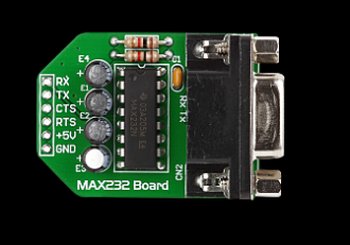
As we know, PIC12F675 microcontroller doesn't have built in UART module, so we can create UART functionality in it's software. This post provides the details of how to program software UART functionality in PIC12F675. This code is written in C language using MPLAB with HI-TECH C compiler. You can download this code from the 'Downloads' section at the bottom of this page.
It is assumed that you know how to blink an LED with PIC12F675 microcontroller. If you don't then please read this page first, before proceeding with this article.
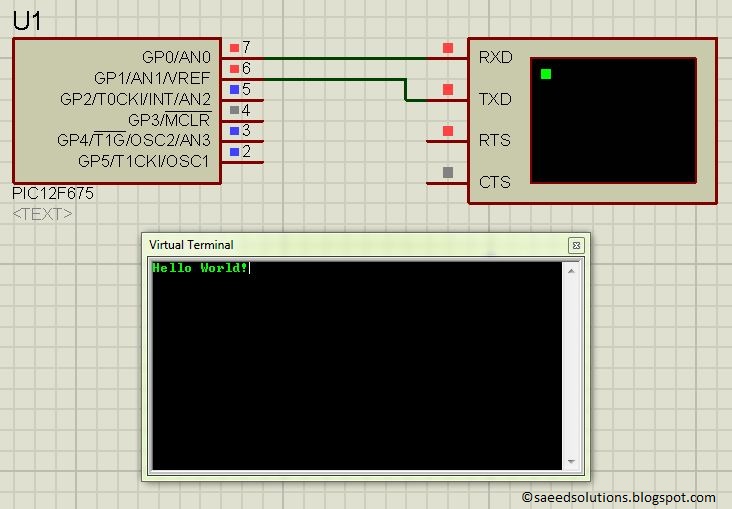
The result of simulating the code in Proteus is shown below.
In the above figure, PIC12F675 is running at 4MHz internal crystal. GP0 pin is being used as TX pin and GP1 pin is the RX pin of the software UART.
Code
The code used to set different properties of UART is shown below. (From Software_UART.h file)
In the above figure, _XTAL_FREQ is defined to be 4000000, which is the internal crystal frequency used with this PIC12F675. If you change the crystal (e-g by attaching an external crystal of different frequency) then you will need to change _XTAL_FREQ value as well. For example, if 20MHz external crystal is used, then _XTAL_FREQ should be defined as 20000000 in the above code.
Similarly, you can define Baudrate for the UART, in the above figure it is defined to be 1200 bps. Since this is a software UART, that is why when you increase Baudrate , then bit error rate for UART also increases drastically. You should increase crystal value to reduce UART bit errors. For example to use a Baudrate of 4800, you should use a crystal of atleast 20MHz. DataBitCount is defined to be 8, which means this UART will use one starting bit, 8 data bits and then one stop bit. There is no parity bit and no flow control mechanism.
Downloads
Software UART code for PIC12F675 was compiled in MPLAB v8.85 with HI-TECH C v9.83 compiler and simulation was made in Proteus v7.10. To download code and Proteus simulation click here.
For more detail: PIC12F675 software UART (bit banging) code and Proteus simulation
Quick Solutions to Questions related to PIC12F675 Software UART:
- Can PIC12F675 implement UART without hardware UART module?
Yes, the article shows how to implement UART in software (bit banging) on PIC12F675. - Which pins are used for TX and RX in the example?
GP0 is used as TX and GP1 is used as RX in the example. - What compiler and IDE were used to build the example code?
The code was compiled with HI-TECH C v9.83 and MPLAB v8.85. - What clock frequency is _XTAL_FREQ set to in the example?
_XTAL_FREQ is set to 4000000 to match a 4 MHz internal oscillator. - What Baudrate is used in the provided example?
The example defines Baudrate as 1200 bps. - Is parity or flow control used in this software UART?
No, there is no parity bit and no flow control; it uses one start bit, 8 data bits, and one stop bit. - How can bit errors be reduced at higher baud rates?
Use a higher clock frequency or an external crystal (for example, 20 MHz for 4800 bps) to reduce bit errors. - Where can I get the code and Proteus simulation?
The article provides a download link for the software UART code and Proteus simulation.
Related projects
PIC 12F675 Programmable 12V Battery Monitor
Being an active outdoor guy, I have a few different types of 12V lights and a variety of battery types. - For...
Audio, Sound & Radio · PIC12F675Audio CRO using PIC12F675 Microcontroller
This project is a miniature Audio CRO. For those not familiar with the abbreviation "CRO," it means "Cathode Ray Oscilloscope" and this...
Development Boards & Kits · PIC12F675DIY $1 PIC 12f675 JDM Programmer (Cheap and Easy)
Hi EveryBody i am Again Doing something. and it is with PIC's! Almost Everybody do not want a Big Arduino in their...
Beginner Tutorials · PIC16F877APIC16F877 Driving LCD in 4-Bit Mode using PIC16F877 with Proteus Simulation
Introduction This microcontroller project shows how a PIC16F877 can drive an LCD display using 4-bit mode inside a Proteus simulation.The project demonstrates...
Beginner Tutorials · PIC18F4550PICDEM FS USB CDC Evaluation Board using PIC18F4550 with Proteus Simulation
Introduction The PICDEM FS USB CDC Evaluation Board is a practical microcontroller project built around the PIC18F4550, designed to demonstrate USB communication...
Beginner TutorialsPIC12CE518 I2C EEPROM using PIC12CE518 with Proteus Simulation
Introduction This microcontroller project demonstrates how to write and read data using the internal I2C EEPROM of the PIC12CE518 and visualize the...

Ibrar Ayyub
I am an experienced technical writer holding a Master's degree in computer science from BZU Multan, Pakistan University. With a background spanning various industries, particularly in home automation and engineering, I have honed my skills in crafting clear and concise content. Proficient in leveraging infographics and diagrams, I strive to simplify complex concepts for readers. My strength lies in thorough...