


Introduction
When working with microcontrollers that require a factory calibrated osccal value stored in memory, its very normal that once in a while this setting could be lost during an upload of a new program or when accidentally erasing the device.
Im no exception and erased many times this value by mistake in several devices. Once this value is erased, its not possible to recover it unless it was written on a sheet of paper or in our own memory and use it to record it back.
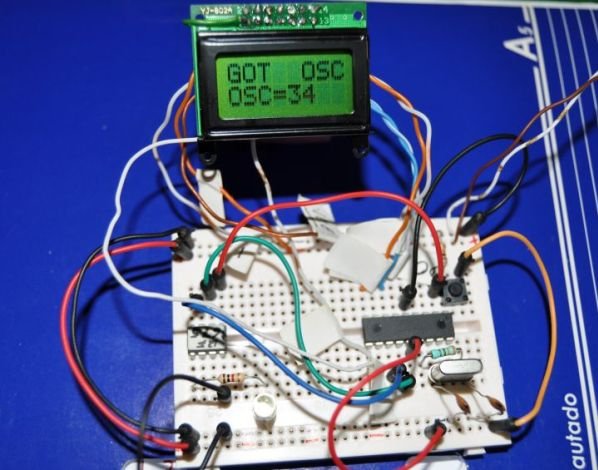
This project has the ability to calculate what is the appropriate osccal value for the 12F675 microcontroller.
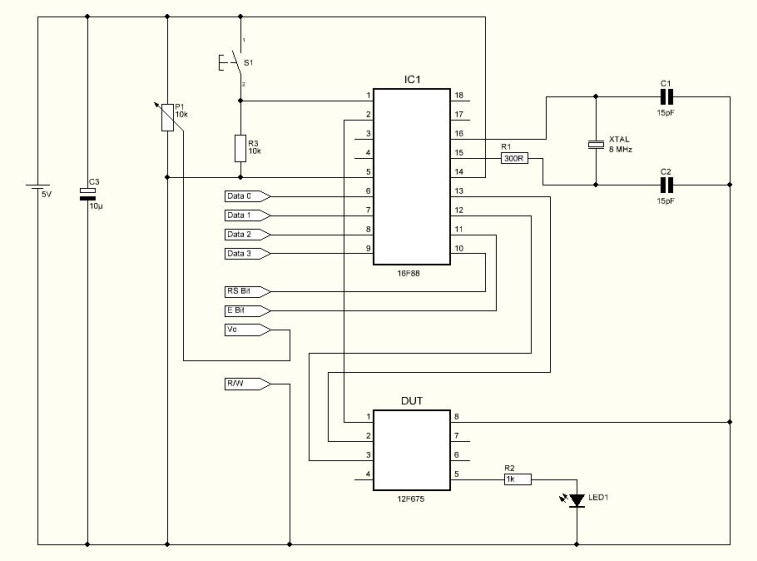
Schematic
Parts List
R1 300 ohms resistor
R2 1K ohms resistor
R3 10K ohms resistor
P1 10K Potentiometer
C1 15pF capacitor
C2 15pF capacitor
C3 10uF capacitor
Led1 3mm green led
LCD 8X2 LCD
XTAL 8Mhz cristal
IC1 16F88 microcontroller from Microchip
S1 Push button
Others:
Box
8 PIN IC SOCKET
PCB
Hex program for the microcontroller
How it works
The program loaded in the 12F675 device which has no osccal value will force a pulse on GPIO.4 and it will make a loop while increasing the osccal value internally.
GPIO.5 will send the current osccal value used for each pulse sent. Because the device has no calibrated osccal value, the pulse will be variable. The circuit will wait until it receives the correct pulse. When the correct pulse is received, it will stop the test and display the osccal value used when the correct pulse was measured.
The value displayed is in Hexadecimal format which means it can be used without conversions directly to the devices memory.
For more detail: OSCCAL Value Finder
Related projects
Calculator Test using PIC24FJ64GA006 with Proteus Simulation
Introduction The Calculator Test using EASYHDL is a practical microcontroller project built on the PIC24FJ64GA006 and simulated in Proteus. This project demonstrates...
Programmers & ICSPPID Controlled Oven using TMS320F28027PT with Proteus Simulation
IntroductionThis project demonstrates a PID controlled oven implemented using a PICCOLO TMS320F28027PT microcontroller and verified through Proteus simulation.It is a practical microcontroller...
Programmers & ICSPPICCOLO Motor Controller Sample Design using TMS320F28023PT with Proteus Simulation
IntroductionThis project demonstrates a PICCOLO motor controller sample design implemented using the TMS320F28023PT Piccolo microcontroller and tested through Proteus simulation. It focuses...
Programmers & ICSP · PIC16F84APIC Musical Doorbell using PIC16F84A with Proteus Simulation
IntroductionThis microcontroller project demonstrates a musical doorbell built around a PIC16F84A and a simple piezo sounder.Using two push buttons, the system allows...
Programmers & ICSP · PIC16F877AEPE PIC/LCD Demo using PIC16F877 with Proteus Simulation
IntroductionThe EPE PIC/LCD Demo is a classic microcontroller project that demonstrates how a PIC16F877 can fully control a PG12864F graphical LCD.Designed as...
Programmers & ICSP · PIC16F628ADHT11 Low Cost Humidity Sensor using PIC16F628A with Proteus Simulation
IntroductionThis microcontroller project demonstrates how to interface a low-cost DHT11 temperature and humidity sensor with a PIC16F628A using a Proteus simulation environment.The...

Ibrar Ayyub
I am an experienced technical writer holding a Master's degree in computer science from BZU Multan, Pakistan University. With a background spanning various industries, particularly in home automation and engineering, I have honed my skills in crafting clear and concise content. Proficient in leveraging infographics and diagrams, I strive to simplify complex concepts for readers. My strength lies in thorough...