
Summary of NANOPI R1S DUAL GIGABIT ETHERNET ROUTER COMES WITH 32-BIT OR 64-BIT ARM PROCESSOR
FriendlyELEC introduced the NanoPi R1S, a dual Gigabit Ethernet single-board computer available in H3 (32-bit) and H5 (64-bit) variants. While one port connects directly to the processor, the second uses a USB 2.0 bridge, limiting its speed to approximately 330 Mbps. The board features 512MB RAM, WiFi 4, and runs on FriendlyWrt or FriendlyCore firmware within a yellow enclosure.
Parts used in the NanoPi R1S:
- Allwinner H3 quad-core Arm Cortex-A7 processor
- Allwinner H5 quad-core Arm Cortex-A53 processor
- Mali-400MP2 GPU
- Mali-450MP GPU
- 512MB DDR3 RAM
- MicroSD Slot
- SPI flash footprint
- Gigabit Ethernet port (WAN)
- USB 2.0 Gigabit Ethernet bridge (LAN)
- 802.11b/g/n WiFi 4 with IPX-I antenna connector
- USB Type-A host port
- Micro USB port
- 3-pin 2.54mm pitch header for serial console
- 3x LEDs (WAN, LAN, SYS)
- K1 reset button
- Fan header
- Heatsink
FriendlyELEC launched NanoPi R1 SBC & Gateway earlier this year with Allwinner H3 processor, two Ethernet ports, as well as WiFi and Bluetooth connectivity. The design makes use of both Ethernet on the processor, but that also means on Gigabit Ethernet port had to be combined with a Fast Ethernet processor.
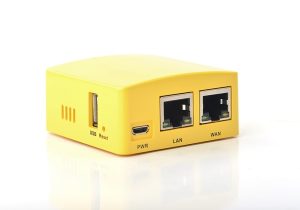
The company has now added a USB to Gigabit Ethernet bridge to their latest NanoPi R1S board meaning it’s now a dual Gigabit Ethernet SBC, but with the caveat that the port behind the USB bridge is limited to USB 2.0 speed (480 Mbps), and with overhead the USB Ethernet bandwidth is around 330 Mbps.
There are two versions of the board, namely NanoPi R1S-H3 and R1S-H5 with respectively Allwinner H3 32-bit processor, and Allwinner H5 64-bit processor.
Apart from the different processors, both boards share the same PCBA and specifications:
- SoC
- NanoPi R1S-H3 – Allwinner H3 quad-core Arm Cortex-A7 processor @ up to 1.2GHz with Mali-400MP2 GPU
- NanoPi R1S-H5 – Allwinner H5 quad-core Arm Cortex-A53 processor @ up to 1.2GHz with Mali-450MP GPU
- System Memory – 512MB DDR3 RAM
- Storage – MicroSD Slot, SPI flash footprint
- Connectivity
- 1x “true” Gigabit Ethernet (WAN)
- 1x “USB 2.0” Gigabit Ethernet (LAN) up to around 330 Mbps
- 802.11b/g/n WiFi 4 with IPX-I antenna connector
- USB – 1x USB Type-A host port, 1x micro USB port
- Debugging – 3-pin 2.54mm pitch header for serial console
- Misc – 3x LEDs (WAN, LAN, SYS), K1 reset button, fan header
- Power Supply – DC 5V/3A via micro USB port
- Dimensions – 55.6 x 52mm
- Temperature Range – -20℃ to 70℃
The company does not currently sell the barebone board , and instead, NanoPi R1S is sold as a router with a yellow enclosure (no other colors available) running either FriendlyWrt based on OpenWrt or FriendlyCore based on Ubuntu 18.04, both shipping with Linux 4.14.
You’ll find more technical details and links to the respective firmware files on the Wikis for R1S-H3 and R1S-H5 routers. Cooling is achieved with a heatsink that covers a large part of the board.
Read more: NANOPI R1S DUAL GIGABIT ETHERNET ROUTER COMES WITH 32-BIT OR 64-BIT ARM PROCESSOR
- What processors are available in the NanoPi R1S?
The board comes in two versions: the NanoPi R1S-H3 with an Allwinner H3 32-bit processor and the NanoPi R1S-H5 with an Allwinner H5 64-bit processor. - How does the USB Ethernet bridge affect network speed?
The port behind the USB bridge is limited to USB 2.0 speed of 480 Mbps, resulting in an actual bandwidth of around 330 Mbps due to overhead. - Can I purchase the barebone NanoPi R1S board?
No, the company does not currently sell the barebone board; it is only sold as a router with a yellow enclosure. - What operating systems run on the NanoPi R1S router?
The device ships with either FriendlyWrt based on OpenWrt or FriendlyCore based on Ubuntu 18.04. - Does the NanoPi R1S support WiFi connectivity?
Yes, it includes 802.11b/g/n WiFi 4 with an IPX-I antenna connector. - What is the power supply requirement for this device?
The device requires a DC 5V/3A power supply delivered via the micro USB port. - How is cooling managed on the NanoPi R1S board?
Cooling is achieved using a heatsink that covers a large part of the board. - What storage options are supported by the NanoPi R1S?
The board supports a MicroSD Slot and has an SPI flash footprint.

