


The PIC microcontroller is quite popular in industrial and hobbyist, some of the newest 8-bit midrange Microchip PIC microcontroller with nanoWatt technology is PIC16F690, this 20 pin microcontroller has a build in peripherals such as ADC, UART, PWM, I2C, analog comparator and with 7KBytes program memory flash; for those who’s come from the AVR background this is a good change to gain the knowledge as we know is hard to find the comparable 20 pin 8-bit AVR microcontroller product which has the same feature as Microchip PIC16F690; and for those who are the first time learner welcome to the PIC microcontroller world.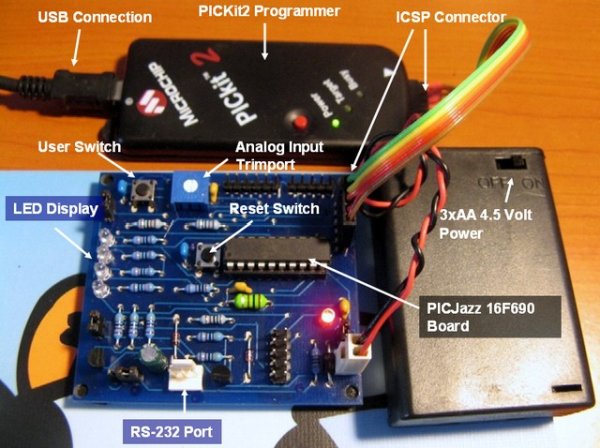
1. Which tools should I use
To start C programming language on Microchip PIC Microcontroller you need these following tools:
- Down load the latest Microchip MPLAB IDE which provide you with the complete IDE (integrated development environment) for managing project, program editing, compiling, debugging and downloader for all Microchip PIC Microcontroller series.
The MPLAB IDE is already come with the HITECH PICC-Lite C compiler and fully integrated with MPLAB IDE. - The PIC16F690 datasheet, is one of the most important document if you want to learn this type of microcontroller
- Microchip PICKit2 Programmer.
- PICJazz 16F690 board from ermicro (for circuit schema click here)
After downloading, install the Microchip MPLAB IDE and just follow all the default setting.
2. My first PIC C Programming
To create your first PIC project go to Start -> All Programs -> Microchip -> MPLAB IDE ver 8.00 -> MPLAB IDE (I am using version 8.00 on this tutorial), this will launch the MPLAB IDE application screen then start the project wizard by selecting the menu Project -> Project Wizard… from MPLAB IDE and this will launch the project wizard, just continue with Next button and it will show the project wizard step one form as follow: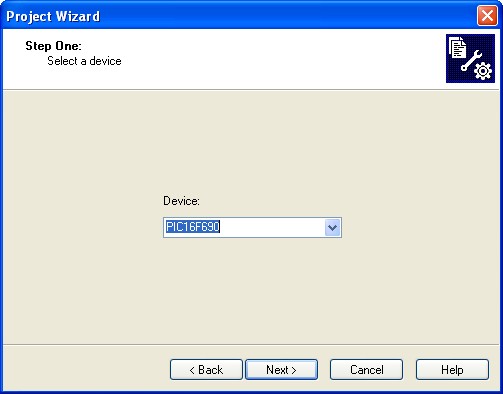
For more detail: Introduction to the Microchip PIC C Programming
Related projects
Air Sampler using PIC16F690 microcontroller
Do you ever wonder what is in the air you breathe? Or maybe you have hay fever and want to know what...
LCD & Display Projects · PIC16F690LCD Module Control over IR Link using PIC16F690
Recently I got my hands on a couple of HSDL-1100 based IR transceivers and a KS070B LCD display module. This was a...
LED Projects · PIC16F6908×8 LED matrix using PIC16F690 microcontroller
8x8 LED matrix This instructable will show you how to make a 8x8 LED matrix in witch you can control evry single...
Programmers & ICSPCalculator Test using PIC24FJ64GA006 with Proteus Simulation
Introduction The Calculator Test using EASYHDL is a practical microcontroller project built on the PIC24FJ64GA006 and simulated in Proteus. This project demonstrates...
Programmers & ICSPPID Controlled Oven using TMS320F28027PT with Proteus Simulation
IntroductionThis project demonstrates a PID controlled oven implemented using a PICCOLO TMS320F28027PT microcontroller and verified through Proteus simulation.It is a practical microcontroller...
Programmers & ICSPPICCOLO Motor Controller Sample Design using TMS320F28023PT with Proteus Simulation
IntroductionThis project demonstrates a PICCOLO motor controller sample design implemented using the TMS320F28023PT Piccolo microcontroller and tested through Proteus simulation. It focuses...

Ibrar Ayyub
I am an experienced technical writer holding a Master's degree in computer science from BZU Multan, Pakistan University. With a background spanning various industries, particularly in home automation and engineering, I have honed my skills in crafting clear and concise content. Proficient in leveraging infographics and diagrams, I strive to simplify complex concepts for readers. My strength lies in thorough...