


Summary of How to make a JDM Programmer
This article describes building a JDM RS232 (DB9) serial programmer for first-time programming of a PIC18F4550 USB interface board using WinPic800. It compares JDM to commercial programmers, advises using a desktop with a native DB9 port (not a USB-to-DB9 adapter), and provides two schematics: an original JDM Extreme and a simplified modified schematic tailored for 40-pin microcontrollers like the PIC18F4550. The author removed unneeded components and instructs to follow the second schematic for hardware assembly.Parts used in the JDM Programmer for PIC18F4550:
- RS232 DB9 (9-pin) connector
- Circuit board (perfboard or PCB)
- Resistors (various as per schematic)
- Capacitors (various as per schematic)
- Zener diodes or voltage reference components (as per schematic)
- Transistors or switching components (as per schematic)
- IC socket or connector for 40-pin microcontroller
- Wires and connectors for target 40-pin PIC18F4550 board
- Power supply connections (to match schematic)
- Soldering materials and hardware
(PIC18F4550 Programming)
Hardware | Schematic | Complete Description
This JDM programmer works with a RS232, 9-pin(9 wire) DB9 Serial connector on your computer, and is used for loading Source Code (hex files) into your microcontroller. JDM programmers are Cheap and very easy to make. JDM programmer that we are going to make will be used for loading the code into microcontroller board. You can probably buy this JDM Online or from some Electronic store but if you are going to make one for yourself then, total spending for all components and board will cost you less than half of the actual price of the JDM that you will get in any electronic store.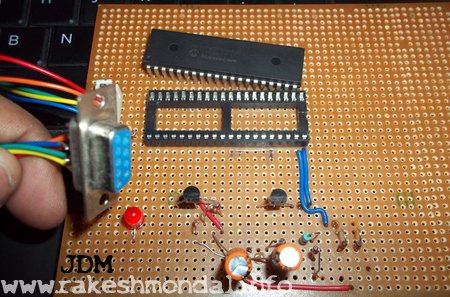
Overview JDM
This jdm programmer responds, or lets us to burn the program into the microcontroller chip through small software known as winpic800. Winpic800 is compatible with pic18f4550 and JDM serial programmer. It works with lot of other hardware too, which are similar to JDM programmer, like the [GTP-USB] but it costs around 60 € from their official website. So it’s a good option for beginners to stay with JDM programmer as cheap alternative in the early stages. Later for a better programmer I recommended pickit3 from microchip which makes it easier to program with a USB port. As of now with this JDM programmer we are going to program PIC18F4550 USB Interface Board for FIRST TIME BURNING OF CODE INTO THE CHIP
This JDM programmer uses RS232 DB9 port to program the code into the microcontroller. I recommend do not use a laptop for JDM programmer. Usually now a days laptop's does not comes with a DB9 serial port, so if you are thinking to use a USB to DB9 converter cable for doing this job then its a bad idea. Don’t even think about USB to DB9 converter, it just won’t work. So I recommend use a Desktop Computer which comes with an inbuilt DB9 Serial port. If you are thinking of a USB programmer then pickit2 or pickit3 will be a good option.
Schematics and Components
I found a nice tutorial about long time ago for making this JDM programmer. The name of the device was JDM EXTREME. I don’t remember where I found it, but I still have Schematic for making it. I have modified the actual schematic according to our need for this programming 40 pin microcontroller. I have posted both the actual Schematic and modified Schematic below. FOLLOW THE SECOND SCHEMATIC FOR 40PIN Microcontroller board.
The 1st one is actual schematic which can be used for verities of JDM supported microcontrollers (you can modify it according to the type of microcontroller you want to use) and second one is the modified schematic (removed all non-required components for our microcontroller) which we are going to use for 1st time programming of our pic18f4550 USB interface board.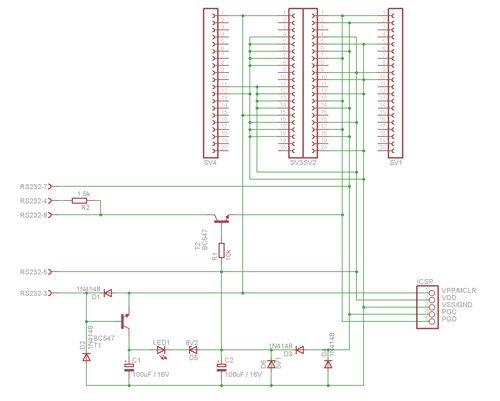
SCHEMATIC -2 ( follow this one for your hardware)
In the second schematic all the components that we don’t required for our 40 pin microcontroller is roughly removed. Please don’t mind some left out lines in the schematic 🙂 , just ignore the incomplete lines and follow hard lines. Follow basics of schematic, DOT shows connectivity of lines in schematics , Ignore the incomplete lines that I have left in the second schematic.
For more detail: How to make a JDM Programmer
- Can I use a laptop with a USB-to-DB9 adapter to run this JDM programmer?
No, the article advises against using a USB-to-DB9 converter and recommends a desktop with a built-in DB9 serial port. - Which software is used to program the PIC18F4550 with this JDM?
WinPic800 is used and is compatible with PIC18F4550 and the JDM serial programmer. - Should I follow the original or modified schematic for a 40-pin PIC18F4550?
Follow the second, modified schematic tailored for the 40-pin microcontroller. - Is the JDM programmer suitable as a low-cost option?
Yes, the article presents JDM as a cheap and easy-to-make alternative for beginners. - Does the article recommend other programmers for later use?
Yes, it recommends moving to Pickit3 for easier USB-based programming later. - Are unnecessary components removed in the provided modified schematic?
Yes, the modified schematic removes components not required for the 40-pin microcontroller. - Will the original JDM Extreme schematic work for other microcontrollers?
Yes, the first schematic can be used for various JDM-supported microcontrollers with modifications as needed. - Does the article provide detailed wiring connectivity guidance?
It notes that dots indicate connectivity and to ignore incomplete lines, following the hard lines in the schematic.
Related projects
PICDEM FS USB CDC Evaluation Board using PIC18F4550 with Proteus Simulation
Introduction The PICDEM FS USB CDC Evaluation Board is a practical microcontroller project built around the PIC18F4550, designed to demonstrate USB communication...
Peripheral Tutorials · PIC18F4550PICDEM FS USB Mass Storage Device using PIC18F4550 with Proteus Simulation
Introduction This microcontroller project demonstrates how to simulate a USB Mass Storage Device (MSD) using the PIC18F4550 in a Proteus simulation environment....
Development Boards & Kits · PIC18F2550Pinguino Project: A PIC Microcontroller Based Arduino
This is a complete tutorial to make a PIC Microcontroller based Arduino. This is a complete tutorial to make PIC microcontroller based...
Programmers & ICSPCalculator Test using PIC24FJ64GA006 with Proteus Simulation
Introduction The Calculator Test using EASYHDL is a practical microcontroller project built on the PIC24FJ64GA006 and simulated in Proteus. This project demonstrates...
Programmers & ICSPPID Controlled Oven using TMS320F28027PT with Proteus Simulation
IntroductionThis project demonstrates a PID controlled oven implemented using a PICCOLO TMS320F28027PT microcontroller and verified through Proteus simulation.It is a practical microcontroller...
Programmers & ICSPPICCOLO Motor Controller Sample Design using TMS320F28023PT with Proteus Simulation
IntroductionThis project demonstrates a PICCOLO motor controller sample design implemented using the TMS320F28023PT Piccolo microcontroller and tested through Proteus simulation. It focuses...

Ibrar Ayyub
I am an experienced technical writer holding a Master's degree in computer science from BZU Multan, Pakistan University. With a background spanning various industries, particularly in home automation and engineering, I have honed my skills in crafting clear and concise content. Proficient in leveraging infographics and diagrams, I strive to simplify complex concepts for readers. My strength lies in thorough...