
Summary of Generating PWM with PIC Microcontroller – MPLAB XC8
Pulse Width Modulation (PWM) on PIC16F877A uses CCP modules (CCP1/CCP2) with Timer2 as the time base to produce variable-duty digital pulses for analog output tasks. PWM period is set by PR2; duty cycle by CCPR1L and CCP1CON. Outputs are on RC1/RC2; Timer2 prescaler and T2CON control timing. Duty must be less than PR2; both CCPs share Timer2 so they cannot have different frequencies. The module latches duty changes on PR2/TMR2 match to avoid glitches.
Parts used in the PWM with PIC16F877A project:
- PIC16F877A microcontroller
- CCP modules (CCP1 and CCP2) internal to PIC16F877A
- Timer2 (internal to PIC16F877A)
- PR2 register (Timer2 period register, internal)
- CCPR1L register (PWM duty high bits, internal)
- CCP1CON register (PWM control and two LSBs of duty, internal)
- TMR2 register (Timer2 counter, internal)
- T2CON register (Timer2 control/prescaler, internal)
- PORTC pins RC1 and RC2 (PWM output pins)
- TRIS register bits TRIS and TRIS (to configure RC1/RC2 as outputs)
Pulse Width Modulation (PWM) is the one of the simple and most commonly used technique to produce analog voltages from digital signals. It has a wide variety of applications such as Digital to Analog Converter (DAC), DC Motor Speed Control, Sine Wave Inverters, Brightness control etc.
PWM signals are ON – OFF signals (HIGH or LOW) (hence the name Pulse) whose HIGH or ON duration is changed (hence Width Modulation) in accordance with our requirements. The fraction of time period for which the signal is ON to the total time period is termed as Duty Cycle.
PWM waves can be easily generated using CCP modules available with most of the PIC Microcontrollers. CCP stands for Capture / Compare / PWM, which means that it can be used for Capture or Compare or PWM operations. To program this module with MPLAB XC8 compiler we need to learn its working. Here for demonstration we are using PIC 16F877A microcontroller.
 CCP – Capture / Compare / PWM Module
Microchip’s PIC 16F877A microcontroller has two CCP modules, named as CCP1 and CCP2. Each CCP module comprises of two 8 bit registers which can be operate as :
- 16 bit Capture Register
- 16 bit Compare Register
- PWM Master / Slave Duty Cycle register
This tutorial deals only with PWM operation of CCP module. Using this we can generate PWM output having resolution up to 10 bit. Output of CCP modules are multiplexed with RC1 & RC2 of PORTC, hence TRIS<1> and TRIS<2> must be cleared to make these pins output.
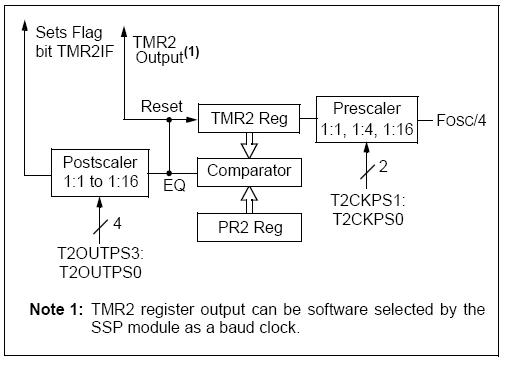
Timer 2 module provides the time base for the PWM operation of both CCP modules. The value of the TMR2 register increases from zero to maximum value as per the timer 2 input clock. The input clock is determined by the microcontroller clock frequency (Fosc) and timer 2 prescaler value.
- Prescaler Input Clock : Fosc / 4
- Timer 2 Input Clock : (Fosc / 4) / Prescaler Value = Fosc / (4*Prescaler)
Time period of the generated PWM waves are determined by the value of PR2 Register. The comparator compares the values of PR2 and TMR2 registers. When these values become equal, the output pulse from the comparator sets the PWM output to HIGH. It also resets the Timer 2 value to zero.
The PWM duty cycle is determined by the value in the CCPR1L and CCP1CON<5:4> registers, which can be written any time. This value is stored to CCPR1H and a 2 bit internal latch when there is a match between PR2 and Timer 2. This avoids the possibility of glitches in the PWM output due to changing of duty cycle.
The PWM output become LOW when there is a match between Timer 2 value and Duty Cycle (CCPR1L and CCP1CON<5:4>).
Note 1 : The value of Duty Cycle should be less than Time Period (PR2) for the proper generation of PWM signals.
Note 2 : It is not possible to use different PWM frequencies for both CCP modules, because they use Timer 2 for their operation.
 PWM Resolution
PWM Resolution of CCP modules can be calculated using the following equation.
Configuration
- Set the PWM Period by writing to PR2 register. The relation between PR2 value and time period is shown below.
- Then set the PWM Duty Cycle by writing to CCPR1L and CCP1CON<5:4> registers. The relation between register value and duty cycle is shown below.
- Configure the CCP pins as Output by writing to TRIS<2> and TRIS<1> bits.
- Set the Timer 2 (TMR2) prescale value and enable it by writing to T2CON register.
- Finally, configure the CCP module for PWM operation by writing to CCP control registers.
For more detail: Generating PWM with PIC Microcontroller – MPLAB XC8
- What determines the PWM period?
The PWM period is set by the PR2 register as described in the article. - How is the PWM duty cycle set?
The duty cycle is set by writing to CCPR1L and CCP1CON<5:4> registers. - Which timer provides the time base for PWM?
Timer2 provides the time base for PWM operation of both CCP modules. - On which pins are PWM outputs available?
PWM outputs are multiplexed with RC1 and RC2 of PORTC. - Can CCP1 and CCP2 run at different PWM frequencies?
No, both CCP modules share Timer2 so they cannot have different PWM frequencies. - When does the PWM output become HIGH and LOW?
The output becomes HIGH when PR2 equals TMR2 and becomes LOW when TMR2 matches the duty cycle value in CCPR1L and CCP1CON<5:4>. - What must be ensured about duty cycle value relative to PR2?
The duty cycle value should be less than the time period specified in PR2 for proper PWM generation. - How are duty cycle updates prevented from causing glitches?
Duty changes are latched into CCPR1H and a 2 bit internal latch on PR2/TMR2 match to avoid glitches.
