Summary of ESP8266 based e-paper WiFi weather station
The author built a custom 3D-printed weather station using the Squix e-Paper kit, featuring magnets for fridge mounting. Unlike power-hungry OLED or TFT alternatives, this e-paper model runs for weeks on battery, updating data every 20 minutes via WiFi. The project combines Daniel Eichhorn's open-source software with a custom enclosure and an external programmer to achieve long-term operation without constant charging.
Parts used in the Custom E-Paper Weather Station:
- Waveshare 2.9″ E-Paper display (296×128 resolution)
- ESP8266 WiFi module
- JST LiPo connector with charging circuit (100 mA/h)
- CP2102 USB to Serial Converter module
- 3 User buttons
- Custom 3D printed enclosure
- Magnets for fridge attachment
I’m a fan of all kind of weather stations. When Daniel Eichhorn twittered about his new version using an E-Paper display module, I immediately preordered one. I decided to build a station with a custom enclosure, so here is my version of a 3D printed version, featuring magnets so it can be attached to the fridge:
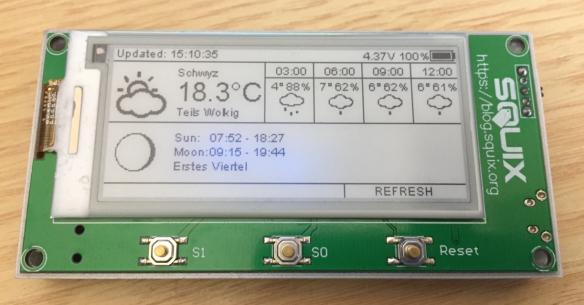
Using e-paper for a weather station is an ideal solution, as the data does not need to be updated often. By default, the station reaches out every 20 minutes for new data over WiFi and then updates the display. Daniel Eichhorn already has published kits for OLED (see “WiFi OLED Mini Weather Station with ESP8266“) and touch display (see “WiFi TFT Touch LCD Weather Station with ESP8266“). I like them both, but especially the TFT one is very power-hungry and not really designed to work from batteries. What I would like is a station which can run for weeks.
The e-paper weather station from Squix/Daniel Eichhorn is available in two versions:
- as a kit, with programmer, enclosure and battery: https://blog.squix.org/product/2-9-espaper-plus-kit
- or the ‘lite’ kit with the display module: https://blog.squix.org/product/2-9-espaper-lite-kit
Features:
- Waveshare 2.9″ E-Paper 296×128 (black, white)
- ESP8266 WiFi module
- JST LiPo connector and charging circuit (100 mA/h)
- 3 User buttons
Because the ‘lite’ kit was supposed to be available earlier, I ordered that version. And I wanted to build custom enclosure anyway.
Setup
Daniel provides an extensive and well documented software for the module on GitHub, the setup guide is available on https://blog.squix.org/espaper-setup-guide.
Because I was familiar with his other weather stations, I had the module up and running in less than 30 minutes.
Because the ‘lite’ kit does not include a programmer (actually a USB to Serial Converter), I had ordered a CP2102 module.
Read more: ESP8266 based e-paper WiFi weather station
-
Why is e-paper considered ideal for this weather station?
E-paper is ideal because the data does not need to be updated often, allowing the station to run for weeks. -
How often does the station update its display data?
The station reaches out every 20 minutes over WiFi to fetch new data and update the display. -
What was missing from the lite kit that required an additional purchase?
The lite kit did not include a programmer, so the user ordered a CP2102 USB to Serial Converter module separately. -
Can this weather station operate on batteries like the other versions?
Yes, unlike the power-hungry TFT version, this e-paper design is intended to work from batteries for weeks. -
Where can users find the setup guide and software?
Software is available on GitHub, and the setup guide is located at blog.squix.org/espaper-setup-guide. -
What specific display resolution does the Waveshare module have?
The module features a Waveshare 2.9″ E-Paper display with a resolution of 296×128 pixels in black and white. -
Does the standard kit include a programmer?
The full kit includes a programmer, whereas the lite kit requires the user to source one independently.