


Summary of COMPUTER CONTROLLED ROBOT PROJECT PIC16F877
Computer-controlled robot project using a PIC16F877 microcontroller moves according to shapes drawn in a PC program; it can also follow coordinate inputs. Communication between PC and robot uses an RS232 serial link. The L298 motor driver controls the motors. Project files include Micro-Pascal source code and Proteus ISIS (Ares) simulation/design files.Parts used in the Computer Controlled Robot Project PIC16F877:
- PIC16F877 microcontroller
- L298 motor driver
- RS232 serial port interface (PC communication)
- Motors (driven by L298)
- Power supply for microcontroller and motors
- PC with software to draw shapes or enter coordinates
- Micro-Pascal source code files
- Proteus ISIS / Ares project files
Computer-controlled robot circuit special program is moving according to the shapes drawn on further action can be achieved by giving the coordinates instead of drawing circuit PIC16F877 microcontroller used robot communication between computers via... Electronics Projects, Computer Controlled Robot Project PIC16F877 "microchip projects, microcontroller projects, pic16f877 projects, "
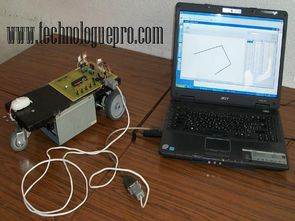
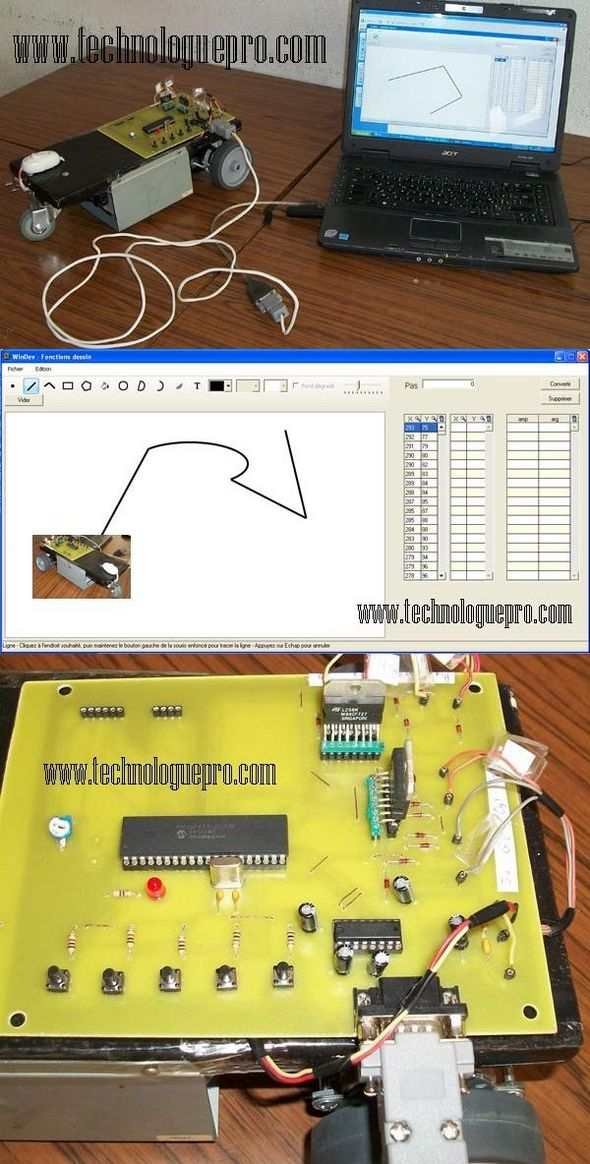
Computer-controlled robot circuit special program is moving according to the shapes drawn on further action can be achieved by giving the coordinates instead of drawing circuit PIC16F877 microcontroller used robot communication between computers via RS232 serial port is provided. L298 as motor driver PIC16F877 software used for the project prepared by micro-pascal computer program source code file and ares proteus isis files there ..
Source: COMPUTER CONTROLLED ROBOT PROJECT PIC16F877alternative computer-controlled-robot-project-pic16f877.rar
Quick Solutions to Questions related to Computer Controlled Robot Project PIC16F877:
- How does the robot receive movement instructions?
The robot receives instructions from a PC program either by shapes drawn or by giving coordinates via RS232 serial communication. - What microcontroller is used in this project?
The project uses a PIC16F877 microcontroller. - Which motor driver is used to control the robot motors?
The L298 motor driver is used to control the motors. - Can the robot follow coordinates instead of drawing shapes?
Yes, further action can be achieved by giving coordinates instead of drawing. - What software development language is the project source written in?
The software for the project is prepared in Micro-Pascal. - Are simulation or design files provided with the project?
Yes, Proteus ISIS and Ares files are provided. - How does the PC communicate with the robot?
The PC communicates with the robot via an RS232 serial port. - Does the project include source code?
Yes, the project includes Micro-Pascal source code files.
Related projects
PIC16F877 Driving LCD in 4-Bit Mode using PIC16F877 with Proteus Simulation
Introduction This microcontroller project shows how a PIC16F877 can drive an LCD display using 4-bit mode inside a Proteus simulation.The project demonstrates...
Programmers & ICSP · PIC16F877AEPE PIC/LCD Demo using PIC16F877 with Proteus Simulation
IntroductionThe EPE PIC/LCD Demo is a classic microcontroller project that demonstrates how a PIC16F877 can fully control a PG12864F graphical LCD.Designed as...
Motors & Robotics · PIC16F877AEfficient Sun-Following Robot: A Solar Tracker with Microcontroller Control
Abstract The impending global challenge of dwindling non-renewable fuel resources underscores the urgency of transitioning towards renewable energy alternatives like solar power....
Motors & RoboticsReal-Time CAN-Based Vehicle Monitoring System with PIC MCU
INTRODUCTION The Controller Area Network (CAN) is a robust vehicle communication bus standard that was primarily developed for automobile applications but has...
Motors & RoboticsEasy Way to Learn Robotics Using Microcontrollers: A Beginner’s Guide
The title, "Easy Way to Learn Robotics Using Microcontrollers," promises an accessible entry point for those curious about the exciting world of...
Motors & RoboticsInnovative Robotics: A Comprehensive Project Exploration
A DC motor functions as an electromechanical device, translating electrical signals into mechanical movements. The rotation of the motor correlates directly with...

Ibrar Ayyub
I am an experienced technical writer holding a Master's degree in computer science from BZU Multan, Pakistan University. With a background spanning various industries, particularly in home automation and engineering, I have honed my skills in crafting clear and concise content. Proficient in leveraging infographics and diagrams, I strive to simplify complex concepts for readers. My strength lies in thorough...