
Summary of CadSoft Eagle Tutorials by jeremyblum.com
CadSoft Eagle tutorial series by Jeremy Blum, supported by CadSoft and element14, teaches PCB design using Eagle CAD. Episode 1 covers installing Eagle, interface navigation, creating schematics, and using DesignConnect for a bill-of-materials. Episode 2 covers converting schematics to PCB layouts, including part placement, routing (automatic and manual), layer/grid controls, ULPs, ground pours, and net classes. Files, Adafruit Eagle library, and source materials are available via provided links and GitHub.
Parts used in the CadSoft Eagle Tutorial Series:
- CadSoft Eagle software
- DesignConnect (Eagle feature for BOM)
- Adafruit Eagle Library
- ULPs (User Language Programs) for Eagle
- Example schematic and board files from tutorial repository
- Ground pour tools/features within Eagle
- Net classes feature within Eagle
- Layer and grid control features within Eagle
- Routing tools (automatic and manual) within Eagle
CadSoft Eagle: Schematic Design
In the course of making my Arduino Tutorial Series (don’t worry, I have more of those in the works), I got a ton of requests for a tutorial series on how to design circuit boards. Now, I’m answering those requests with my Eagle Tutorial Series! Supported by element14 & cadsoft, this series will take you through the process of designing a complete PCB using the very popular Eagle CAD software. In this first tutorial on CadSoft Eagle, I’ll show you how to get the program up and running, how to navigate the interface, how to design your first schematic, and how to use DesignConnect to build a Bill-of-Materials.
This tutorial has been made possible with support from CadSoft and element14. Learn more about Cadsoft Eagle here: http://www.element14.com/cadsoft
You can download CadSoft Eagle here: http://www.cadsoftusa.com/
You can download the Adafruit Eagle Library that I used in this tutorial here: https://github.com/adafruit/Adafruit-Eagle-Library
You can download the files associated with this episode here: Eagle Tutorial 1 Files
Source materials for all my eagle tutorials can be found in my github repository.
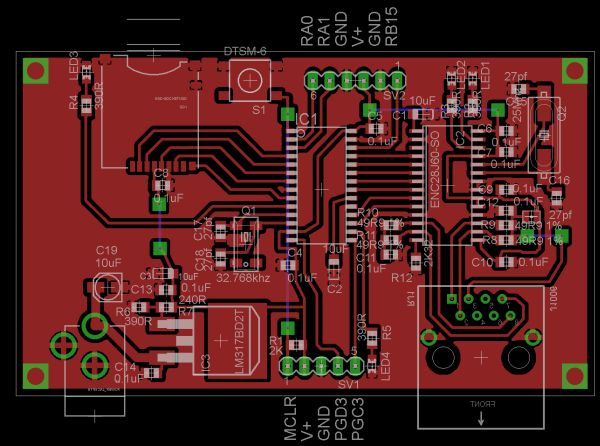
CadSoft Eagle: Printed Circuit Board Layout
This is my second CadSoft Eagle tutorial, sponsored by element14 & cadsoft. In this second tutorial on CadSoft Eagle, I’ll show you how to turn your schematic into a board design that you can get manufactured! Specifically, I’ll cover part layout, automatic and manual routing, layer and grid controls, ULPs, ground pours, net classes, and much more! If you haven’t watched my first eagle tutorial yet, I recommend that you watch that first.
This tutorial has been made possible with support from CadSoft and element14. Learn more about Cadsoft Eagle here: http://www.element14.com/cadsoft
You can download CadSoft Eagle here: http://www.cadsoftusa.com/
You can download the files associated with this episode here: Eagle Tutorial 2 Files
Source materials for all my eagle tutorials can be found in my github repository.
For more detail: CadSoft Eagle Tutorials by jeremyblum.com
- What does the first CadSoft Eagle tutorial cover?
The first tutorial covers getting Eagle up and running, navigating the interface, designing a schematic, and using DesignConnect to build a bill-of-materials. - Where can I download CadSoft Eagle?
The article directs readers to download CadSoft Eagle from http://www.cadsoftusa.com/. - How can I get the Adafruit Eagle Library used in the tutorial?
The Adafruit Eagle Library used is available at https://github.com/adafruit/Adafruit-Eagle-Library. - What topics are covered in the second CadSoft Eagle tutorial?
The second tutorial covers turning schematics into board designs, part layout, automatic and manual routing, layer and grid controls, ULPs, ground pours, and net classes. - Are example files available for the tutorials?
Yes, the article provides links to download files associated with each episode (Eagle Tutorial 1 Files and Eagle Tutorial 2 Files). - Who supports the CadSoft Eagle tutorial series?
The tutorials are supported by CadSoft and element14. - Where can I find source materials for all Eagle tutorials?
Source materials for all Eagle tutorials are available in the author's GitHub repository. - Should I watch the first tutorial before the second?
Yes, the article recommends watching the first Eagle tutorial before the second.

