


Summary of TrH Meter: A DIY indoor thermometer plus hygrometer with adaptive brightness control implemented to 7-segment LED displays
This project constructs a microcontroller-based digital room thermometer and hygrometer using a PIC16F688. It features four 1-inch seven-segment LED displays that automatically adjust brightness via an LDR to suit ambient light conditions. The system measures temperature and humidity with a DHT11 sensor and uses a MAX7219 driver chip for display control, offering a power-saving and eye-friendly reading experience day or night.Parts used in the TrH Meter:
- PIC16F688 microcontroller
- DHT11 sensor
- Light-dependent resistor (LDR)
- Four 1-inch seven-segment LED displays
- MAX7219 display driver chip
- LM7805 regulator IC
- 9-15V DC wall adapter
- LED1 power-on indicator LED
- S2 switch for unit selection
- R7 pull-up resistor
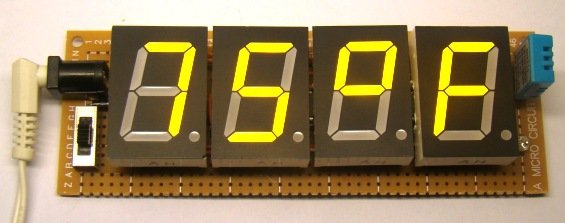
This project is about building a microcontroller-based digital room thermometer plus hygrometer that displays temperature and relative humidity on 4 large (1 inch) seven segment LED displays which adjust their brightness level according to the surrounding illumination. It consists of a closed loop system that continuously assesses ambient light condition using an inexpensive light-dependent resistor (LDR) and uses that information to adjust the brightness of the display. An inexpensive DHT11 sensor is used to measure temperature and relative humidity. The microcontroller used in this project is PIC16F688, and it runs at 4 MHz clock generated from its internal source. A separate display driver chip (MAX7219) is used to control and refresh the display data on the seven segment LEDs.
Why do we need adaptive brightness control?
Auto-adjusting the brightness of the seven segment LED displays not only saves power but also enhances the readability in all ambient lighting conditions. Many smartphones, HDTVs, PDAs, tablets, and computer screens now come with this feature. It basically dims the display in a dark environment and is still readable and eye-soothing. Similarly, when the ambient light level goes up, it brightens the display to enhance the readability. This project displays indoor temperature and relative humidity on large 1 inch seven segment LEDs that automatically adjust the brightness to be in balance with the light condition in the room. So, if you put this meter in your bedroom, you won’t have to worry about turning it off during nighttime. It will automatically dim low enough to not to disturb your sleep, while maintaining the readability.
Circuit diagram
To make it easy to explain, I have divided the complete circuit diagram into 3 parts: Power supply unit, Microcontroller and sensor unit, and Display driver unit.
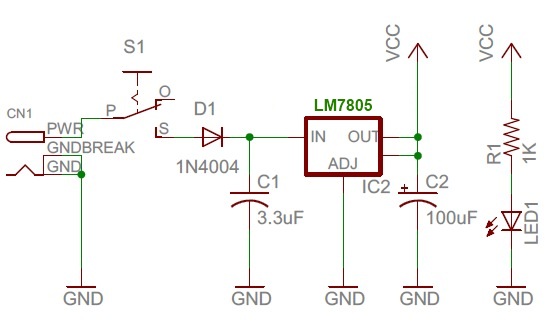
The power supply unit consists of a LM7805 regulator IC to derive regulated +5V power supply from a 9-15V DC wall adapter. The complete power supply unit circuit diagram is shown below. LED1 is a power-on indicator LED.
The following circuit diagram shows connections of the DHT11 sensor and the photoresistor (also called light dependent resistor or LDR) to the PIC16F688 microcontroller. DHT11 is a low cost digital sensor for measuring temperature from 0-50 °C with an accuracy of ±2°C and relative humidity ranging from 20-95% with an accuracy of ±5%. The sensor provides fully calibrated digital outputs and has got its own proprietary 1-wire protocol for communication. I have described more about this sensor and its communication protocol in Measurement of temperature and relative humidity using DHT11 sensor and PIC microcontroller. The PIC16F688 uses the RC4 I/O pin to read the DHT11 output data. Note that R7 serves as the pull-up resistor required for the data pin of the DHT11 sensor. The S2 switch in the circuit diagram is to select between degree Fahrenheit (°F) and degree Celsius (°C) unit for temperature display. When the switch is open, the RC3 pin is pulled low by default, and the temperature is displayed in °F scale. In order to chose °C scale, the RC3 pin should be pulled high, which happens when S2 is closed.
For more detail: TrH Meter: A DIY indoor thermometer plus hygrometer with adaptive brightness control implemented to 7-segment LED displays
Quick Solutions to Questions related to TrH Meter:
- How does the project adjust display brightness?
The system uses an inexpensive light-dependent resistor (LDR) to continuously assess ambient light and adjusts the display brightness accordingly. - What microcontroller is used in this project?
The project utilizes a PIC16F688 microcontroller running at a 4 MHz clock generated from its internal source. - Can I change the temperature units on the device?
Yes, closing the S2 switch pulls the RC3 pin high to display degrees Celsius, while keeping it open defaults to degrees Fahrenheit. - Does the DHT11 sensor require external calibration?
No, the DHT11 provides fully calibrated digital outputs directly. - What component drives the seven-segment LEDs?
A separate MAX7219 display driver chip is used to control and refresh the data on the LEDs. - Why is adaptive brightness control important for this meter?
It saves power and enhances readability by dimming the display in dark environments and brightening it when ambient light increases. - What is the accuracy of the DHT11 sensor?
The sensor measures temperature with ±2°C accuracy and relative humidity with ±5% accuracy. - How is the power supply regulated?
An LM7805 regulator IC derives a regulated +5V power supply from a 9-15V DC wall adapter.
Related projects
Determine capacitance by measuring the charging time using PIC16F688
When TEST botton is pressed, RA3 pin is set to "1". R2 and R3 are divide the voltage to 1/2 Vra3 which...
Meters & Test Instruments · PIC16F688Digital Oscilloscope using PIC16F688
Far and away my most ambitious project to date, this digital oscilloscope can sample up to four channels at a rate up...
Sensors & Temperature · PIC16F688Digital Thermometer Using PIC16F688 microcontroller
Digital thermometers are cool devices as they show temperatures in human readable formats. This digital thermometer project is based on a PIC16F688...
Meters & Test InstrumentsFrequency Meter Using Microcontroller
This tutorial simply states how to calculate frequency of a pulse source using a microcontroller. Story https://youtu.be/NAoj-HLRIro This tutorial simply states how...
Meters & Test Instruments · PIC16F84ADigital thermometer with PIC16F84 circuit
This electronic project is a very simple thermometer that is based on the PIC16F84A microcontroller, designed by Microchip. Why to use a...
Meters & Test InstrumentsProjects on Speed Checker To Detect Rash Driving On Highways
While driving on highways, drivers should not exceed the maximum speed limit permitted for their vehicle. However, accidents keep on occurring due...

Ibrar Ayyub
I am an experienced technical writer holding a Master's degree in computer science from BZU Multan, Pakistan University. With a background spanning various industries, particularly in home automation and engineering, I have honed my skills in crafting clear and concise content. Proficient in leveraging infographics and diagrams, I strive to simplify complex concepts for readers. My strength lies in thorough...