
Summary of How to use MQ2 Gas Sensor – Arduino Tutorial
The article explains using an MQ-2 gas sensor with an Arduino to detect LPG, i-butane, propane, methane, alcohol, hydrogen, and smoke. It covers required parts, simple wiring (Vcc to 5V, GND to GND, analog output to A0), notes that the sensor heats up, mentions an adjustable sensitivity resistor on some modules, and suggests viewing readings via the serial monitor while exposing the sensor to gases like a lighter for testing.
Parts used in the MQ-2 Gas Sensor project:
- Arduino Uno
- Breadboard
- MQ-2 Gas sensor module
The MQ series of gas sensors use a small heater inside with an electro-chemical sensor. They are sensitive for a range of gasses and are used indoors at room temperature. The output is an analog signal and can be read with an analog input of the Arduino.
The MQ-2 Gas Sensor module is useful for gas leakage detecting in home and industry. It can detect LPG, i-butane, propane, methane ,alcohol, hydrogen and smoke.
Some modules have a built-in variable resistor to adjust the sensitivity of the sensor.
Note: The sensor becomes very hot after a while, don’t touch it!
In this tutorial we will use the serial monitor of Codebender (or Arduino IDE) to see how the sensor acts in variable gasses.
So, let’s get started!
Step 1: What you will need
For this tutorial you will need:
- Arduino uno
- Breadboard
- MQ-2 Gas sensor module
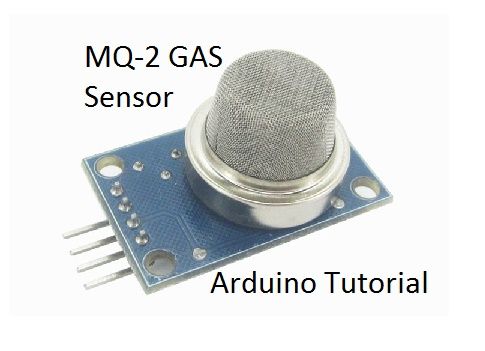
Step 2: The Circuit
The connections are pretty easy:
- Vcc to Arduino 5V pin
- GNG to Arduino GND pin
- Output to Arduino Analog A0 pin
Note: The sensor becomes very hot after a while, don’t touch it!
Step 3: The Code
Here’s the code, embedded using Codebender!
Try downloading the codebender plugin and clicking on the Run on Arduino button to program your Arduino with this sketch. And that’s it, you’ve programmed your Arduino board! Press connect button to start serial communication with your Arduino board.
Now you can try this:
Take a lighter and press the button to release gas near the sensor. Observe values on serial monitor.
For more detail: How to use MQ2 Gas Sensor – Arduino Tutorial
- What gases can the MQ-2 detect?
The MQ-2 can detect LPG, i-butane, propane, methane, alcohol, hydrogen and smoke. - How do I connect the MQ-2 module to the Arduino?
Connect Vcc to Arduino 5V, GND to Arduino GND, and the module output to Arduino analog A0. - Can the MQ-2 output be read by Arduino?
Yes, the MQ-2 provides an analog output that can be read by an Arduino analog input. - Does the MQ-2 module have adjustable sensitivity?
Some MQ-2 modules include a built-in variable resistor to adjust sensitivity. - How can I test the MQ-2 sensor readings?
Open the serial monitor and expose the sensor to gases, for example by releasing gas from a lighter near the sensor, and observe the values. - Is there any safety note when using the MQ-2?
The sensor becomes very hot after a while, so do not touch it.