


Summary of PIC16F84A + DHT22(AM2302, RHT03) sensor Proteus simulation
This article explains interfacing the DHT22 (AM2302/RHT03) temperature and humidity sensor with a PIC16F84A microcontroller and how to simulate it in Proteus (version 8.1+). It details the DHT22 electrical specs, its one-wire timing protocol, data format (40 bits: 16-bit RH, 16-bit T, 8-bit checksum), examples of decoding raw data to human values, and notes on configuring MCU pin directions during communication.Parts used in the DHT22 Proteus simulation:
- DHT22 (AM2302, RHT03) sensor
- PIC16F84A microcontroller
- Power supply (3.3V to 5.5V)
- Pull-up resistor for data line
- Connecting wires
- Proteus 8.1 or higher simulation software
This topic shows how to interface DHT22 (AM2302, RHT03) digital relative humidity and temperature sensor with PIC16F84A microcontroller, and how to simulate this interfacing using Proteus.
Note that for the simulation Proteus version should be 8.1 or higher. With these versions there is no need to install Proteus DHT22 library, it is included with the software, so don't waste your time searching for dht22 library, dht22 Proteus library, dhtxx.mdf or dht22 module for Proteus, just use Proteus version 8.1 or higher.

About DHT22 (AM2302, RHT03) relative humidity and temperature sensor:
The DHT22(AM2302, RHT03) sensor comes in a single row 4-pin package and operates from 3.3 to 5.5V power supply. It can measure temperature from -40-80 °C with an accuracy of ±0.5°C and relative humidity ranging from 0-100% with an accuracy of ±2%. The sensor provides fully calibrated digital outputs for the two measurements. It has got its own proprietary 1-wire protocol, and therefore, the communication between the sensor and a microcontroller is not possible through a direct interface with any of its peripherals. The protocol must be implemented in the firmware of the MCU with precise timing required by the sensor.
The following timing diagrams describe the data transfer protocol between a MCU and the DHT22 sensor. The MCU initiates data transmission by issuing a “Start” signal. The MCU pin must be configured as output for this purpose. The MCU first pulls the data line low for at least 18 ms and then pulls it high for next 20-40 us before it releases it. Next, the sensor responds to the MCU “Start“ signal by pulling the line low for 80 us followed by a logic high signal that also lasts for 80 us. Remember that the MCU pin must be configured to input after finishing the “Start“ signal. Once detecting the response signal from the sensor, the MCU should be ready to receive data from the sensor. The sensor then sends 40 bits (5 bytes) of data continuously in the data line. Note that while transmitting bytes, the sensor sends the most significant bit first.
Data consists of decimal and integral parts. A complete data transmission is 40bit, and the sensor sends higher data bit first.
Data format: 16 bits RH data + 16 bits temperature data + 8bit check sum. If the data transmission is right, the check-sum should be the last 8bit of "MSB 8-bit RH data + LSB 8-bit RH data + MSB 8-bit temperature data + LSB 8-bit temperature data".
The DHT22 is a digital sensor so it sends 1's and 0's, but it is very important to know how it sends the digital data. The figure below shows how the sensor sends its information:
Example: MCU has received 40 bits data from AM2302 as
0000 0010 1000 1100 0000 0001 0101 1111 1110 1110
16 bits RH data 16 bits T data check sum
Here we convert 16 bits RH data from binary system to decimal system,
0000 0010 1000 1100 → 652
Binary system Decimal system
RH=652/10=65.2%RH
Here we convert 16 bits T data from binary system to decimal system,
0000 0001 0101 1111 → 351
Binary system Decimal system
T=351/10=35.1℃
When highest bit of temperature is 1, it means the temperature is below 0 degree Celsius.
Example: 1000 0000 0110 0101, T= minus 10.1℃
16 bits T data
Sum=0000 0010+1000 1100+0000 0001+0101 1111=1110 1110
Check-sum=the last 8 bits of Sum=1110 1110
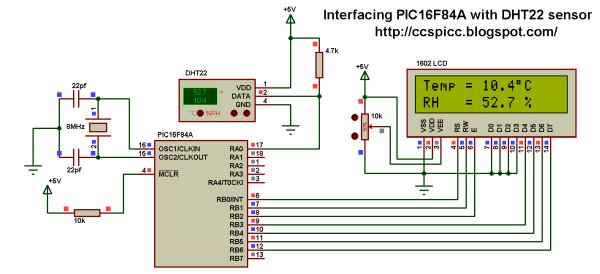
Interfacing PIC16F84A with DHT22(AM2302, RHT03) sensor circuit:
The following circuit schematic shows complete project circuit.
Read more: PIC16F84A + DHT22(AM2302, RHT03) sensor Proteus simulation
Quick Solutions to Questions related to DHT22 Proteus simulation:
- What Proteus version is required for DHT22 simulation?
Proteus version 8.1 or higher is required because the DHT22 model is included in these versions. - What supply voltage does the DHT22 require?
The DHT22 operates from 3.3 to 5.5V power supply. - How many bits of data does the DHT22 send?
The sensor sends 40 bits: 16 bits RH data, 16 bits temperature data, and an 8-bit checksum. - How does the MCU initiate communication with the DHT22?
The MCU pulls the data line low for at least 18 ms, then high for 20–40 µs, then releases the line and switches the pin to input to detect the sensor response. - What is the sensor response timing after the MCU start signal?
The sensor pulls the line low for 80 µs and then high for 80 µs to acknowledge before sending data. - How are bits encoded by the DHT22?
The sensor transmits bits most significant bit first, using different high-pulse durations to indicate 0 or 1 as described in the timing diagrams. - How is temperature and humidity value extracted from the 40-bit data?
Convert the first 16 bits to decimal and divide by 10 for RH; convert the next 16 bits to decimal and divide by 10 for temperature, with the highest temperature bit indicating negative values. - How is the checksum calculated?
The checksum is the low 8 bits of the sum of MSB and LSB of RH and temperature data bytes.
Related projects
PIC Stepper Motor Controller using PIC16F84A with Proteus Simulation
Introduction Stepper motors are widely used in embedded systems and DIY electronics projects where precise position control is required. This PIC Stepper...
Programmers & ICSP · PIC16F84APIC Musical Doorbell using PIC16F84A with Proteus Simulation
IntroductionThis microcontroller project demonstrates a musical doorbell built around a PIC16F84A and a simple piezo sounder.Using two push buttons, the system allows...
Beginner Tutorials · PIC16C84Exploring the World of PIC Microcontrollers: An Architectural Overview
A Peripheral Interface Microcontroller (PIC), developed by General Instruments Microcontrollers in 1993, operates under software control and is programmed to execute various...
Sensors & TemperatureSpectrum Analyzer using TMS320F28023DA with Proteus Simulation
Introduction This project demonstrates a real-time audio spectrum analyzer using the TMS320F28023DA Piccolo microcontroller, simulated in Proteus VSM. The system captures an...
Sensors & TemperatureDHT22 Low Cost Humidity Sensor using PIC18F25K20 with Proteus Simulation
IntroductionThis microcontroller project demonstrates how to interface a DHT22 (RHT03) digital temperature and humidity sensor with a PIC18F25K20 using Proteus simulation.The project...
Sensors & TemperatureCrafting a Microcontroller-Based Temperature Monitoring System
Abstract As technological advancements progress, processes become increasingly intricate, demanding a corresponding expansion in the parameters necessary for efficient analysis. Data acquisition,...

Ibrar Ayyub
I am an experienced technical writer holding a Master's degree in computer science from BZU Multan, Pakistan University. With a background spanning various industries, particularly in home automation and engineering, I have honed my skills in crafting clear and concise content. Proficient in leveraging infographics and diagrams, I strive to simplify complex concepts for readers. My strength lies in thorough...