


Summary of Interfacing PIC16F877A with DHT11 (RHT01) sensor Proteus simulation
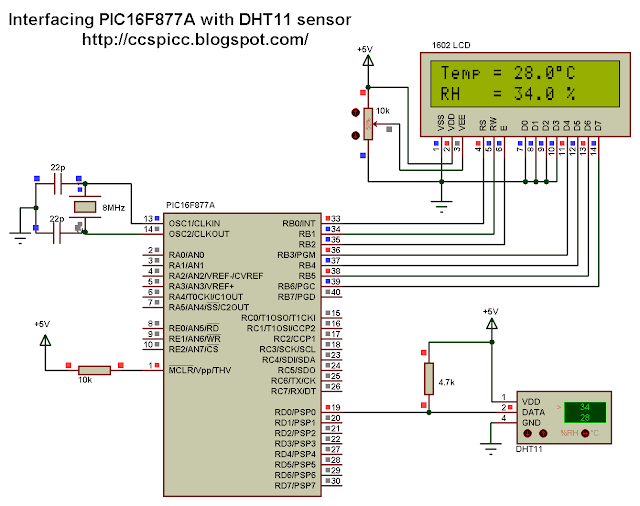
This article details the Proteus simulation of a project interfacing a DHT11 temperature and humidity sensor with a PIC16F877A microcontroller. It explains the 1-wire communication protocol, provides CCS C source code for data reading and checksum validation, and describes displaying results on a 1602 LCD. The guide specifies using Proteus version 8.1 or higher, which includes the necessary sensor library without extra installation.Parts used in the PIC16F877A + DHT11 Proteus Simulation:
- PIC16F877A Microcontroller
- DHT11 (RHT01) Sensor
- 1602 LCD Display
- Proteus Software (Version 8.1 or higher)
- CCS C Compiler PCWHD version 5.051
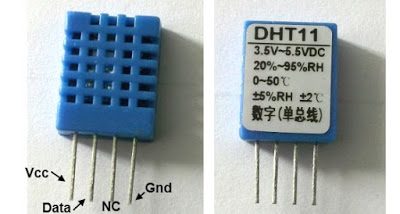
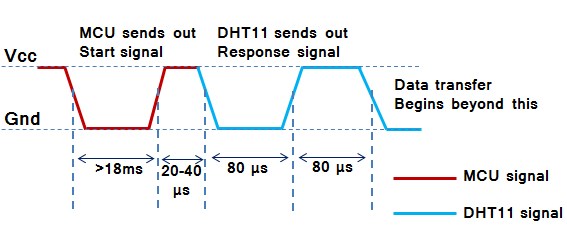
The DHT11 sensor comes in a single row 4-pin package and operates from 3.3 to 5.5V power supply. It can measure temperature from 0-50 °C with an accuracy of ±2°C and relative humidity ranging from 20-90% with an accuracy of ±5%. The sensor provides fully calibrated digital outputs for the two measurements. It has got its own proprietary 1-wire protocol, and therefore, the communication between the sensor and a microcontroller is not possible through a direct interface with any of its peripherals. The protocol must be implemented in the firmware of the MCU with precise timing required by the sensor.
Interfacing PIC16F877A with DHT11 (RHT01) sensor CCS C code:
Variables Time_out and k are used to test reading time to avoid wrong data reception or microcontroller hanging.
// Interfacing PIC16F877A with DHT11 sensor
// http://ccspicc.blogspot.com/
// [email protected]

//LCD module connections
#define LCD_RS_PIN PIN_B0
#define LCD_RW_PIN PIN_B1
#define LCD_ENABLE_PIN PIN_B2
#define LCD_DATA4 PIN_B3
#define LCD_DATA5 PIN_B4
#define LCD_DATA6 PIN_B5
#define LCD_DATA7 PIN_B6
//End LCD module connections

#include <16F877A.h>
#fuses HS,NOWDT,NOPROTECT,NOLVP
#use delay(clock = 8000000)
#include <lcd.c>
#use fast_io(D)
// Connection pin between PIC16F877A and DHT11 (RHT01) sensor
#BIT Data_Pin = 0x08.0                       // Pin mapped to PORTD.0
#BIT Data_Pin_Direction = 0x88.0             // Pin direction mapped to TRISD.0

char message1[] = "Temp = 00.0 C";
char message2[] = "RH   = 00.0 %";
short Time_out;
unsigned int8 T_byte1, T_byte2, RH_byte1, RH_byte2, CheckSum ;
void start_signal(){
  Data_Pin_Direction = 0;              // Configure connection pin as output
  Data_Pin = 0;                        // Connection pin output low
  delay_ms(25);
  Data_Pin = 1;                        // Connection pin output high
  delay_us(30);
  Data_Pin_Direction = 1;              // Configure connection pin as input
}
short check_response(){
  delay_us(40);
  if(!Data_Pin){                     // Read and test if connection pin is low
    delay_us(80);
    if(Data_Pin){                    // Read and test if connection pin is high
      delay_us(50);
      return 1;}
    }
}
unsigned int8 Read_Data(){
  unsigned int8 i, k, _data = 0;     // k is used to count 1 bit reading duration
  if(Time_out)
    break;
  for(i = 0; i < 8; i++){
    k = 0;
    while(!Data_Pin){                          // Wait until pin goes high
      k++;
      if (k > 100) {Time_out = 1; break;}
      delay_us(1);}
    delay_us(30);
    if(!Data_Pin)
      bit_clear(_data, (7 - i));               // Clear bit (7 - i)
    else{
      bit_set(_data, (7 - i));                 // Set bit (7 - i)
      while(Data_Pin){                         // Wait until pin goes low
      k++;
      if (k > 100) {Time_out = 1; break;}
      delay_us(1);}
    }
  }
  return _data;
}
void main(){
  lcd_init();                                 // Initialize LCD module
  lcd_putc('\f');                             // LCD clear
  while(TRUE){
    delay_ms(1000);
    Time_out = 0;
    Start_signal();
    if(check_response()){                    // If there is response from sensor
      RH_byte1 = Read_Data();                 // read RH byte1
      RH_byte2 = Read_Data();                 // read RH byte2
      T_byte1 = Read_Data();                  // read T byte1
      T_byte2 = Read_Data();                  // read T byte2
      Checksum = Read_Data();                 // read checksum
      if(Time_out){                           // If reading takes long time
        lcd_putc('\f');                       // LCD clear
        lcd_gotoxy(5, 1);                     // Go to column 5 row 1
        lcd_putc("Time out!");
      }
      else{
       if(CheckSum == ((RH_Byte1 + RH_Byte2 + T_Byte1 + T_Byte2) & 0xFF)){
        message1[7]  = T_Byte1/10  + 48;
        message1[8]  = T_Byte1%10  + 48;
        message1[10] = T_Byte2/10  + 48;
        message2[7]  = RH_Byte1/10 + 48;
        message2[8]  = RH_Byte1%10 + 48;
        message2[10] = RH_Byte2/10 + 48;
        message1[11] = 223;                   // Degree symbol
        lcd_putc('\f');                       // LCD clear
        lcd_gotoxy(1, 1);                     // Go to column 1 row 1
        printf(lcd_putc, message1);           // Display message1
        lcd_gotoxy(1, 2);                     // Go to column 1 row 2
        printf(lcd_putc, message2);           // Display message2
       }
        else {
          lcd_putc('\f');                     // LCD clear
          lcd_gotoxy(1, 1);                   // Go to column 1 row 1
          lcd_putc("Checksum Error!");
        }
      }
    }
    else {
      lcd_putc('\f');             // LCD clear
      lcd_gotoxy(3, 1);           // Go to column 3 row 1
      lcd_putc("No response");
      lcd_gotoxy(1, 2);           // Go to column 1 row 2
      lcd_putc("from the sensor");
    }
  }
}
Interfacing PIC16F877A with DHT11 (RHT01) sensor Proteus simulation video:
The following video shows Proteus simulation of this interfacing.
Quick Solutions to Questions related to PIC16F877A + DHT11 Proteus Simulation:
- What Proteus version is required for this simulation?
Proteus version 8.1 or higher is required because the DHT11 library is included. - How does the MCU initiate data transmission with the DHT11?
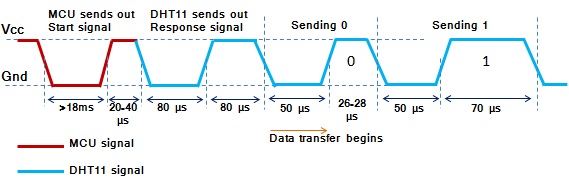
The MCU pulls the data line low for at least 18 ms and then high for 20-40 us. - What voltage range does the DHT11 sensor operate from?
The sensor operates from a 3.3 to 5.5V power supply. - Can the DHT11 communicate directly via standard peripherals?
No, it uses a proprietary 1-wire protocol requiring precise timing in the firmware. - What is the data format sent by the sensor?
The format is 8-bit integral RH, 8-bit decimal RH, 8-bit integral T, 8-bit decimal T, and an 8-bit check sum. - Which compiler was used for the provided code?
The code was written using CCS PIC C compiler PCWHD version 5.051. - How many bits of data does the sensor send continuously?
The sensor sends 40 bits (5 bytes) of data continuously. - What happens if the check-sum calculation fails?
The LCD displays "Checksum Error!"
Related projects
PIC16F877 Driving LCD in 4-Bit Mode using PIC16F877 with Proteus Simulation
Introduction This microcontroller project shows how a PIC16F877 can drive an LCD display using 4-bit mode inside a Proteus simulation.The project demonstrates...
Programmers & ICSP · PIC16F877AEPE PIC/LCD Demo using PIC16F877 with Proteus Simulation
IntroductionThe EPE PIC/LCD Demo is a classic microcontroller project that demonstrates how a PIC16F877 can fully control a PG12864F graphical LCD.Designed as...
Motors & Robotics · PIC16F877AEfficient Sun-Following Robot: A Solar Tracker with Microcontroller Control
Abstract The impending global challenge of dwindling non-renewable fuel resources underscores the urgency of transitioning towards renewable energy alternatives like solar power....
Sensors & TemperatureSpectrum Analyzer using TMS320F28023DA with Proteus Simulation
Introduction This project demonstrates a real-time audio spectrum analyzer using the TMS320F28023DA Piccolo microcontroller, simulated in Proteus VSM. The system captures an...
Sensors & TemperatureDHT22 Low Cost Humidity Sensor using PIC18F25K20 with Proteus Simulation
IntroductionThis microcontroller project demonstrates how to interface a DHT22 (RHT03) digital temperature and humidity sensor with a PIC18F25K20 using Proteus simulation.The project...
Sensors & TemperatureCrafting a Microcontroller-Based Temperature Monitoring System
Abstract As technological advancements progress, processes become increasingly intricate, demanding a corresponding expansion in the parameters necessary for efficient analysis. Data acquisition,...

Ibrar Ayyub
I am an experienced technical writer holding a Master's degree in computer science from BZU Multan, Pakistan University. With a background spanning various industries, particularly in home automation and engineering, I have honed my skills in crafting clear and concise content. Proficient in leveraging infographics and diagrams, I strive to simplify complex concepts for readers. My strength lies in thorough...