
Summary of USB Low Pin Kit
This article describes a minimalist USB development board designed to replace bulkier Microchip kits. Using the PIC18F14K50 microcontroller, the project enables basic USB functionalities like HID devices (mouse, keyboard) and serial converters, though it cannot support storage devices due to memory constraints. The design prioritizes simplicity for breadboard use, featuring essential components and an ICSP header for programming while omitting a reset switch.
Parts used in the USB Low Pin Kit:
- PIC18F14K50 microcontroller
- 12MHz Crystal
- USB connector
- ICSP header
Introduction
USB is very common interface today. If you look around, many of devices today comes with a USB port. Computers, printers, routers, usb keys, etc. All this devices have a USB controller inside. These devices can be divided in two groups:
- USB Host (like a computer, routers, modern LCD TV’s);
- USB Device (like flash drive, mouse, keyboard);
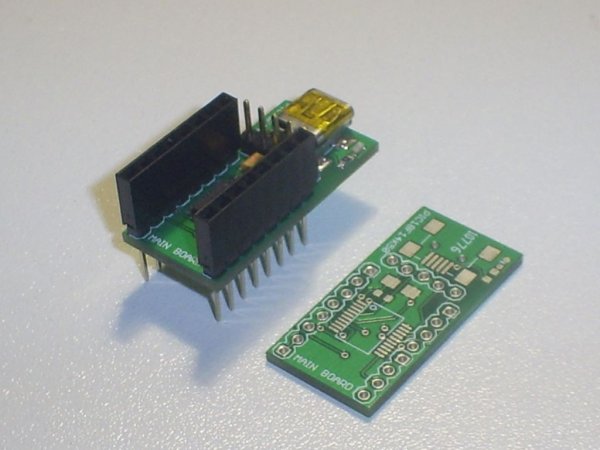
Most of hobby electronic projects still are in RS232 serial communications world. Think in that great market,
Microchip create a very smart line of microcontrollers, USB capable, to move your projects to future. They have great introductory kits, one of them is the “Low Pin Count USB Development Kit”.
These boards contain a PIC18F14K50 microcontroller and can help you to grow up your USB knowledge and with a few steps you still able to create a mouse device, a USB temperature meter or a USB-Serial converter.
My Project
My idea is create a little board with most of Microchip kit, but less parts then all these boards. Only the basic
components to get the microcontroller up and running the Microchip USB Library examples. PIC18F14K50 is a really
basic device and after some research I found what you can do and what you can not do with it:
- What you can do: USB HID (Human Interface Devices) like mouse, keyboards, sensors, serial-usb converters, etc
- What you can not do: USB storage devices, like USB flash drives
USB storage is a problem because of memory limitations on PIC18F14K50 family.
Design
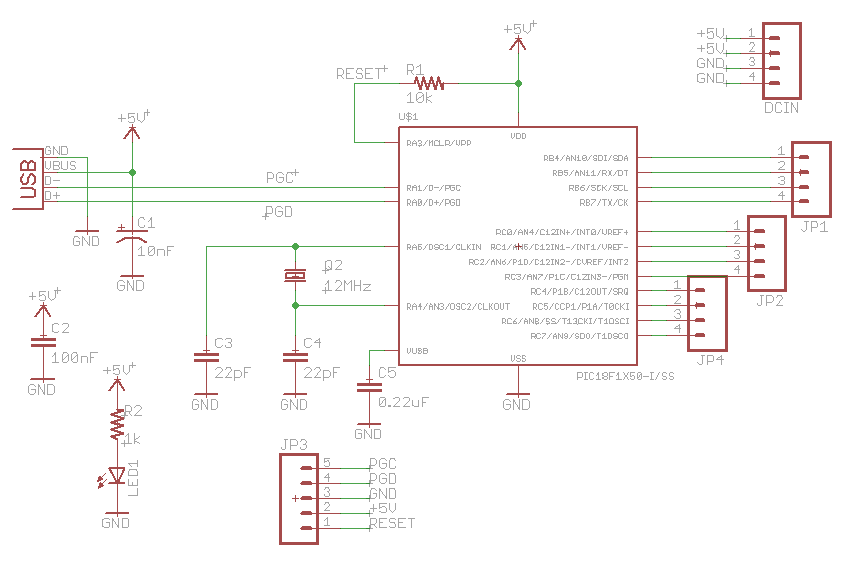
The circuit design is very simples. Basically all you need is
- PIC18F14K50;
- 12MHz Crystal;
- USB connector;
The circuit still have a ICSP header for device programming and debugging. It’s USB powered, so you can pay
attention on current drain (500mA max.). See below:
connect wires and breakout boards. I don’t put a RESET switch on board because I think it’s not necessary (does your mouse have a reset button?). The final design you can view above:For more detail: USB Low Pin Kit
- What types of USB devices can this kit create?
The kit supports USB Human Interface Devices such as mice, keyboards, sensors, and serial-usb converters. - Can I create USB storage devices with this project?
No, you cannot create USB storage devices because of memory limitations on the PIC18F14K50 family. - What is the maximum current drain for the USB powered board?
The board is USB powered and requires attention to a maximum current drain of 500mA. - Why did the author omit a RESET switch from the design?
The author believes a reset button is not necessary since typical devices like mice do not have one. - How is the board intended to be used physically?
The design allows the device to sit alone or be placed on a breadboard with headers to connect wires and breakout boards. - Does the circuit include a feature for debugging?
Yes, the circuit includes an ICSP header specifically for device programming and debugging. - What microcontroller is central to this project?
The project uses the PIC18F14K50 microcontroller which is capable of running Microchip USB Library examples. - What are the two main groups into which USB devices are divided?
USB devices are divided into USB Hosts like computers and routers, and USB Devices like flash drives and keyboards.

