
Summary of 4-port NanoHub – tiny USB hub for hacking projects
The NanoHub 4-port is a compact evolution of the original 2-port NanoHub: a tiny 4-port USB hub only 4 mm wider than its predecessor. It adds ESD protection diodes on input and output ports, increased power traces for up to 4 A combined output, and supports typical full-speed operation though peak draw can reach about 0.8 W. It is intended for soldering into hacking projects with closely spaced wires (cable length limit ~400 mm), requires careful polarity checking, and benefits from insulation like heatshrink or Kapton tape after installation.
Parts used in the NanoHub 4-port:
- NanoHub 4-port PCB assembly (main hub board)
- ESD protection diodes on input and output ports
- Power traces on PCB (upgraded for up to 4 A combined)
- Downstream USB ports (4 ports)
- Upstream USB input port
- Wires for soldering connections (fine, closely spaced)
- Heatshrink tubing or Kapton tape for insulation
A 4-port upgrade to the original NanoHub; an entire 4-port USB hub that is smaller than a USB connector
The NanoHub 4-port is a natural evolution of the original 2-port NanoHub – a truly tiny USB hub to use in the most cramped of spaces. Nanohub 4-port is bigger and better! Even though it boasts twice as many downstream ports (effectively tripling its usefulness; providing 3 extra USB ports instead of just 1), it is only 4mm wider (1/8″). Also, by popular request, ESD protection diodes are included on the input and output ports, meaning you can safely use the NanoHub 4-port with user-accessible ports, where you might zap the port contacts with static electricity. Lastly, the power traces have gotten a slight boost; you can now draw up to 4A on the output ports (combined, sustained).
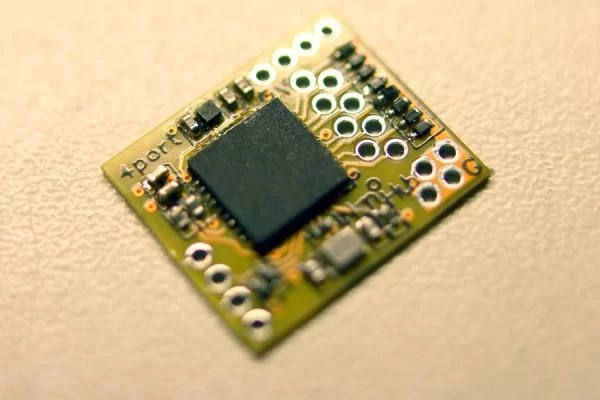
There is a bit of a downside to all this grunt – the power consumption is considerably higher. If you want to run this on a small battery (e.g. hack it into a phone or tablet, or use it in a battery-powered IoT device), you might want to consider using one or more cascaded 2-port NanoHubs. At full speed with all ports operational and transferring data, it can draw up to 0.8W (average). On an operating system that supports selective suspend (and all attached devices also support this), the average power consumption is well below this, a few hundred mW typically.
Directions for use
This USB hub is really for hacking projects, by people who are comfortable soldering tiny wires. The 4-port NanoHub wires are spaced very close together and require a steady hand to connect up. Because these aren’t properly impedance matched wires, you will not be able to use more than approx. 400mm cable lengths reliably. Also, carefully observe and double-check the polarity of your wires. The correct port and pole designation is on the back of the board. Getting this wrong almost certainly means damaging the NanoHub and any attached USB devices. After building it into your project, in order to avoid accidental shorts, use heatshrink or kapton tape around the board to insulate it.
Read More: 4-port NanoHub – tiny USB hub for hacking projects
- What is the size increase compared to the 2-port NanoHub?
It is only 4 mm wider than the original 2-port NanoHub. - How many downstream ports does the NanoHub 4-port provide?
It provides four downstream USB ports, effectively three extra ports compared to the 2-port model. - Does the NanoHub 4-port include ESD protection?
Yes, ESD protection diodes are included on the input and output ports. - What is the maximum combined output current?
The power traces are boosted to allow up to 4 A combined on the output ports (sustained). - How much power can it draw at full speed with all ports active?
At full speed with all ports operational and transferring data, it can draw up to 0.8 W (average). - Is the NanoHub 4-port suitable for battery-powered devices?
Power consumption is higher, so for small battery use consider cascaded 2-port NanoHubs instead. - What cable length is recommended for reliable operation?
Because the wires are not impedance matched, use cable lengths no longer than approximately 400 mm. - Who is the intended user for this USB hub?
It is intended for hacking projects by people comfortable soldering tiny wires. - What precautions are recommended when wiring the NanoHub 4-port?
Carefully observe and double-check wire polarity using the back-of-board designations to avoid damage. - How should the board be protected after installation?
Use heatshrink or Kapton tape around the board to insulate it and avoid accidental shorts.

