
Summary of TRACK CONTROLLER FOR AWANA® GRAND PRIX using PIC16F628
This project describes a measurement and display unit for an Awana Grand Prix racetrack, designed for Christ Memorial Church. It features a three-part system: a controller/display box, a finish line bridge, and a start gate. The system uses a PIC16F648 microcontroller to time cars crossing the finish line within 9.999 seconds, displaying results via an LCD and LEDs. It supports computer connectivity via a 9-pin serial jack using "GrandPrix Race Manager" software and allows timing initiation via push button or remote control.
Parts used in the Awana Grand Prix Track Controller:
- PIC16F648 microcontroller
- Liquid Crystal Display (LCD)
- Start switch (local N.O. pushbutton)
- Remote gate switch (N.C.)
- Remote gate actuator
- First Place LED atop each lane
- 9-pin serial jack
- RS232-to-USB adapter
- GrandPrix Race Manager software
- 6MHz XTAL oscillator
- 20K potentiometer
Introduction
This project is for the hobbiest who wants to build a measurement and display unit for an Awana Grand Prix® track (also known as a Pinewood Derby track.)
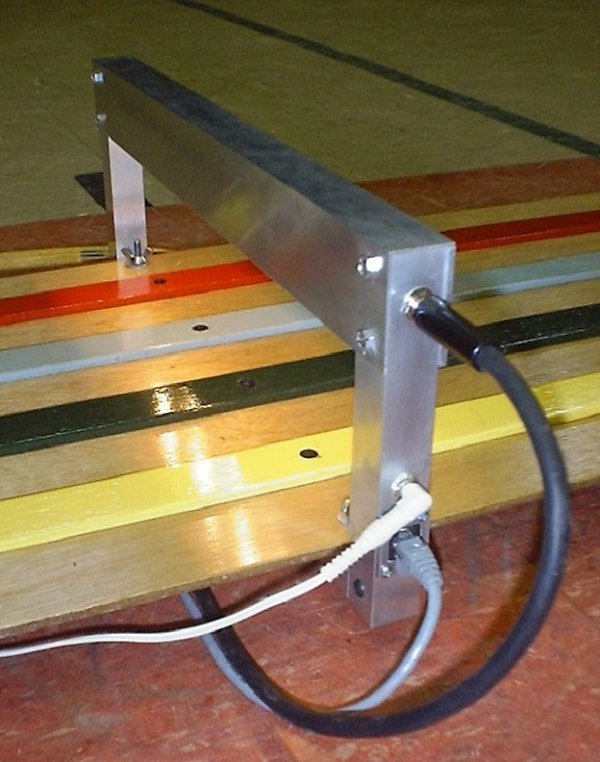
The racetrack for which I designed this unit is a 4-car track. A car is approximately seven inches long, is released by a gate at the starting line, rolls down the ramp by gravity, and crosses the finish line in approximately five seconds. This was designed for Christ Memorial Church, Williston, Vermont, USA.
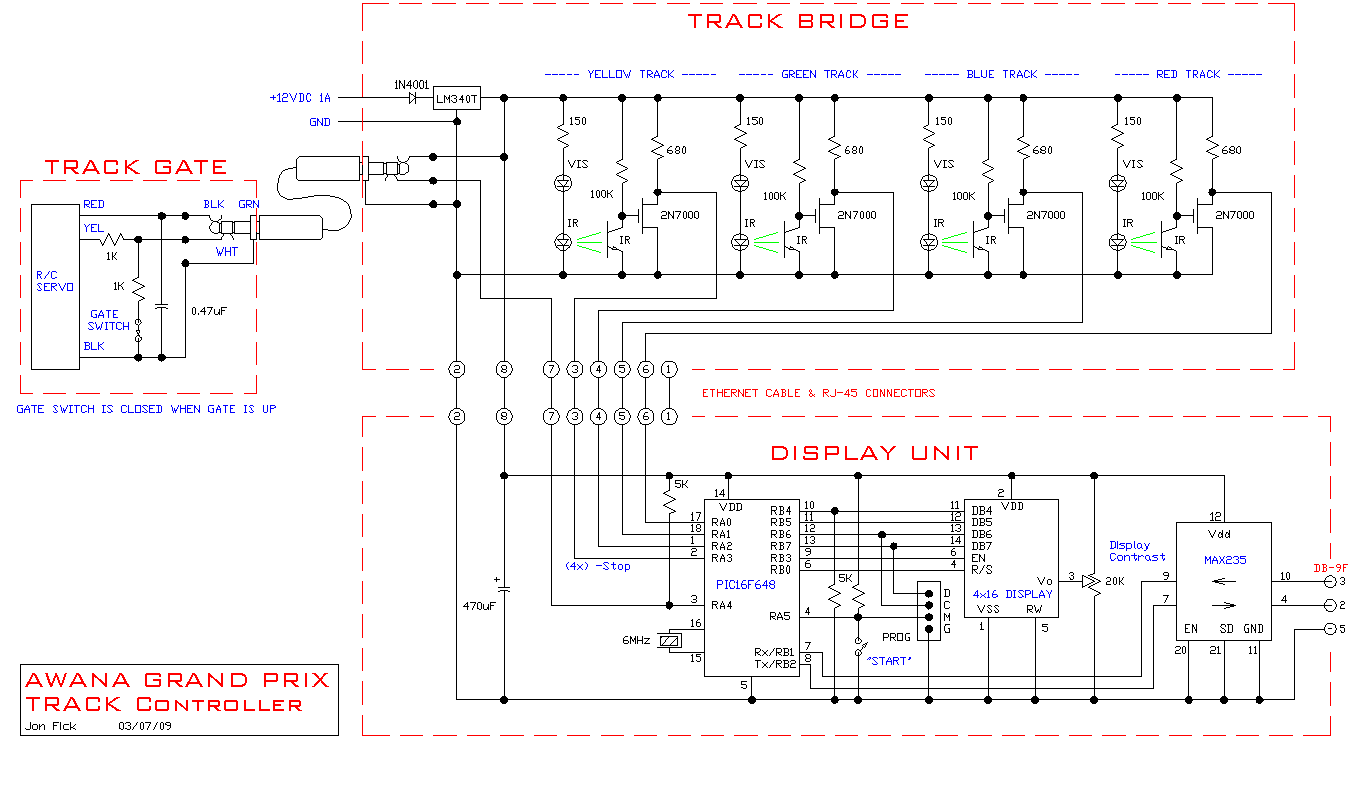
This circuit is contained in three places: in the controller/display box, in the finish line “bridge” unit, and at the start gate. The power supply, the controller/display box, and the start gate switch/servo each connect to the track finish line “bridge.”
The controller box also has a 9-pin serial jack for connection to a computer with appropriate software. For computers lacking a serial jack, RS232-to-USB adapters may provide connectivity. Recommended and tested race management software is “GrandPrix Race Manager” from GrandPrix Software Central. This software is well-written by Randy Lisano, highly configurable (easily customized to work with this track controller) and produces a full-screen image that is very suitable for use with a video projector.
C code
Schematic
My other projects
Questions? Please email me. Jon Fick
Features
Timing is initiated either by pressing the push button or by computer control. The controller waits for one or more cars to cross the finish line and displays the order of finish as well as elapsed timing information.
Code:
// RACE START CHECKS.  These are defined at compile time.
// 0 = no checks,    1 = finish line check only,    2 = start gate and finish line check
#define START_CHECKS     1

/***************************************************************************
AGPV030709.C

This program controls an Awana Grad Prix racetrack.
Times out at 9.999 seconds.
Uses a start switch (local N.O. pushbutton)
and a remote gate switch (N.C.)
and a remote gate actuator.
This version can mask lanes.
With serial communication.
With First Place LED atop each lane.

Elapsed time is 1mS interrupt driven.
Serial communication is interrupt driven, 9600-8-E-1.

WORKING CODE, RACE VERSION!!!

                         +5                             +5
                          |                              |
                         14                              2
                      ----------                     ----------
 -Start---ProgM----4-|          |-10-------------11-|DB4 Vdd   |
 -StopR-----------17-|          |-11-------------12-|DB5       |
 -StopB-----------18-|          |-12----ProgC----13-|DB6       |
 -StopG------------1-|  16F648  |-13----ProgD----14-|DB7     Vo| 3----20K pot
 -StopY------------2-|          |-9---------------6-|EN  LCD   |
 -RemSw------------3-|          |-6---------------4-|RS        |
        6MHz XTAL-16-|          |-7--Rx             |          |
              TAL-15-|          |-8--Tx             | RW   Vss |
                      ----------                     ----------
                           5                           1   5
                           |------------ProgG          |   |
                          Gnd                         Gnd Gnd

**************************************************************************/
For more detail: TRACK CONTROLLER FOR AWANA® GRAND PRIX using PIC16F628
- How is timing initiated?
Timing starts either by pressing the local push button or through computer control. - What happens when cars cross the finish line?
The controller displays the order of finish along with elapsed timing information. - Can this system connect to a computer?
Yes, it has a 9-pin serial jack for connection, though RS232-to-USB adapters work for modern computers lacking serial jacks. - Which software is recommended for race management?
GrandPrix Race Manager from GrandPrix Software Central is the tested and recommended software. - Does the system support masking lanes?
Yes, this version of the code can mask specific lanes during operation. - What is the maximum timeout duration for the timer?
The program times out at 9.999 seconds. - How are the first place indicators displayed?
A First Place LED is located atop each lane to indicate the winner. - Is the elapsed time calculation interrupt driven?
Yes, the elapsed time is managed by a 1mS interrupt.
