
Summary of SIMSCALE RELEASES MAJOR USER INTERFACE UPDATE FOR A BETTER SIMULATION EXPERIENCE IN THE CLOUD
SimScale Workbench 2.0 is a complete rebuild of the web-based CAE platform using modern technology to enhance speed and productivity. It offers desktop-like interaction with cloud computing power, featuring a larger viewer, floating settings panels, improved model coloring, and translucent render modes. This update aims to make simulation accessible to all engineers while paving the way for future automation features.
Parts used in the SimScale Workbench 2.0:
- Web-based CAE platform
- Latest state-of-the-art technology stack
- Cloud computing infrastructure
- Viewer interface component
- Floating settings panels
- Model color scheme system
- Translucent render mode
The new and improved SimScale Workbench 2.0 was built entirely from scratch on the latest, state-of-the-art technology stack, with the goal of drastically improving user productivity by decreasing loading time and increasing interaction speed.
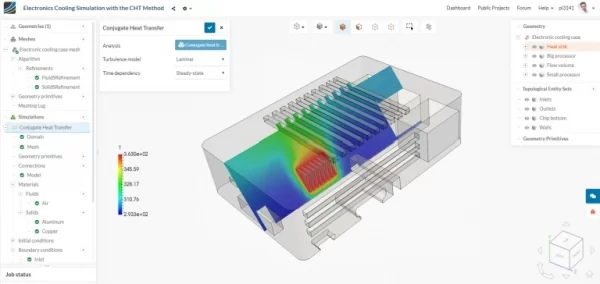
With this update, the SimScale web-based CAE platform is now as fast and interactive as a desktop application, while taking advantage of the unlimited computing power of the cloud. Furthermore, the new solution stack sets the stage for major new updates and features that are already in development and will be released in the coming months.
Right from the start I love it! Well done. This is a really nice improvement,
said Ben Lewis, President at Custom Machines and SimScale customer.
SimScale was built to bring simulation technology to every designer and engineer in the world. With the release of the new workbench, we take a big leap towards making CAE as easy as it needs to be to emerge from the expert’s toolbox into a web-based platform everybody can benefit from. Some exciting automation features are yet to come, so keep an eye on us,
said Alexander Fischer, VP Product and co-founder of SimScale.
In addition, the latest release from SimScale introduces some fundamental changes to the overall user experience, making the SimScale Workbench 2.0 the most advanced, yet user-friendly simulation interface version ever created by the cloud simulation company.
Compared to the old workbench, with the new version the viewer takes up significantly more screen real estate, becoming the heart of the interface. To improve the overall user experience, the settings panels now ‘float’ on top of the viewer, reserving as much space as possible for visualization. Together with a new model color scheme—which preserves the original CAD coloring if possible—and a translucent render mode, interaction with the model has been made significantly more efficient.
Read more: SIMSCALE RELEASES MAJOR USER INTERFACE UPDATE FOR A BETTER SIMULATION EXPERIENCE IN THE CLOUD
- What is the main goal of the new SimScale Workbench 2.0?
The goal is to drastically improve user productivity by decreasing loading time and increasing interaction speed. - How does the new workbench compare to a desktop application?
The platform is now as fast and interactive as a desktop application while utilizing unlimited cloud computing power. - Does the new version change the screen layout significantly?
Yes, the viewer takes up significantly more screen real estate and becomes the heart of the interface. - Can users still see their original CAD colors in the new interface?
Yes, the new model color scheme preserves the original CAD coloring if possible. - What rendering option helps improve interaction efficiency?
A translucent render mode has been introduced to make interaction with the model significantly more efficient. - Are there plans for additional features after this release?
Yes, major new updates including exciting automation features are already in development. - Is the new interface considered user-friendly?
Yes, it is described as the most advanced yet user-friendly simulation interface version created by the company. - Who mentioned loving the improvement right from the start?
Ben Lewis, President at Custom Machines and a SimScale customer, expressed immediate satisfaction with the update.

