


Summary of PROTON IDE TUTORIAL PROTON COMPILER EXAMPLE
Proton IDE tutorials list common PIC microcontroller projects and examples for beginners using the Proton compiler, primarily targeting PIC16F76x/F877/F876/F84 series. Topics include EEPROM read/write, 7-segment display, ADC, 1-Wire iButton, motor drivers, PWM, temperature sensors, RTC, I2C EEPROM, LCDs, RF modules, RGB and servo control, timers, and stepper drivers.Parts used in the Proton IDE Tutorial Examples:
- PIC16F877 microcontroller
- PIC16F876 microcontroller
- PIC16F876A microcontroller
- PIC16F84 / PIC16F84A microcontroller
- EEPROM 24LC256 (I2C)
- DS1307 RTC (32.768 kHz crystal)
- LM35DZ temperature sensor
- DS18S20 temperature sensor
- MAX232 level converter
- iButton Dallas 1-Wire ROM ID chip
- 7-segment display
- 2x16 LCD display
- L298 motor driver
- ULN2003 driver (unipolar stepper)
- TLP434A / RLP434A RF modules
- RGB LEDs
- Servo motor
- DC motor
- Crystals and oscillator components (32.768 kHz)
- General passive components (resistors, capacitors)
Proton PIC Programming Examples and Circuits for Beginners
These Proton PIC programming examples provide a practical starting point for beginners learning PIC microcontroller programming with Proton BASIC. The collection covers common microcontroller tasks such as reading sensors, controlling displays, using communication protocols, managing timers, and driving motors.
Instead of learning only programming syntax, these examples help show how PIC registers, ports, and built-in peripherals are configured in real circuits.
What the Proton Tutorials Cover
The tutorial collection includes projects for several PIC microcontrollers, particularly the PIC16F877, PIC16F876, and related devices.
Topics include:
- EEPROM read and write
- 7-segment display interfacing
- ADC configuration
- Dallas 1-Wire and iButton communication
- L298 DC motor control
- PWM and HPWM
- DS18S20 temperature sensing
- MAX232 serial communication
- DS1307 real-time clock
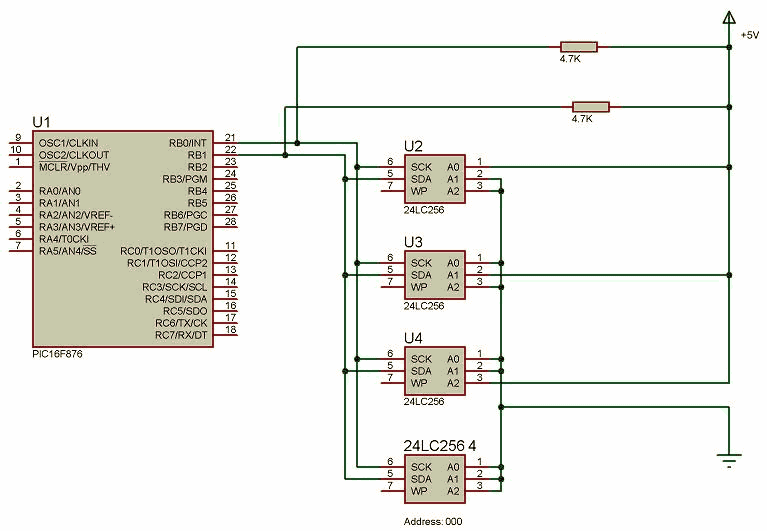
- I2C communication with 24LC256 EEPROM
- LCD and LED applications
- LM35 temperature measurement
- RF transmitter and receiver modules
- RGB LED control
- Servo motor control
- Timer registers
- ULN2003 stepper motor control
Each example can be studied independently before several functions are combined into a larger project.
Check the PIC Configuration Before Compiling
Code written for one PIC model may not work directly on another device.
Before compiling a Proton BASIC example, check the selected microcontroller, oscillator frequency, pin assignments, ADC channels, timers, and required libraries. Different PIC devices may use different registers or peripheral configurations.
The target PIC datasheet and the compiler device configuration should be checked before modifying an existing example.
Testing Sensors and Communication Circuits
Interfaces such as I2C, 1-Wire, MAX232 serial communication, and RF modules depend on correct wiring and timing.
A good approach is to test one section at a time. For example, confirm that an LCD operates correctly before connecting a sensor, or verify serial communication before adding additional functions.
This makes hardware and software faults easier to isolate.
Motor Driver Considerations
Motor-control examples using devices such as the L298 or ULN2003 require additional attention to power.
Motors should normally use an appropriate external supply rather than drawing their operating current directly from the PIC circuit. The microcontroller and motor driver must also share a common ground so that control signals have the same electrical reference.
Final Overview
These Proton PIC programming examples offer practical exercises for learning how PIC microcontrollers interact with displays, sensors, memory devices, communication modules, timers, and motors.
Beginners can start with a simple circuit, confirm that it works correctly, and then gradually combine multiple functions as their understanding of Proton BASIC and PIC hardware improves.
Source: PROTON IDE TUTORIAL PROTON COMPILER EXAMPLE Download proton ide compiler example circuits alternative link: proton-ide-tutorial-proton-compiler-example.rar
Quick Solutions to Questions related to Proton IDE Tutorial Examples:
- What microcontrollers are used in these Proton IDE examples?
The examples target PIC16F877, PIC16F876, PIC16F876A, and PIC16F84 series microcontrollers. - Can I find examples for EEPROM I2C communication?
Yes, there is an example using 24LC256 with SDA and SCL I2C protocol on PIC16F876. - How does the tutorial cover real-time clock functionality?
It includes a DS1307 RTC example using a 32.768 kHz crystal for PIC16F876A. - Does the list include motor control examples?
Yes, it includes L298 DC motor control, ULN2003 unipolar stepper motor, and servo motor examples. - Are temperature sensor examples available?
Yes, examples include LM35DZ with 2x16 LCD and DS18S20 with 2x16 LCD on PIC16F877. - Is there an example for RS232 level conversion?
Yes, a MAX232 example is listed for PIC16F877. - Does the tutorial include LED and display projects?
Yes, it covers 7-segment displays, 2x16 LCDs, and RGB LED control examples. - Are PWM and DAC examples provided?
Yes, it lists PWM HPWM Digital To Analogue Conversion on PIC16F877. - Is there support for 1-Wire devices like iButton?
Yes, an iButton Dallas 1-Wire ROM ID example for PIC16F877 is included. - Where can I download the example circuits?
The source references a downloadable archive named proton-ide-tutorial-proton-compiler-example.rar.
Related projects
PIC16F877 Driving LCD in 4-Bit Mode using PIC16F877 with Proteus Simulation
Introduction This microcontroller project shows how a PIC16F877 can drive an LCD display using 4-bit mode inside a Proteus simulation.The project demonstrates...
Programmers & ICSP · PIC16F877AEPE PIC/LCD Demo using PIC16F877 with Proteus Simulation
IntroductionThe EPE PIC/LCD Demo is a classic microcontroller project that demonstrates how a PIC16F877 can fully control a PG12864F graphical LCD.Designed as...
Motors & Robotics · PIC16F877AEfficient Sun-Following Robot: A Solar Tracker with Microcontroller Control
Abstract The impending global challenge of dwindling non-renewable fuel resources underscores the urgency of transitioning towards renewable energy alternatives like solar power....
Beginner Tutorials · PIC18F4550PICDEM FS USB CDC Evaluation Board using PIC18F4550 with Proteus Simulation
Introduction The PICDEM FS USB CDC Evaluation Board is a practical microcontroller project built around the PIC18F4550, designed to demonstrate USB communication...
Beginner TutorialsPIC12CE518 I2C EEPROM using PIC12CE518 with Proteus Simulation
Introduction This microcontroller project demonstrates how to write and read data using the internal I2C EEPROM of the PIC12CE518 and visualize the...
Beginner TutorialsPico Timer Project using Pico with Proteus Simulation
Introduction Timers are one of the most important features in embedded systems because they allow microcontrollers to perform tasks at precise intervals...

Ibrar Ayyub
I am an experienced technical writer holding a Master's degree in computer science from BZU Multan, Pakistan University. With a background spanning various industries, particularly in home automation and engineering, I have honed my skills in crafting clear and concise content. Proficient in leveraging infographics and diagrams, I strive to simplify complex concepts for readers. My strength lies in thorough...