


Summary of Interfacing Camera with PIC Microcontroller via Matlab GUI
Interfacing Camera with PIC Microcontroller via Matlab GUI enables a PIC16F877 to control a PC-attached camera by sending UART commands to MATLAB, which initializes the camera and captures snapshots. Two push buttons on the PIC send commands: one to initialize the camera, the other to take and save a snapshot. The system uses a serial connection (e.g., COM1 at 9600 baud) between PIC and MATLAB; MATLAB runs a GUI and listens for specific characters (e.g., 'a') to trigger videoinput and snapshot functions.Parts used in the Interfacing Camera with PIC Microcontroller via Matlab GUI:
- PIC16F877 microcontroller
- Personal computer with MATLAB installed
- Webcam or PC camera compatible with MATLAB (videoinput)
- Serial cable (RS232 or USB-serial) for UART communication
- Two push-button switches
- Power supply for PIC16F877
- Breadboard or PCB and interconnecting wires
- Optional TTL-to-RS232 level shifter (e.g., MAX232) if needed
For project on security systems, Interfacing Camera with PIC Microcontroller via Matlab GUI is mostly desirable. But size internal ROM and RAM of PIC16F877 is very small. So it is very difficult or other word imposible to direct Interfacing Camera with PIC16f877 Microcontroller . But we can do it to introducing Matlab GUI and interfacing PIC16F877 with Matlab via UART communication using serial cable.
Project description:
In this project “Interfacing Camera with PIC Microcontroller via Matlab GUI”, we can do interfacing camera via Matlab. By using Matlab command we can easily initialized camera attaching with Computer. So if we establish communication between matlab with microcontroller (PIC16F877) and take control of Matlab command using Matlab GUI from microcontroller then we can easily control camera from our microcontroller. Using this logic we connect two push switch with microcontroller
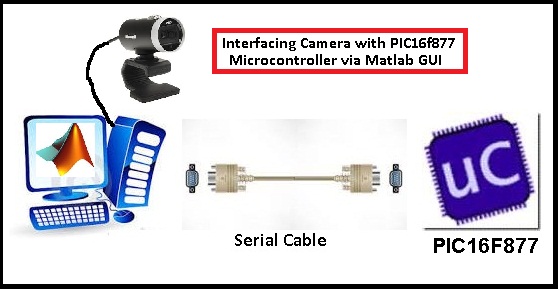
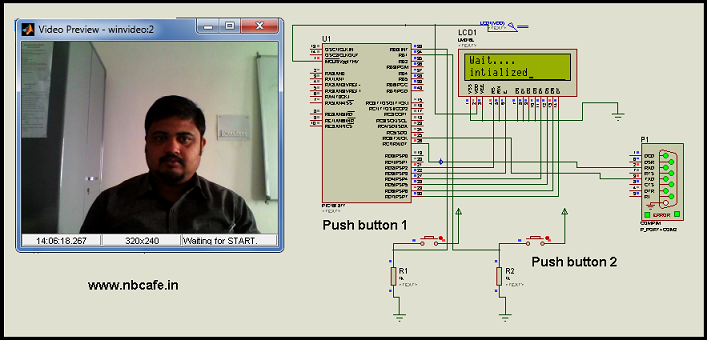
- 1> Push button 1 :- If we press that then Camera will initialized.
- 2> Push Button 2 :- If we press that then Camera will take snapshot and store it to Hard Disk.
In bellow I give the circuit diagram of this project.
Project Operation: - In this project we have to work on two different sectors.
1> Create own Matlab GUI for interfacing Camera attach with Computer.
2> Write a Program for sending control data via UART from PIC16F877.
Matlab GUI for interfacing Camera:
Now question is how to make Matlab GUI? And for that see the bellow video for making simple push button via Matlab GUI or visit this post for know How to make matlab GUI.
And for our project we have write different program for our project Interfacing Camera with PIC Microcontroller via Matlab GUI.
Matlab Code
x=0; while (x==0) s = serial(‘COM1′,’BaudRate’,9600); fopen(s); out=fscanf(s); if (out==’a’) vid = videoinput(‘winvideo’, 2, ‘YUY2_320x240′); For more detail: Interfacing Camera with PIC Microcontroller via Matlab GUIQuick Solutions to Questions related to Interfacing Camera with PIC Microcontroller via Matlab GUI:
- How does the PIC16F877 control the camera?
The PIC sends control characters via UART to MATLAB, which runs commands to initialize the camera or take a snapshot. - Can a PIC16F877 interface directly with a camera?
No, the article states direct interfacing is impractical due to limited internal ROM and RAM, so MATLAB mediates control via UART. - What do the two push buttons do?
Push button 1 sends the command to initialize the camera; push button 2 sends the command to take a snapshot and save it to the hard disk. - How is the serial communication configured in the example MATLAB code?
Serial communication is opened on COM1 with BaudRate 9600 in the example code. - What MATLAB function initializes the webcam in the provided code snippet?
The videoinput function is used to initialize the camera, e.g., vid = videoinput('winvideo', 2, 'YUY2_320x240'). - How does MATLAB detect the PIC command to act?
MATLAB reads from the serial object with fscanf and checks if the received character equals the expected trigger (for example 'a'). - Where are snapshots stored when taken?
The snapshots are saved to the computer's hard disk as indicated in the project description. - What are the two main development tasks for this project?
Create a MATLAB GUI for camera control and write the PIC firmware to send UART control data.
Related projects
PIC16F877 Driving LCD in 4-Bit Mode using PIC16F877 with Proteus Simulation
Introduction This microcontroller project shows how a PIC16F877 can drive an LCD display using 4-bit mode inside a Proteus simulation.The project demonstrates...
Programmers & ICSP · PIC16F877AEPE PIC/LCD Demo using PIC16F877 with Proteus Simulation
IntroductionThe EPE PIC/LCD Demo is a classic microcontroller project that demonstrates how a PIC16F877 can fully control a PG12864F graphical LCD.Designed as...
Motors & Robotics · PIC16F877AEfficient Sun-Following Robot: A Solar Tracker with Microcontroller Control
Abstract The impending global challenge of dwindling non-renewable fuel resources underscores the urgency of transitioning towards renewable energy alternatives like solar power....
Communication & Interfacing · PIC18F4520CAN FD Node based on a PIC18 Microcontroller
The introduction sets the stage for an embedded systems project that involves developing a Embedded C CAN FD project using the MCP2517FD...
Communication & InterfacingLAN9662 Gigabit Switch: Optimized for Industrial Ethernet
Introduction It should come as little surprise therefore that one element of what is now more commonly referred to in some circles...
Communication & InterfacingPIC Microcontroller: Fundamentals & Applications for Students
Introduction Microcontrollers are the key components in the embedded systems market. A variety of embedded systems was formed and developed after the...

Ibrar Ayyub
I am an experienced technical writer holding a Master's degree in computer science from BZU Multan, Pakistan University. With a background spanning various industries, particularly in home automation and engineering, I have honed my skills in crafting clear and concise content. Proficient in leveraging infographics and diagrams, I strive to simplify complex concepts for readers. My strength lies in thorough...