


Summary of Extend I/O Ports using PIC Microcontroller
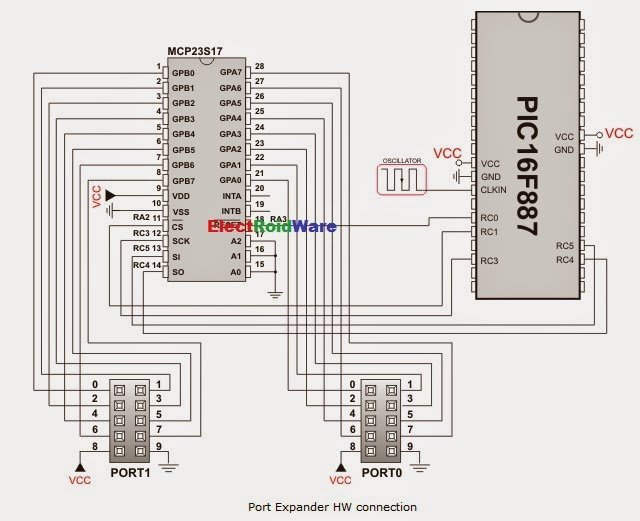
This article details the mikroC PRO for PIC library enabling SPI communication with the Microchip MCP23S17 Port Expander. It outlines necessary external variable definitions for reset and chip select lines, specifies that the SPI module must be pre-initialized, and lists various routines for initialization, byte I/O, port reading/writing, and direction/pull-up configuration.Parts used in the MikroC PRO for PIC Port Expander Project:
- Microchip MCP23S17 Port Expander
- PIC compliant MCU
- SPI module
- Reset line (SPExpanderRST)
- Chip Select line (SPExpanderCS)
- Port A pins
- Port B pins
Important :
- The library uses the SPI module for communication. User must initialize the appropriate SPI module before using the Port Expander Library.
- Library does not use Port Expander interrupts.
 External dependencies of Port Expander Library
| The following variables must be defined in all projects using Port Expander Library: | Description : | Example : |
|---|---|---|
extern sfr sbit SPExpanderRST; |
Reset line. | sbit SPExpanderRST at RC0_bit; |
extern sfr sbit SPExpanderCS; |
Chip Select line. | sbit SPExpanderCS at RC1_bit; |
extern sfr sbit SPExpanderRST_Direction; |
Direction of the Reset pin. | sbit SPExpanderRST_Direction at TRISC0_bit; |
extern sfr sbit SPExpanderCS_Direction; |
Direction of the Chip Select pin. | sbit SPExpanderCS_Direction at TRISC1_bit; |
Library Routines
- Expander_Init
- Expander_Init_Advanced
- Expander_Read_Byte
- Expander_Write_Byte
- Expander_Read_PortA
- Expander_Read_PortB
- Expander_Read_PortAB
- Expander_Write_PortA
- Expander_Write_PortB
- Expander_Write_PortAB
- Expander_Set_DirectionPortA
- Expander_Set_DirectionPortB
- Expander_Set_DirectionPortAB
- Expander_Set_PullUpsPortA
- Expander_Set_PullUpsPortB
- Expander_Set_PullUpsPortAB
Expander_Init
| Prototype | void Expander_Init(char ModuleAddress); |
|---|---|
| Returns | Nothing. |
| Description | Initializes Port Expander using SPI communication. Port Expander module settings :
Parameters :
|
| Requires | Global variables :
must be defined before using this function. |
| Example |
C source |
Expander_Init_Advanced
| Prototype | void Expander_Init_Advanced(char *rstPort, char rstPin, char haen); |
|---|---|
| Returns | Nothing. |
| Description | Initializes Port Expander using SPI communication. Parameters :
|
| Requires |
must be defined before using this function. |
| Example |
C source (2) |
Expander_Read_Byte
| Prototype | char Expander_Read_Byte(char ModuleAddress, char RegAddress); |
|---|---|
| Returns | Byte read. |
| Description | The function reads byte from Port Expander. Parameters :
|
| Requires | Port Expander must be initialized. |
| Example |
Code listing (3) |
Expander_Write_Byte
| Prototype | void Expander_Write_Byte(char ModuleAddress, char RegAddress, char Data); |
|---|---|
| Returns | Nothing. |
| Description | Routine writes a byte to Port Expander. Parameters :
|
| Requires | Port Expander must be initialized. |
| Example |
Code listing (4) |
Expander_Read_PortA
| Prototype | char Expander_Read_PortA(char ModuleAddress); |
|---|---|
| Returns | Byte read. |
| Description | The function reads byte from Port Expander's PortA. Parameters :
|
| Requires | Port Expander must be initialized.
Port Expander's PortA should be configured as input. |
| Example |
C source (5) |
 Expander_Read_PortB
| Prototype | char Expander_Read_PortB(char ModuleAddress); |
|---|---|
| Returns | Byte read. |
| Description | The function reads byte from Port Expander's PortB. Parameters :
|
| Requires | Port Expander must be initialized.
Port Expander's PortB should be configured as input. |
| Example |
C source (6) |
For more detail: Extend I/O Ports using PIC
Quick Solutions to Questions related to MikroC PRO for PIC Port Expander Project:
- How do you initialize the Port Expander?
The user must first initialize the appropriate SPI module before using the library functions like Expander_Init. - What variables must be defined in all projects?
Variables for the Reset line, Chip Select line, and their respective directions must be defined externally. - Does the library use interrupts?
No, the library does not use Port Expander interrupts. - Can you read data from specific ports?
Yes, functions like Expander_Read_PortA and Expander_Read_PortB allow reading bytes from specific ports. - How do you configure a port as input?
You use routines like Expander_Set_DirectionPortA or Expander_Set_DirectionPortB to set the direction. - What parameters are required for Expander_Init?
The function requires the ModuleAddress which represents the Port Expander hardware address. - Is hardware addressing enabled by default?
Yes, the standard Expander_Init enables hardware addressing. - Can you write a byte to a register?
Yes, the Expander_Write_Byte routine writes a byte to the Port Expander's internal register address. - What is the best way to handle digital I/O configuration?
The example code suggests setting ANSEL and ANSELH to 0 to configure analog pins as digital I/O.
Related projects
CAN FD Node based on a PIC18 Microcontroller
The introduction sets the stage for an embedded systems project that involves developing a Embedded C CAN FD project using the MCP2517FD...
Communication & InterfacingLAN9662 Gigabit Switch: Optimized for Industrial Ethernet
Introduction It should come as little surprise therefore that one element of what is now more commonly referred to in some circles...
Communication & InterfacingPIC Microcontroller: Fundamentals & Applications for Students
Introduction Microcontrollers are the key components in the embedded systems market. A variety of embedded systems was formed and developed after the...
Communication & Interfacing10BASE-T1S Ethernet: Simplified OEM Design for Auto Devices
Introduction Cars these days are surrounded by technology. They come loaded with all sorts of electronic gadgets and sensors. This project wants...
Communication & InterfacingDesigning a Microcontroller Framework for PC-Based Control of Electrical Appliances
ABSTRACT The preference for personal computers as a platform for designing and implementing control algorithms is growing due to the ease of...
Communication & InterfacingEfficient Multichannel Data Acquisition with USB Connectivity using PIC Microcontroller
1. INTRODUCTION With the rapid advancements in embedded technology, there is a growing demand for a data acquisition system that combines fast...

Ibrar Ayyub
I am an experienced technical writer holding a Master's degree in computer science from BZU Multan, Pakistan University. With a background spanning various industries, particularly in home automation and engineering, I have honed my skills in crafting clear and concise content. Proficient in leveraging infographics and diagrams, I strive to simplify complex concepts for readers. My strength lies in thorough...