
Summary of How to set up your B&W Zeppelin Air
This article guides users on setting up the Bowers & Wilkins Zeppelin Air for wireless AirPlay streaming using a dedicated mobile app. It highlights firmware updates that enable wireless configuration without Ethernet cables, allowing audio streaming from iOS devices or computers. The process involves downloading the "Bowers & Wilkins AirPlay Setup" app, connecting the speaker to a temporary Wi-Fi network named after the device, and following on-screen instructions to finalize the setup.
Parts used in the Bowers & Wilkins Zeppelin Air Setup:
- Bowers & Wilkins Zeppelin Air
- iPod docking station
- AirPlay compatible device
- Mac or PC
- Ethernet cable (optional)
- iPhone
- iPad
- iPod touch
- Bowers & Wilkins AirPlay Setup app
With the B&W Zeppelin Air being such a popular iPod docking station as well as a fantastic AirPlay compatible device we thought it would be a good idea to write a ‘how to’ on setting up your new Zeppelin Air.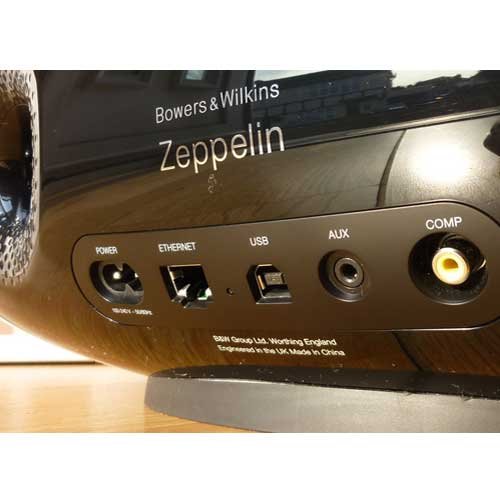
As of September 2012 newer machines are installed with a slightly newer firmware version. The main reason for this is to make the Zeppelin Air easier to setup for AirPlay. The main benefit being you can now get AirPlay setup wirelessly rather than having to connect an Ethernet cable from your Zeppelin Air and your PC.
Apple’s AirPlay technology allows music to be streamed wirelessly from your Mac or PC to your Zeppelin Air. You can also bypass the computer entirely if you want and stream high-quality audio directly from your iPhone, iPad or iPod touch.
B&W have released a new app to walk you through the setup of this feature so no need to flick through manuals finding the right step or messing around with cables. The app will show you pictures of each step throughout the setup. If you want to make use of the AirPlay feature and don’t currently own an iPod or iPad etc. in the near future B&W will be releasing a program for your PC or Mac very similar to the current one for iPods.
The app is called ‘Bowers & Wilkins AirPlay Setup’ and is available free on the App Store. Once you have downloaded the app all you have to do is start it up and do the following:
Once the app has started up you will see the following screen,
As you can see from the welcome page of the app you can set up as many Bowers & Wilkins Wireless Music Systems as you like. For each system you want to setup just click ‘add new’.
So for setting up your Zeppelin Air you need to click the ‘add new’ button on the bottom right.
You will then be shown a message to make sure you have removed any docked or connected devices and once you have done this power up the system.
The first thing you should see on your Zeppelin Air is the led flashing red.
It will flash red for a few moments then start flashing yellow, this means it is ready to be setup.
Once you see the yellow LED flashing click next in the app, you then need to click the home button on your iPod/iPhone/iPad and go into you settings app.
Once in the settings app select Wi-Fi
Then choose ‘yourdevice_setup’ in this case it will say ‘ZeppelinAir_setup’ or similar. When you have selected that Wi-Fi network press the home button again and reopen the ‘Bowers & Wilkins AirPlay Setup’ app.
When you reopen the app it will take you back to the page you were on and you can click ‘done’, you will then be asked if you have selected the Wi-Fi network as described, click ‘continue’.
For more detail: How to set up your B&W Zeppelin Air
- How can I set up my Zeppelin Air wirelessly?
You can use the free Bowers & Wilkins AirPlay Setup app to configure the device without an Ethernet cable. - What is the main benefit of the newer firmware version installed as of September 2012?
The update allows for wireless AirPlay setup instead of requiring an Ethernet cable connection between the speaker and a computer. - Can I stream music directly from my iPhone or iPad without a computer?
Yes, Apple's AirPlay technology allows you to bypass the computer and stream high-quality audio directly from your iPhone, iPad, or iPod touch. - Where can I download the Bowers & Wilkins AirPlay Setup app?
The app is available for free on the App Store. - What does it mean if the LED on my Zeppelin Air is flashing yellow?
A flashing yellow light indicates that the system is ready to be set up via the app. - Which Wi-Fi network should I select during the setup process?
You must choose the network labeled 'ZeppelinAir_setup' or similar from your device's Wi-Fi settings. - Do I need to remove connected devices before starting the setup?
Yes, the app instructs you to ensure all docked or connected devices are removed before powering up the system. - What happens if I do not own an iPod or iPad but want to use this feature?
Bowers & Wilkins plans to release a program for PC or Mac similar to the current one for iPods.
