
Summary of Weather station using PIC18F452 Microcontroller
This project is a PIC18F452-based weather station displaying indoor/outdoor temperatures, pressure, relative humidity, calendar, clock, and 42-hour history with high/low memory. It supports Celsius/Fahrenheit and mbar/hPa or mm Hg, uses power-saving sleep modes, wireless outdoor transmitter, EEPROM data storage, and a 3-button menu for configuration. Schematic, PCB, source code, and hex file are available; parts sold in the project shop.
Parts used in the Weather station using PIC18F452 Microcontroller:
- PIC18F452 microcontroller
- 9V battery or AA batteries (power source)
- Wireless outdoor transmitter module
- LCD display
- Pressure sensor (for mbar/hPa or mm Hg)
- Relative humidity sensor
- Temperature sensors (indoor and remote outdoor)
- EEPROM (onboard or external for data storage)
- Three user buttons: Menu, Min, Plus
- Supporting resistors, capacitors, and connectors (PCB components)
- Schematic and PCB (Eagle 4.11e files)
Weather station with pressure reading, relative humidity, indoor & remote outdoor temperature display.
Both Celsius or Fahrenheit & mbar/hPa or mm Hg supported. With calendar & clock. Easy 3-button user-menu. 42 hour-history display (curve). Auto-memory & display of all high and low-values.
PIC 18F452 running at 4 MHz, power saving sleep mode. Sensors are only turned on when needed.
All parts are available in our online shop.
Schematic & pcb (Eagle 4.11e), source code (CCS) and hex file available. Updated on May 6, 2006.
Future developments: fully solar powered.
Circuit explanation:
Now this was a huge project! All sensors had to be fully tested one at a time, wireless communication had to be perfect, various LCDs were tried. Nevertheless, here’s the result: hope you enjoy it!
The circuit may be powered by a small 9V battery, but you’d better take a couple of AA-batteries. A 6-pack will last a several months. Consumption for the base station is around 8 to 9 mA whilst active and only 2 to 3 mA in sleep mode (LCD remains on.) The transmitter takes slightly less.
The receiver (base station) is active during 5 seconds & then goes to sleep for 45 seconds. The transmitter takes a nap every 30 seconds or so.
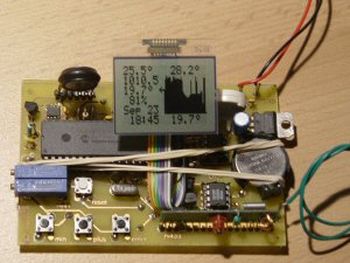
Menu mode is entered when pushing the “menu” button (what’s in a name?) for 1 second. Browsing & value changes are done with the “min” & “plus” keys. When in normal mode (like in the picture above), the “min” and “plus” keys can browse through the different histories. All these controls will wake up the processor if it was in sleep mode.
On the left-hand side of the LCD we have (from top to bottom:) Outside temperature, Pressure, Inside Temperature, Relative Humidity, Calendar and Clock.
On the right: High value of the past 42-hours, Bar graph histogram (right is most recent value), Low value.
All sensors are read & LCD (left-hand side) are updated every 50 seconds. Histogram is updated on the hour (e.g. 10h00, 17h00, 22h00,…)
All data is stored in EEPROM and is loaded at power-up. In case of a power failure (or when changing batteries), there will be no data (nor history) lost.
For more detail: Weather station using PIC18F452 Microcontroller
- What microcontroller does the project use?
The project uses a PIC18F452 microcontroller. - Can it display both Celsius and Fahrenheit?
Yes, it supports both Celsius and Fahrenheit. - Does it support different pressure units?
Yes, it supports mbar/hPa and mm Hg. - How long is the history display?
The device displays a 42-hour history with curves and stores high and low values. - How is power saved in the system?
The PIC runs at 4 MHz and uses sleep mode; sensors are turned on only when needed. - How often are sensors read and the LCD updated?
Sensors are read and the LCD left-hand side updated every 50 seconds. - How often is the histogram updated?
The histogram is updated on the hour (e.g., 10:00, 17:00, 22:00). - Will data be lost on power failure or battery change?
No, all data is stored in EEPROM and loaded at power-up so no data or history is lost. - What buttons control the menu and navigation?
Three buttons are used: Menu (enter menu), Min and Plus (browse and change values). - Are the schematic, PCB, and source code available?
Yes, schematic and PCB (Eagle 4.11e), source code (CCS) and hex file are available.

