


Summary of 2 Digit up/down Counter using PIC16F628A
This article describes a two-board microcontroller project featuring a PIC16F628A experimental board and a PIC12F629 2-digit up/down counter. Both circuits support In-Circuit Programming via PICkit-2. The design allows for modifications like adding alarms, buzzers, or expanding the display to three digits, though multiplexing reduces brightness with extra digits. Testing involves checking segment illumination by applying 5V to specific pins without the chip installed.Parts used in the 2 Digit Up/Down Counter:
- PIC16F628A Microcontroller
- PIC12F629 Microcontroller
- PICkit-2 Programmer
- Experimental PC Board
- Surface-mount components
- Diode
- 100n Surface Mount Capacitor
- Two Surface-Mount Transistors
- Up/Down Buttons
- 22k Resistors
This project comes via two circuits on 2 boards. The first circuit is designed around a PIC16F628A. It has been presented on an experimental PC board using surface-mount components and was built in less than 1 hour, with about 2 hours to write and finalise the program. See P1, P2
The second circuit uses a PIC12F629 to produce a 2-Digit Up/Down Counter (see P3).
Both use "In Circuit Programming" via PICkit-2.
P5 Describes the up/down counter displaying the "gear" for motorcycles and racing cars.
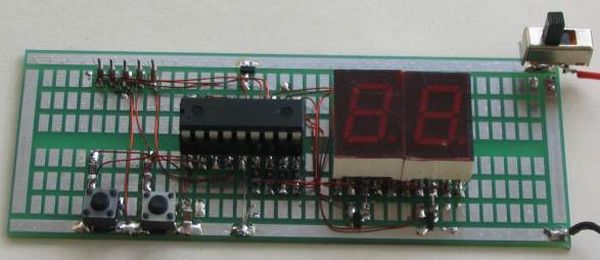
The project shows what can be done with a micro and you can modify it to set an alarm at any count-value or set a limit such as "count-to-60." You can add a buzzer or relay or increase the display to 3 digits. You need to remember that each additional display will reduce the illumination of each digit as they are "multiplexed (time-sharing)."
The experimenter PC Board shows the five "In Circuit Programming" pins and a diode on the positive rail to drop the 6v supply to 5.4v. The board also has a 100n surface mount capacitor and two surface-mount transistors. The Up/Down buttons have 22k resistors. TESTING THE CIRCUIT
Check the circuit by removing the chip and taking pins 6 and 18 to the 5v rail ad make sure segment "A" illuminates. Do the same for all the other segments.
The circuit diagram does not have any voltages marked on it as the circuit is DIGITAL.
All the "lines" or "wires" or pins of a microcontroller will have rail voltage (5v) on them when they are HIGH and when you come to a resistor, the resistor will drop a certain voltage. The voltage it will drop will be the difference between rail voltage and the voltage developed across the component it is driving. If it is driving a LED, the LED will drop a characteristic voltage of between 1.7v and 3.6v, depending on the colour.
If the component is a transistor, the voltage developed between the base and emitter will be about 0.7v.
For more detail: 2 Digit up/down Counter using PIC16F628A
Quick Solutions to Questions related to 2 Digit Up/Down Counter:
- How long did it take to build the first circuit?
The experimental PC board was built in less than 1 hour. - Can you modify the project to set an alarm?
Yes, you can modify it to set an alarm at any count-value. - What happens if you increase the display to 3 digits?
Each additional display will reduce the illumination of each digit because they are multiplexed. - Does the circuit diagram have voltages marked on it?
No, the circuit diagram does not have any voltages marked on it as the circuit is digital. - How do you test the circuit segments?
Remove the chip and take pins 6 and 18 to the 5v rail to make sure segment A illuminates. - What voltage drops across a driving LED?
An LED will drop a characteristic voltage of between 1.7v and 3.6v depending on the color. - What voltage develops between the base and emitter of a transistor?
The voltage developed between the base and emitter will be about 0.7v. - How many programming pins are shown on the experimenter PC Board?
The board shows five In Circuit Programming pins.
Related projects
DHT11 Low Cost Humidity Sensor using PIC16F628A with Proteus Simulation
IntroductionThis microcontroller project demonstrates how to interface a low-cost DHT11 temperature and humidity sensor with a PIC16F628A using a Proteus simulation environment.The...
Motors & Robotics · PIC12F629RGB LED PWM Driver for High Power 350mA LEDs using PIC12F629
Description This project combines a PIC and three constant current 'buck' converters to produce an RGB LED controller that will operate with...
LCD & Display Projects · PIC16F628AFrequency Counter by PIC16F628
In this project we are building a basic and low cost frequency counter circuit . It can measure from 16Hz to 100Hz...
Clocks & TimersAdaptive Alarm Clock: Build a Smart, User-Centric wake-Up system
Project Overview The goal of this ambitious undergraduate project was to develop a novel alarm clock capable of analyzing a person's unique...
Clocks & TimersDesigning Your Ideal Alarm Clock: An Introduction to PIC18
Within this laboratory session, you'll employ the C language to create an alarm clock, delving into the implementation of "C" programs on...
Clocks & TimersBuilding your Dream Alarm Clock Using the PIC18
Objective: In this laboratory session, your objective is to create an alarm clock using the C programming language. You will gain proficiency...

Ibrar Ayyub
I am an experienced technical writer holding a Master's degree in computer science from BZU Multan, Pakistan University. With a background spanning various industries, particularly in home automation and engineering, I have honed my skills in crafting clear and concise content. Proficient in leveraging infographics and diagrams, I strive to simplify complex concepts for readers. My strength lies in thorough...