


Summary of Pic-Plot2 GPIB to USB converter
Pic-Plot2 is a low-cost GPIB to USB converter that emulates an HP7470A plotter. It captures data from GPIB instruments and outputs it via USB for PC storage, using a PIC16F628 microcontroller and FT232R chip. The device draws power directly from the USB port, eliminating the need for external adapters or dip-switches. It supports both listener and talker modes but does not support controller mode, allowing users to capture raw measurement arrays or rasterized data easily through simple setup menus.Parts used in the Pic-Plot2 Project:
- PIC16F628 microcontroller
- FT232R chip (FTDI)
- Green LED (LD1)
- Red LED (LD2)
- Pushbutton switch
- GPIB cable
- A-B USB cable
- PCB board (57x64mm)
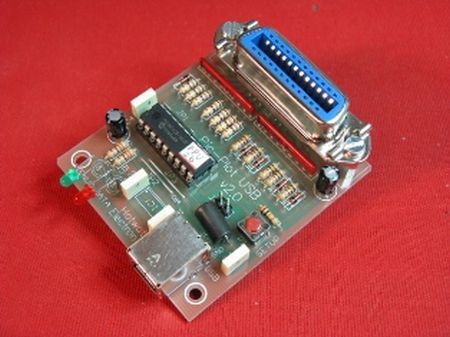
Pic-plot now goes to USB! A perfect low cost solution to quickly get screen plots of your GPIB instrument on your laptop PC without complex software. It emulates the HP7470A operation on the GPIB side, and outputs the HP-GL data at the USB port to be read and stored on the PC by any capturing software. GPIB addresses and other set-and-forget parameters can be configured by a simple Setup menu, then no Dip-switches are used. Power is taken from the USB port to simplify cabling and get rid of a DC adaptor. The operation of this interface is not just limited to digital plotter emulation: any data intended to be received by a GPIB Device (addressable or listener only) can be captured from the instrument and brought out to the USB port, including raw measurement arrays or rasterized data for a graphic printer. It is based on a PIC16F628 microcontroller and an FT232R chip. PCB size is just 57x64mm.
SCHEMATIC AND DETAILS
The hardware of Pic-Plot2 interface is quite simple: the active components are a Microchip PIC16F628 microcontroller and an FT232 chip from FTDI. The microcontroller manages the GPIB protocol and signals, while the FT232 does the bridging between the USB and the microcontroller UART. No oscillator crystal is needed because the FT232 provides the 12 MHz clock for the microcontroller, and the 5V needed to supply the whole circuit are taken from the USB host PC.
The microcontroller does all the necessary jobs to emulate GPIB Device functionality, in both Listener and Talker mode, by recognizing addressing, commands and managing the Handshake lines. Controller mode is not needed for the intended functionality, and therefore is not supported. Once the device is addressed and it receives data from the Talker, the same data are forwarded from microcontroller UART to the FT232 at 38400 baud. Then the FT232 manages the USB communication to the host PC where a Virtual COM Port (VCP) has been created by installing the proper drivers. A standard A-B USB cable is needed for data and power connection. There is no power switch: the interface is ON whenever plugged to the host PC.
Two LEDs (LD1-green, LD2-red) respectively indicate:
- Successful bus enumeration
- Data traffic (RX or TX) over USB bus
A small pushbutton switch is provided to enter Setup mode. In this mode the PC is used to read/change a few set-and-forget parameters that are stored in the non-volatile memory of the microcontroller. Even if the GPIB cable can be left connected to the instrument, in Setup mode the GPIB port is not monitored by the Pic-Plot2. Normal operation is restored at the end of Setup procedure, or unplugging-replugging the interface from the host PC.
For more detail: Pic-Plot2 GPIB to USB converter
Quick Solutions to Questions related to Pic-Plot2 Project:
- How does the Pic-Plot2 project obtain power?
Power is taken directly from the USB port of the host PC, so no DC adaptor is needed. - What components are used as the active hardware parts?
The hardware uses a Microchip PIC16F628 microcontroller and an FT232 chip from FTDI. - Does the device require an external oscillator crystal?
No, the FT232 provides the 12 MHz clock required by the microcontroller. - Can the interface operate in controller mode?
No, controller mode is not supported; it only functions in Listener and Talker modes. - How are GPIB addresses configured on this device?
Addresses and parameters are set via a Setup menu on the PC rather than using Dip-switches. - What baud rate is used for data forwarding between the microcontroller and FT232?
Data is forwarded at 38400 baud from the microcontroller UART to the FT232. - What do the two LEDs on the device indicate?
The green LED indicates successful bus enumeration, while the red LED shows data traffic over the USB bus. - Is a power switch included on the Pic-Plot2 interface?
No, there is no power switch because the interface turns on whenever it is plugged into the host PC.
Related projects
DHT11 Low Cost Humidity Sensor using PIC16F628A with Proteus Simulation
IntroductionThis microcontroller project demonstrates how to interface a low-cost DHT11 temperature and humidity sensor with a PIC16F628A using a Proteus simulation environment.The...
LCD & Display Projects · PIC16F628AFrequency Counter by PIC16F628
In this project we are building a basic and low cost frequency counter circuit . It can measure from 16Hz to 100Hz...
Games, Toys & Calculators · PIC16F628ATIC TAC TOE game using PIC16F628
This project is not to introduce Tic Tac Toe. Everyone knows this game. It's to introduce two features. Bi-coloured LEDs, microcontrollers and...
Communication & Interfacing · PIC18F4520CAN FD Node based on a PIC18 Microcontroller
The introduction sets the stage for an embedded systems project that involves developing a Embedded C CAN FD project using the MCP2517FD...
Communication & InterfacingLAN9662 Gigabit Switch: Optimized for Industrial Ethernet
Introduction It should come as little surprise therefore that one element of what is now more commonly referred to in some circles...
Communication & InterfacingPIC Microcontroller: Fundamentals & Applications for Students
Introduction Microcontrollers are the key components in the embedded systems market. A variety of embedded systems was formed and developed after the...

Ibrar Ayyub
I am an experienced technical writer holding a Master's degree in computer science from BZU Multan, Pakistan University. With a background spanning various industries, particularly in home automation and engineering, I have honed my skills in crafting clear and concise content. Proficient in leveraging infographics and diagrams, I strive to simplify complex concepts for readers. My strength lies in thorough...