


Summary of Door lock opener
This article describes a programmable door lock opener circuit controlling electric strikes or electromagnetic locks. It features automatic doorbell-triggered unlocking, immediate manual button activation, and delayed timer-based unlocking via long-press. A two-color LED indicates system states (red for off/auto-off, flashing red/green for auto, yellow during delay). Users can program relay duration and delay timers using hex values entered through a specific button-switch combination, with timing measured in 10ms units.Parts used in the Door Lock Opener:
- Electric strike or electromagnetic lock
- Doorbell
- Switch (SW)
- Button (BUTTON)
- Relay
- Two-color LED display
description
This circuit can be used to operate an electric strike or an electromagnetic lock on a door. It is not the door being opened/closed, but a small electromagnetic strike which unlocks the door. The opener has the following features currently programmed in software:
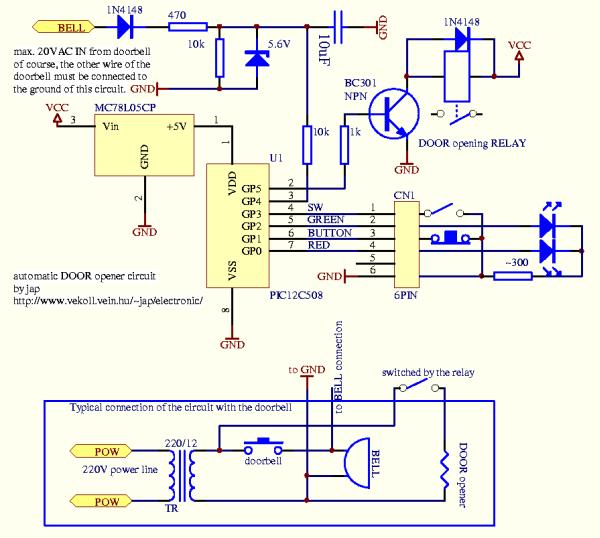
- automatic operation when a guest pushes the doorbell, the strike is operated immediately - can be set by a switch (SW)
- manual remote operation - by pushing a button (BUTTON), the strike is operated immediately
- timer delayed operation by pushing the same button longer than 500 ms - the strike is operated after a pre-set time
- programmable timer delays for relay operating time and delay before timer opening
- two-color LED display shows current state
usage
After power-on the circuit will be operating and the display LED will be constant RED when the auto switch is in OFF state and will be slowly changing between red and green when the switch is in AUTO state. Shortly pushing the BUTTON will operate the door relay for about 3 seconds (this delay can be reprogrammed). Holding down the PUSH button for a bit longer will operate the door relay after about 20 seconds. This timer delay is also reprogrammable. The display LED lights in constant YELLOW while the delay timer is running.
delay programming
WARNING: entering inappropriate codes for the timers will result in strange operation (too long/short delays) and you may have to break the power for the device to reset and start again.
To enter the delay programming mode, hold down the BUTTON and change the state of the SWITCH. The LED display will turn OFF until the release of the BUTTON. In this mode the software reads the values for the two timers in the form of 4 hex numbers. The first two numbers make up an 8-bit value for the timer of the door opening time and the second two numbers make up an 8-bit value for the delay timer. The values are given in a rough 10 ms unit.
For more detail: Door lock opener
Quick Solutions to Questions related to Door Lock Opener:
- How does the circuit operate when a guest pushes the doorbell?
The strike is operated immediately if the auto switch is set to the ON state. - Can I manually open the door using a button?
Yes, pushing the BUTTON immediately operates the strike. - What happens if I hold down the PUSH button longer than 500 ms?
The strike operates after a pre-set time delay of about 20 seconds. - What does the constant RED LED indicate?
It shows the circuit is operating with the auto switch in the OFF state. - How do I enter the delay programming mode?
Hold down the BUTTON and change the state of the SWITCH simultaneously. - What unit are the timer values given in?
The values are given in a rough 10 ms unit. - What does the LED display show while the delay timer is running?
The display LED lights in constant YELLOW. - How many hex numbers are read during programming?
The software reads four hex numbers representing two 8-bit values.
Related projects
Voice Activated Power Sockets (Home Automation)
Yet another voice controlled home automation system! As shown in the picture, the system can control any electrical appliance, by turning ON...
Home Automation & SecurityHome Security System with GSM Using 8051 Microcontroller
Security is a big challenge everywhere because thefts are increasing day by day owing to the unsafe and insecure security systems in...
Home Automation & SecurityHome Automation and Security System using Microcontroller ATMEGA8 with Arduino Programming
Home automation and security systems have become very popular these days, today industrial automation techniques are widely adopted by luxurious homes and...
Home Automation & Security · PIC16F84ABicycle Persistence of Vision Light Display using PIC16F84
In February of 2007 I spent a little while prototyping a board that turns any bicycle wheel into a moving display billboard...
Home Automation & SecurityFTS-8 subtone encoder
Many Yaesu transceivers from the 1990s and thereabouts could use an optional FTS-8 module, that provided subtone generation for transmission, and subtone...
Home Automation & SecurityHand Sign Lock
Introduction Security using technology is a growing and expanding field to protect against the user's identity or property. As more advanced tools...

Ibrar Ayyub
I am an experienced technical writer holding a Master's degree in computer science from BZU Multan, Pakistan University. With a background spanning various industries, particularly in home automation and engineering, I have honed my skills in crafting clear and concise content. Proficient in leveraging infographics and diagrams, I strive to simplify complex concepts for readers. My strength lies in thorough...