


Summary of Building a PIC18F USB device
This article guides readers in building a breadboarded USB HID device using the PIC18F4550 microcontroller. It covers firmware development with MPLAB and C18 compiler, and Windows interface creation via Visual C# 2010 Express. The project demonstrates two-way communication to control an LED and read a push-button state without requiring custom drivers or expensive certifications.Parts used in the PIC18F USB Device:
- PIC18F4550 microcontroller
- PIC18F2550 microcontroller (optional substitute)
- Breadboard
- LED
- Push-button switch
- MPLAB software
- Microchip C18 compiler
- Microsoft Visual C# 2010 Express
Introduction
I get a number of emails every month asking about creating USB devices using the PIC18F microcontroller. After looking at projects such as my Atari Joystick USB Adaptor and C64 VICE Front-End there seems to be a demand for more information on how to 'hack your own'.
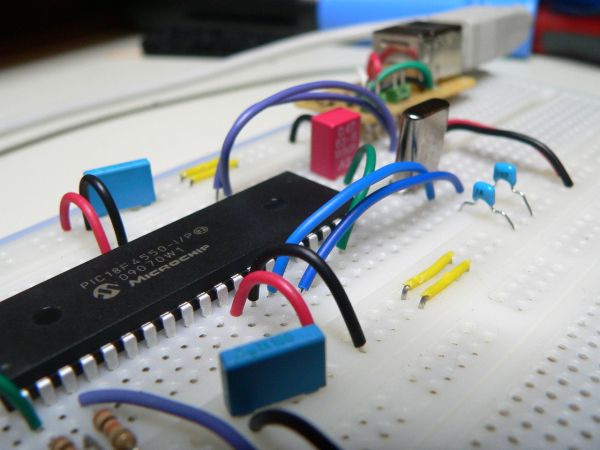
In this article I will show how to breadboard a simple USB generic HID device, creating the PIC18F firmware and finally creating the Windows interface for the device which will allow you to control a LED from the PC and read the state of a push-button from the device. Since the advent of Windows 7 you need an expensive Microsoft validation certification to create custom USB drivers (without it most users cannot even install your software). Using the built in drivers for generic HID devices provides a simple method of creating Windows and Linux compatible devices and also makes the creation of both firmware and software far simpler. Since the HID standard does not require custom drivers you will not need to get a certificate for your driver, also both Windows and Linux have built-in libraries to help you communicate.
For this article we're going to stick to a fairly basic USB device. The device will allow you to control a LED from Windows and also see the status of a push-switch on the device. Using this the basic principals of 2-way USB communication will be made clear allowing you to progress onto more complex projects.
To keep the cost and difficulty as low as possible I will concentrate on breadboard construction of the hardware using few components, the PIC18F firmware will be based on (the freely available) MPLAB and Microchip C18 compiler, the Windows software will be created using Microsoft Visual C# 2010 express (which is also free to download).
Although this article is based around the PIC18F4550 microcontroller you can easily substitute this for the smaller and cheaper PIC18F2550 which is code compatible with the larger 4550.
If you want to follow along with this article I suggest you scroll down to the bottom and download the accompanying software. Also make sure you have MPLAB, Microchip C18 for the PIC18F and Microsoft Visual Studio 2010 express installed.
For more detail: Building a PIC18F USB device
Quick Solutions to Questions related to PIC18F USB Device:
- Why use a generic HID device for this project?
It avoids the need for expensive Microsoft validation certification and allows compatibility with Windows and Linux using built-in drivers. - What hardware method is used for construction?
The project uses breadboard construction to keep costs and difficulty low. - Which microcontroller is primarily featured?
The article focuses on the PIC18F4550, though the PIC18F2550 is a compatible alternative. - What software is used to create the firmware?
Firmware is created using the freely available MPLAB and Microchip C18 compiler. - How is the Windows interface developed?
The interface is created using Microsoft Visual C# 2010 express. - Can this project run on Linux?
Yes, the built-in drivers for generic HID devices make the device compatible with Linux. - What functionality does the device demonstrate?
It controls an LED from Windows and reads the status of a push-switch on the device. - Is the PIC18F2550 code compatible with the PIC18F4550?
Yes, the smaller PIC18F2550 is code compatible with the larger 4550.
Related projects
Voltage Measurement with A PIC Microcontroller
Voltage Measurement with PIC Microcontroller articulates a methodical framework for facilitating analog voltage measurement using the PIC18F4520, an advanced member of Microchip’s...
Development Boards & KitsUltra-Low Power: Microcontroller Standby Current to 130uA with OPEnS Power Control Board
At the OPEnS Lab, a key focus for our projects is achieving exceptionally long battery life. This was particularly true for the...
Development Boards & KitsAn Integrated Approach to Developing Applications with Microchip PIC Microcontrollers
1. Introduction In our daily lives, a variety of devices such as telephones, household appliances, and cars incorporate "smart" electronics, typically manifested...
Development Boards & KitsMicrocontroller-Driven AC Voltage Control with Soft Start Feature
1. INTRODUCTION PWM-based AC voltage controllers find extensive application in uninterruptible power supplies (UPS) and high-power flexible AC transmission systems. This variable...
Development Boards & KitsPIC Microcontroller-Based IC Tester for Efficient Integrated Circuit Verification
1. INTRODUCTION Within the electronics industry[1], as circuit complexity undergoes a drastic increase and the demand for higher reliability rises, a significant...
Development Boards & Kits · PIC16F887Hands-On Microcontroller Projects: BK300 Development Board Featuring PIC16F887 Chip Lab
1. INTRODUCTION The study of microcontroller systems is experiencing a global surge across various fields within science, engineering, and technology departments of...

Ibrar Ayyub
I am an experienced technical writer holding a Master's degree in computer science from BZU Multan, Pakistan University. With a background spanning various industries, particularly in home automation and engineering, I have honed my skills in crafting clear and concise content. Proficient in leveraging infographics and diagrams, I strive to simplify complex concepts for readers. My strength lies in thorough...