
Summary of PIC MicroController Volume Adjuster Program(Proteus 8 Stimulation)
The article describes creating a software-simulated PIC16F877A-based volume adjuster (default 10, min 5, max 20) using Proteus 8 and Mikro C Pro. It uses a 16x2 LCD in 4-bit mode, an SW_ROT_3 rotary switch to avoid floating inputs, and a 10k potentiometer for contrast. The project shows component placement and portB pin connections for RS, E, and D4–D7, with the PIC using its internal 8 MHz crystal.
Parts used in the Volume Adjuster Program:
- Proteus 8 Professional (software)
- Mikro C Pro Plus (software)
- PIC16F877A Microcontroller
- LM016L 16x2 Alphanumeric LCD
- 10k ohm potentiometer (for VEE/contrast)
- SW_ROT_3 rotary switch
- Resistors as needed (10k referenced)
- Power supply +5V and GND
Hello everyone,
The important aspect of every learning is to induce curiosity and doing something meaningful to satisfy that.With the help of that curiosity, I’m here making a volume adjuster program which resembles the same in most devices but not that much, Here the default volume will be 10.Maximum volume will be 20 as well as the minimum volume will be 5.
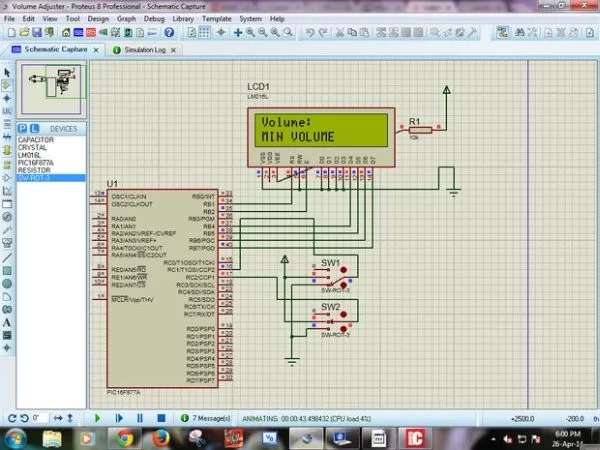
Well, here I’m using Proteus 8 Professional for stimulation and Mikro C Pro Plus 2012 as Embedded Compiler for programming the microcontroller because I’ve already ran out of hardware and money :).
Step 1: Things You will need
Since this is a fully software stimulated program, You will need not more than the following softwares:
1.Proteus 8 (Any build or Version).
2.Mikro C (Any build or Version).
Step 2: The Connections.
Open Proteus. In the Component Mode, select Pick from devices and search and double click the following components:
1.LM016L (16×2 AlphaNumeric Display LCD)
2.PIC16F877A Microcontroller (Here i am going with 16F877A as it is the most common PIC Microcontroller)
3.A Resistor or POT(Value = 10k Ohms).
4. SW_ROT_3 switch
Here we’ll use the inbuilt crystal with the default frequency 8MHz.
I have used the SW_ROT_3 switch to avoid floating point errors.
I made a 4-bit connection to LCD as it is more than enough for this program.
Do the Following Connections:
1.Place the PIC16F877A
2.On the right side of it place the LCD Display.
3.In the LCD, connect VSS to gnd, VDD to +5V and RW , D0,D1,D2,D3 to ground(since its a 4 bit connection) . VEE is connected to +5V via a 10K ohms resistor.
4.We are going to use portB in PIC to control LCD. so, connect RB1,RB2,RB4,RB5,RB6,RB7 to RS,E,D4,D5,D6,D7 in the LCD respectively.
5.Connect the SW_ROT_3 switches as shown.
For more detail: PIC MicroController Volume Adjuster Program(Proteus 8 Stimulation)
- What is the default, minimum, and maximum volume in the program?
The default volume is 10, minimum is 5, and maximum is 20. - Which microcontroller is used in the project?
The PIC16F877A microcontroller is used. - Which software tools are required to simulate this project?
Proteus 8 Professional and Mikro C Pro Plus are required. - How is the LCD connected to the PIC?
The LCD is used in 4-bit mode with RB1, RB2, RB4, RB5, RB6, and RB7 connected to RS, E, D4, D5, D6, and D7 respectively. - Why is the SW_ROT_3 switch used?
The SW_ROT_3 rotary switch is used to avoid floating point errors. - What is used for LCD contrast adjustment?
A 10k ohm potentiometer is connected to VEE for contrast adjustment. - What crystal frequency is used for the PIC?
The inbuilt crystal with default frequency 8 MHz is used. - Which LCD data lines are grounded for 4-bit mode?
D0, D1, D2, and D3 are grounded since a 4-bit connection is used.

