
Summary of Windows 95 on an Apple Watch
Summary: The author ported Windows 95 to an Apple Watch by patching WatchKit apps to run custom code and bundling an emulated x86 environment. They copied Xcode symbols/headers, built a UIKit app as a framework, redirected the WatchKit stub to that framework, integrated a Bochs port, and included a Windows 95 disk image. The emulated OS boots but is very slow (about an hour to boot). Optional hardware hack prevents the watch from sleeping.
Parts used in the Windows 95 on Apple Watch project:
- Apple Watch (with 520 MHz processor, 512 MB RAM, 8 GB internal storage)
- Xcode (iphoneOS, iphoneSimulator, watchOS, watchSimulator platforms)
- Copied symbols and headers from Xcode platforms
- UIKit-based iOS app built inside a framework
- install_name_tool (to repoint WatchKitStub/WK binary)
- Bochs x86 emulator (iOS port jury-rigged into framework)
- Windows 95 disk image
- Configuration file for Bochs/Windows 95
- Optional: motor and hot glue for the watch crown to prevent sleep
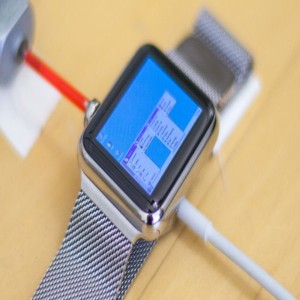
I installed Windows 95 on my Apple Watch
With a 520 MHz processor, 512 MB of RAM, and 8GB of internal storage, the Apple Watch packs a lot of computing horsepower into a very small package. On paper, its processor alone is about twenty-five times faster than the average 386, and 512 MB was the size of a hard drive in the mid nineties, not memory. As a result, I was feeling confident that the Apple Watch had the ability to run one of the most revered desktop operating systems Redmond has ever produced.Pretty much. I was born in the nineties, and the first personal computer my family bought (a $3000 screamer with a 300 MHz Pentium II, 256 MB of RAM, and the optional Boston Acoustics speaker system) ran Windows 95. Also, this isn’t the first time I’ve installed an old operating system on a watch. Here’s a video of my Apple Watch running Mac OS 7.5.5:
Unlike the above port of the Mini vMac emulator, the result here had to be interactive. That meant that Apple’s WatchKit SDK wasn’t good enough, since it doesn’t allow you to access user touch locations directly — it only lets you use Apple’s stock controls. Long story short, it’s possible to patch certain files within a WatchKit app to load your own application code rather than Apple’s. For more information, check out Steven Troughton-Smith’s excellent blog post on the subject.
Here’s an outline of the steps involved:
- Copy symbols and headers from Xcode’s iphoneOS and iphoneSimulator platforms to the watchOS and watchSimulator platforms, respectively.
- Build your “normal” UIKit-based iOS app inside a framework, rather than in your WatchKit extension.
- Use install_name_tool to point your WatchKit app’s _WatchKitStub/WK binary to your framework instead of SockPuppetGizmo. SockPuppetGizmo is the framework that (to my knowledge) runs WatchKit and interacts with normal WatchKit extensions that developers write.
- Jury-rig the iOS port of the Bochs x86 emulator into your framework. “Easy!” “How hard can it be?” read: Pretty hard. In my case, Xcode crashed whenever I tried to use lldb. Your mileage may vary.
- Copy a Windows 95 disk image in to your app’s bundle, write the config file, and boot ‘er up.
*Optional: hot glue a motor to the watch’s crown to keep it from falling asleep.
Will It Blend?
Yes! Due to the fact that it is emulated (not virtualized), it takes about an hour to boot.
For more detail: Windows 95 on an Apple Watch
- Can an Apple Watch run Windows 95?
Yes; the author emulated Windows 95 on an Apple Watch using a Bochs port bundled in a WatchKit app framework. - How was WatchKit made to run custom code?
The author patched files and used install_name_tool to point the WatchKitStub/WK binary to their framework instead of SockPuppetGizmo. - What emulator was used to run Windows 95?
The iOS port of the Bochs x86 emulator was jury-rigged into the framework. - What files were copied from Xcode to enable the port?
Symbols and headers from Xcode's iphoneOS and iphoneSimulator platforms were copied to the watchOS and watchSimulator platforms, respectively. - How long does it take to boot Windows 95 on the Apple Watch?
About an hour to boot due to emulation overhead. - Was any hardware modification used to keep the app running?
Optionally, the author hot glued a motor to the watch crown to keep it from falling asleep. - Does the approach use WatchKit's normal touch APIs?
No; WatchKit's SDK does not allow direct touch locations, which is why custom code and patched binaries were used. - Was running Windows 95 virtualized or emulated?
It was emulated, not virtualized.
