


Summary of AT Keyboard Interface V1.04 using PIC16F84
This article describes a low-cost, simple RS232 terminal project using a PIC16F84 microcontroller. It connects a standard PS/2 keyboard and an LCD module to a PC or serial device via a cable. The system captures keyboard input using an interrupt service routine, converts scan codes to ASCII, and transmits them over RS232. Applications include controlling MP3 jukeboxes, access control systems, and potentially networked appliances with future enhancements.Parts used in the RS232 Terminal Project:
- Microchip PIC 16F84 microcontroller
- Standard PC keyboard (PS/2 type)
- LCD module (2 lines by 40 characters dot matrix)
- MAX232 level shifter
- 4 MHz crystal
- RS232 terminal software (e.g., Windows Hyperterminal)
Introduction
Sometimes you only need a simple and cheap RS232 terminal to get sufficient control over a PC or a RS232 device. There is no need, no space or even no power to place a monitor, a computer case and a keyboard. Maybe there exists also the problem, that the PC or the device is located somewhere else and you want to interact with it over a short distance.
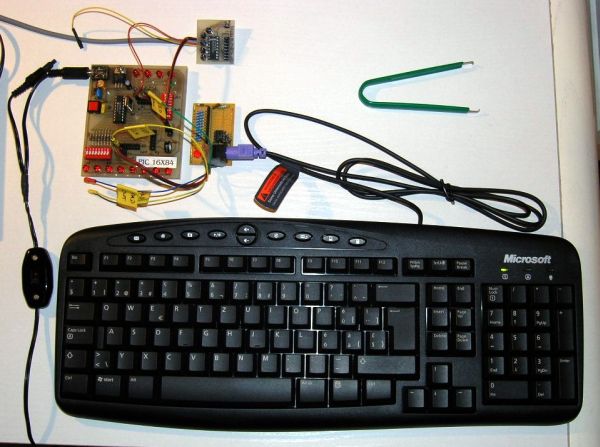
The cheapest way to obtain a complete user interface is the use of standard components, such as LCD modules and PC keyboards. A standard PC keyboard (PS/2 type) costs about US-$ 12, a 2 lines by 40 characters dot matrix LCD module around US-$ 20.
To connect these items to the serial port by cable, a microcontroller and a RS232 level shifter are necessary. For longer distance control, there exists also the possibility to interconnect the terminal with the other device by a wireless physical transmission layer.
Possible Applications
The RS232 terminal for instance is very convenient in conjunction with a PC based Juke-Box playing MP3 files. You only need a command line programmable MP3 player (or a player with a supplied Active-X interface) and a software-based connection between player and RS232 port. This software 'connection' could be realized using Visual Basic and the often supplied Active-X interfaces of the various Windows based MP3 players.
Another possible area for applications is PC observed access control. Therefore, the RS232 terminal is placed at the entrance to the supervised area.
A further enhancement to be able to satisfy todays needs for network-based communication would be a complete TCP/IP based communication layer together with an Ethernet front-end. Then it would be possible to control simple Ethernet appliances, e.g. your coffee maker, electrical rolling shutters, autonomous net-based lawn mower,... 😉 by this remote terminal. Brave new world ...
How it works
Any key stroke on the local keyboard will send the corresponding scan patterns from the keyboard to the PIC microcontroller. Afterwards, the microcontroller converts the keyboard scan patterns to ASCII characters and transmits them to the RS232 target device.
The keyboard scan code capture is done by an interrupt service routine (ISR). The event, which triggers the interrupt is a falling edge on the keyboard clock line (PORTB,0). Keyboard scan pattern acquisition takes place at the keyboard data line (PORTA,4). After 11 clocks (i.e. 11 external interrupts on RB0/INT), the interrupt service routine has completely captured an 8 bit element of the entire scan pattern and sets a ready flag. The decoding of this 8 bit element is then carried out during normal operation mode, activated by a valid ready flag whilst keeping the keyboard stalled (keyboard clock line low).
The fact, that the scan pattern acquisition is carried out using an interrupt service routine and the decoding thereof is done during normal operation mode allows for performing other tasks concurrently: That's why I call the acquisition methodology preemptive, it does not block the processor in the main loop while acquiring keyboard data - therefore passing processing resources to other services. Explicitely, it works as follows:
After proper acquisition, the corresponding flag KBDflag is set (at the end of the ISR) and the decoded keyboard character resides in the register KBD. The KBDflag is cleared at the end of the service routine KBDdecode.
Infinitive main loop to acquire keyboard input (keyboard_v1xx.asm), keyboard data is in register KBD:
        ;******************************
_MLOOP  btfsc   KBDflag      ; check scan pattern reception flag
        call    KBDdecode    ; if set, call decoding routine
        ;btfsc   your_other_flag
        ;call    your_other_service
        goto    _MLOOP
        ;******************************
Only RS232 transmission is supported by this program, since PORTB,0 interrupt is already used by the keyboard clock line. There exists no possibility to implement also RS232 reception using my modules m_rsxxx.asm, because they require PORTB,0 as well and are laid out as non-preemptive data acquisition routines (see also 'Limitations').
For dedicated code adaptations, please refer to the section 'User-specific Customization' below.
Specifications
| Processor: | Microchip PIC 16F84 |
| Clock Frequency: | 4 MHz crystal |
| Throughput: | 1 MIPS |
| RS232 Baud Rate: | 9600 baud, 8 bit, no parity, 1 stopbit |
| Code Size of entire Program: | 523 instruction words |
| Keyboard Routine Features: | Capability of uni-directional communication between microcontroller and keyboard |
| Acquisition Methodology: | Preemptive, interrupt-based keyboard scan pattern acquisition, decoding to ASCII characters during normal operation mode activated by ready flag |
| Required Hardware: | AT keyboard, PS/2 connector, MAX232 |
| Required Software: | RS232 terminal software (or Excel 97 RS232 Debug Interface) |
Features
- Uni-directional communication between microcontroller application and remote RS232 client.
- Uni-directional communication between microcontroller and keyboard.
- Support for all keyboard characters typed with shift button active and inactive.
- English and modified Swiss-German 'codepages' available (QWERTY and QWERTZ)
- Caps Lock implemented
- Num Lock always active
- Possibility to implement short-cuts or user defined characters for 'Esc', 'Num Lock', 'Scroll Lock' and 'F1' - 'F12' keys.
- Further enhancement, not implemented: Support of ASCII conversion from direct ALT-DEC and CTRL-HEX entries, e.g. ALT + 6 + 4 = @ or CTRL + 3 + F = ?
To visualize the ASCII data sent by this microcontroller application, use a terminal program like the Windows Hyperterminal. Below an example session, which proves the correct functionality of the keyboard interface. This terminal program and the Excel 97 RS232 Debug Interface have been used to debug the interface during implementation time.
For more detail: AT Keyboard Interface V1.04 using PIC16F84
- What is the primary purpose of this project?
To provide a simple and cheap RS232 terminal for controlling a PC or RS232 device without needing a monitor, case, or keyboard. - How does the microcontroller handle keyboard input?
It uses an interrupt service routine to capture scan patterns on a falling edge of the clock line and decodes them to ASCII during normal operation. - Can this system support bidirectional RS232 communication?
No, only uni-directional RS232 transmission is supported because PORTB,0 is occupied by the keyboard clock interrupt. - What are the specified RS232 communication settings?
The system operates at 9600 baud, 8 bits, no parity, and 1 stopbit. - Which microcontroller is required for this design?
The project requires a Microchip PIC 16F84 processor running at a 4 MHz clock frequency. - Does the keyboard interface support special keys like Caps Lock?
Yes, Caps Lock is implemented, and Num Lock is always active. - What software tools can be used to visualize the data sent by the microcontroller?
You can use terminal programs like Windows Hyperterminal or the Excel 97 RS232 Debug Interface. - What is the code size of the entire program?
The code size of the entire program is 523 instruction words.
Related projects
PIC Stepper Motor Controller using PIC16F84A with Proteus Simulation
Introduction Stepper motors are widely used in embedded systems and DIY electronics projects where precise position control is required. This PIC Stepper...
Programmers & ICSP · PIC16F84APIC Musical Doorbell using PIC16F84A with Proteus Simulation
IntroductionThis microcontroller project demonstrates a musical doorbell built around a PIC16F84A and a simple piezo sounder.Using two push buttons, the system allows...
Beginner Tutorials · PIC16C84Exploring the World of PIC Microcontrollers: An Architectural Overview
A Peripheral Interface Microcontroller (PIC), developed by General Instruments Microcontrollers in 1993, operates under software control and is programmed to execute various...
Communication & Interfacing · PIC18F4520CAN FD Node based on a PIC18 Microcontroller
The introduction sets the stage for an embedded systems project that involves developing a Embedded C CAN FD project using the MCP2517FD...
Communication & InterfacingLAN9662 Gigabit Switch: Optimized for Industrial Ethernet
Introduction It should come as little surprise therefore that one element of what is now more commonly referred to in some circles...
Communication & InterfacingPIC Microcontroller: Fundamentals & Applications for Students
Introduction Microcontrollers are the key components in the embedded systems market. A variety of embedded systems was formed and developed after the...

Ibrar Ayyub
I am an experienced technical writer holding a Master's degree in computer science from BZU Multan, Pakistan University. With a background spanning various industries, particularly in home automation and engineering, I have honed my skills in crafting clear and concise content. Proficient in leveraging infographics and diagrams, I strive to simplify complex concepts for readers. My strength lies in thorough...