


Summary of PIC16F84A based digital clock using LCD display (Code+Proteus simulation)
This article details a digital clock project using a PIC16F84A microcontroller and an LCD display, programmed in C with the HI-TECH compiler. The system relies on Timer0 to generate 1-millisecond interrupts, incrementing counters for milliseconds, seconds, minutes, and hours up to a 24-hour cycle. The implementation includes code for initializing the LCD and managing time updates, with simulation results provided via Proteus software.Parts used in the Digital Clock:
- PIC16F84A microcontroller
- LCD display
- 4MHz crystal
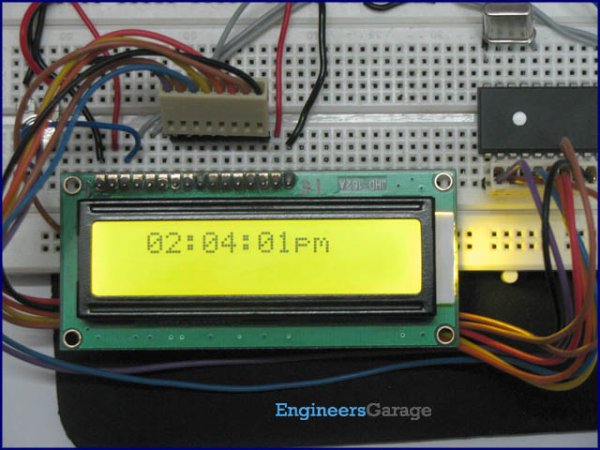
In this article, it is assumed that you know,
- How to interface LCD with PIC16F84A microcontroller. If you don't then please read this page.
- How to configure timer0 of PIC16F84A microcontroller. If you don't then please read this page.
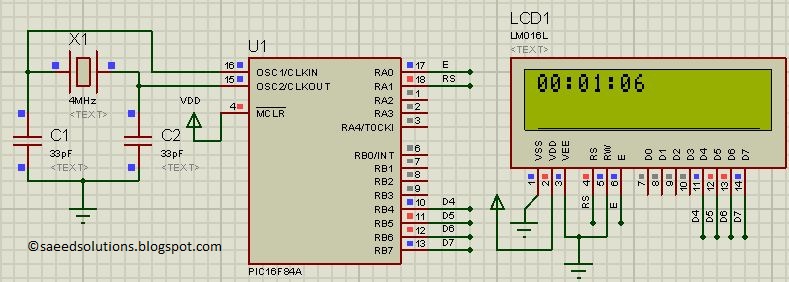
The result of simulating the code in Proteus is shown below.
The above figure was taken after 1 minute and 6 seconds of code simulation in Proteus. In the code, timer0 is used as the base for digital clock generation. Timer0 is used here to generate 1msec interrupts. After every 1msec a global variable named msCounter increments. When msCounter reaches a value of 1000 then another global variable named secCounter increments and this process repeats itself. Similarly, when secCounter reaches 60, then minCounter increments. And when minCounter reaches 60 then hrCounter increments. This process continues until hrCounter reaches 24 then all of these variables reset their values. LCD is updated with the new values of hrCounter, minCounter and secCounter after every second.
A crystal of 4MHz value is used in this circuit, which makes this PIC16F84A run at a speed of 1MIPS (Million of instructions per second).
Code
The main function code is shown below.
In the main function, firstly LCD is initialized using InitLCD() function. Then Timer0 is initialized to generate 1msec interrupts. After that, in the while(1) loop, whenever msCounter reaches a value of zero[1], then new values of hrCounter, minCounter and secCounter are updated on the LCD. UpdateTimeCounters() function is called every time and it corrects the values of every counter variable depending upon the value of msCounter, which is incremented in the ISR function of timer0 (shown below).
Downloads
Digital clock display code using PIC16F84A was compiled in MPLAB v8.85 with HI-TECH C v9.83 compiler and simulation was made in Proteus v7.10. To download code and Proteus simulation click here.
Quick Solutions to Questions related to Digital Clock:
- What programming language is used for this project?
The code is written in C language. - Which microcontroller is used in this digital clock?
A PIC16F84A microcontroller is used. - How does the timer function in this circuit?
Timer0 generates 1msec interrupts to drive the clock logic. - What value of crystal is used in the circuit?
A 4MHz crystal is used. - At what speed does the PIC16F84A run?
The microcontroller runs at a speed of 1MIPS. - When are the counter values updated on the LCD?
Values are updated after every second when msCounter reaches zero. - What happens when the hour counter reaches 24?
All counter variables reset their values. - Which software was used for simulation?
Proteus v7.10 was used for simulation.
Related projects
PIC Stepper Motor Controller using PIC16F84A with Proteus Simulation
Introduction Stepper motors are widely used in embedded systems and DIY electronics projects where precise position control is required. This PIC Stepper...
Programmers & ICSP · PIC16F84APIC Musical Doorbell using PIC16F84A with Proteus Simulation
IntroductionThis microcontroller project demonstrates a musical doorbell built around a PIC16F84A and a simple piezo sounder.Using two push buttons, the system allows...
Beginner Tutorials · PIC16C84Exploring the World of PIC Microcontrollers: An Architectural Overview
A Peripheral Interface Microcontroller (PIC), developed by General Instruments Microcontrollers in 1993, operates under software control and is programmed to execute various...
Clocks & TimersAdaptive Alarm Clock: Build a Smart, User-Centric wake-Up system
Project Overview The goal of this ambitious undergraduate project was to develop a novel alarm clock capable of analyzing a person's unique...
Clocks & TimersDesigning Your Ideal Alarm Clock: An Introduction to PIC18
Within this laboratory session, you'll employ the C language to create an alarm clock, delving into the implementation of "C" programs on...
Clocks & TimersBuilding your Dream Alarm Clock Using the PIC18
Objective: In this laboratory session, your objective is to create an alarm clock using the C programming language. You will gain proficiency...

Ibrar Ayyub
I am an experienced technical writer holding a Master's degree in computer science from BZU Multan, Pakistan University. With a background spanning various industries, particularly in home automation and engineering, I have honed my skills in crafting clear and concise content. Proficient in leveraging infographics and diagrams, I strive to simplify complex concepts for readers. My strength lies in thorough...